

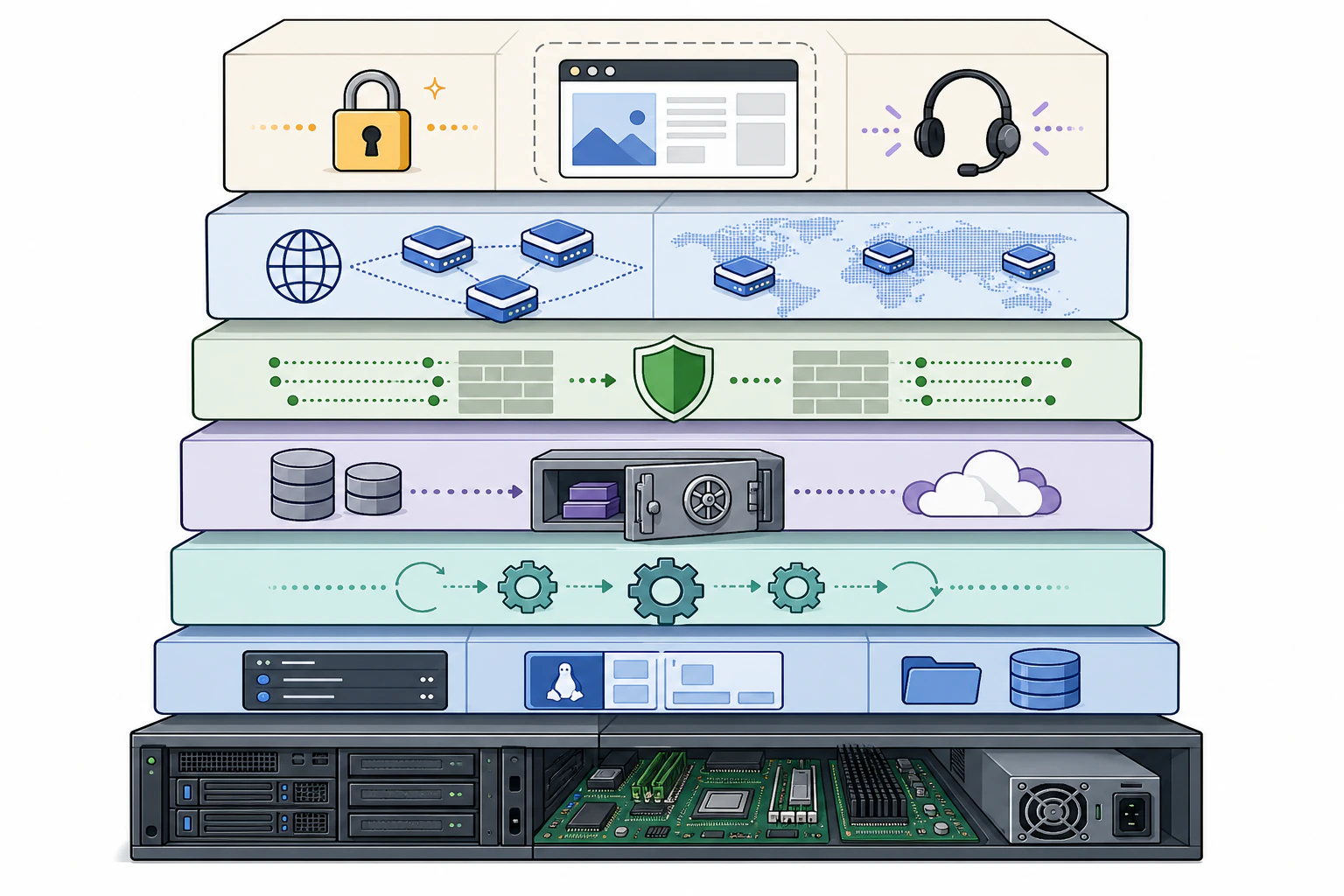
Managed hosting is who is on the hook, not just where the files sit.
Take the list of things that keep a live site healthy and ask who does each one: patch the operating system when a vulnerability drops, keep the stack current, watch for intrusions, pull backups, answer the phone at 2am when something goes sideways. On unmanaged or budget shared hosting, every item sits on your plate, or your developer's, or nobody's. Managed hosting is the arrangement where a team takes that whole list over, so your time goes to the business the site is supposed to support instead of the server underneath it. Below is what actually falls under that umbrella, what quietly does not, and where an all-in-one platform like Devani Hosting changes the shape of the list by not carrying a separate plugin stack to maintain in the first place.
Server and OS management
The hardware, the network, and the operating system underneath your site. A kernel patch, a hardware failure, a networking issue: their problem to solve, and you never touch a terminal for any of it.
Automatic updates
Operating system and core server software kept current on the host's schedule, with no input from you. On WordPress plans the application layer gets updated too, though the fine print varies more than the marketing suggests.
Automatic backups
Scheduled snapshots kept off the server they protect, with restore points you can roll back to. How often they run and how long they are retained is the detail that actually decides whether the backup saves you.
Security and malware scanning
A network firewall and DDoS mitigation, ongoing scans of the files on your account, login-attempt limiting, and account isolation so one compromised neighbor cannot spread to you. Whether cleanup is included or billed is worth checking before you need it.
Caching and a CDN
Server-level caching and a content delivery network tuned for the stack, so pages and media serve faster than they would on cheap shared hosting. A real advantage on the server side, though not a cure for a bloated page.
SSL, staging, uptime and support
Certificates issued and renewed automatically, a staging copy to test changes before they hit production, monitoring that watches whether the site is up, and support staff who actually know the platform instead of reading from a script.
Server management is table stakes. Updates are where "managed" starts meaning different things.
Every managed plan, whether it is a general-purpose host or one built specifically around WordPress, covers the physical and operating-system layer. That part is invisible when it works and easy to take for granted. I have managed servers where a hardware failure at 3am got resolved and the client never knew anything happened. I have also cleaned up after unmanaged setups where nobody was watching, a disk filled up over a weekend, and the site was down for two days before anyone noticed. Server management is the floor: necessary, real, and at this point table stakes even among budget providers.
Updates are where the word starts carrying weight. Operating system and core server software are usually updated automatically and non-negotiably, on the host's schedule. The application layer is more specific. A good managed WordPress host will auto-update core and often flags or applies plugin and theme updates too, sometimes with a staging test first. But "managed" does not mean every plugin update happens invisibly and safely forever. A compatibility conflict between two plugins is one of the most common support tickets in this business, full stop, and a responsible host tests before pushing to a live site rather than blindly applying everything the moment it ships. Ask any specific host exactly what gets auto-updated, on what schedule, and whether there is a staging test first. The answer varies more than the pricing page suggests.
Every host says "we back up." The details are the whole safety net.
- How often do they run. Daily, hourly, or in real time. A daily backup is a reasonable baseline for a small-business site; anything less frequent means more work lost when you do have to restore.
- How many restore points, kept how long. If a host does not mention retention at all, ask. I have seen "we do backups" turn out to mean a single nightly snapshot overwritten every 24 hours, which is not much of a net if you do not catch a problem until day three.
- Self-service or support ticket. A one-click restore you control is a very different thing during an outage than a ticket you have to open and wait on while the site is down.
- Stored separately from the server it protects. If the backup lives on the same box as the site, a single hardware failure can take out both at once. Off-server storage is the point of having a backup at all.
Managed hosting handles the server side of performance. It does not fix a bloated page.
Better hardware helps. It does not do the page's job for it.
Caching, a CDN, and infrastructure tuned to the stack are a genuine advantage over cheap shared hosting, where you are often on a box with hundreds of other accounts and no caching configured for you at all. The part that is easy to gloss over: if a site is running a dozen plugins, a heavy page-builder theme, and unoptimized images, moving that exact site to excellent managed hosting will help, sometimes a lot, but it will not turn a slow site into a fast one. The infrastructure and the software running on it are two different problems, and managed hosting solves one. I have watched clients move from bargain hosting to a genuinely good managed host expecting a speed miracle and get a real but modest gain, because the theme and plugin stack were still doing the same amount of work on better hardware.
Security work is the same shape: more than "we have a firewall." It typically covers a network firewall and DDoS mitigation, ongoing malware scanning, limiting login attempts, keeping software patched, and isolating accounts so one compromised site on shared infrastructure cannot spread to yours. None of it makes a site immune. It meaningfully reduces the odds and shortens the time to detection and recovery, which in practice is what you are paying for. Some hosts include malware removal in the base plan; others treat it as a paid add-on, a fair business decision but one you want to know about before you need it. The support tier is where that expertise shows up most visibly. Read support reviews, not just feature lists, because it is the single hardest thing to judge from a pricing page and the thing that matters most when a site goes down during a launch.
What managed hosting does not include.
Your content is still your content. Nobody at the hosting company is writing your pages, choosing your images, or deciding what your site says. Your design is still your design: managed hosting keeps a theme running, it does not build or redesign one. Your SEO is still your SEO. A fast, secure, well-maintained site is a genuinely better foundation than a slow, hacked one, but managed hosting does not do keyword research, write meta descriptions, or build links for you. Custom development, meaning any bespoke functionality beyond what the platform and its plugins already do, is a separate service most hosts either do not offer or bill hourly through a professional-services arm.
And the honest big one: managed hosting does not make a badly built site immune to being a badly built site. If the underlying theme is bloated, if there is a plugin conflict nobody has caught, or if the page loads fourteen render-blocking scripts, excellent hosting reduces the damage but does not erase it. The site itself still matters. I say this as someone who has watched a client move a genuinely troubled WordPress install onto a well-regarded managed host expecting it to fix problems that were never a hosting issue in the first place.
Shared, managed, and all-in-one are not the same purchase.
Casual conversation calls all three "hosting," but the differences are the whole point. What separates them is how much of the maintenance list above is actually included, and whether there is a plugin stack sitting on top of the server waiting to be the thing that breaks.
| Who handles it | Cheap shared hosting | Managed hosting | All-in-one platform |
|---|---|---|---|
| Server, OS, network | Host, minimally | Host | Host |
| Core software updates | You | Host | Host |
| Backups and security | You or nobody | Host | Host |
| Caching and CDN | You | Host | Built in |
| Plugins, theme, conflicts | You | You | No separate stack |
| The CMS itself | You brought it | You brought it | Same system as the host |
Cheap shared hosting is a server split among many accounts with minimal oversight: a place to put your files and a control panel, with everything above that on you or simply not happening. Managed hosting adds a real layer of people and process on top of infrastructure that is still, underneath, running whatever software stack you brought to it, so you are still responsible for choosing, configuring, and maintaining the plugins, themes, and content that make up the actual site. An all-in-one platform collapses the two: the CMS and the hosting are the same system, built by the same company, so there is no separate plugin stack sitting on managed infrastructure waiting to break. That last column is a meaningfully different model, not a repackaging of the same idea, and it is where a platform like Devani sits.
Where WP Engine, Kinsta, and Flywheel fit.
If you are comparing managed hosting for an existing WordPress site, WP Engine, Kinsta, and Flywheel are the three names that come up constantly, and for good reason. All three cover the fundamentals well: automatic daily backups, staging environments, CDN and caching baked in, and support staff who actually know WordPress rather than reading from a script. Kinsta runs on Google Cloud and leans into developer tooling, with SSH, WP-CLI, Git integration, and its own local development app. Flywheel has historically leaned toward agencies and freelancers managing multiple client sites, with generous site-count tiers on its higher plans. WP Engine is the oldest and largest, with the broadest track record at scale. Pricing on all three is tiered by site count, traffic, and storage, and it is worth pulling current numbers directly from each provider since plans and limits shift over time.
What all three have in common, and what they cannot change no matter how good their infrastructure is, is that you are still running WordPress with whatever plugins and theme you have chosen on top of their hosting. Their managed layer is genuinely good. It sits underneath a plugin ecosystem that is still yours to maintain, choose carefully, and keep from conflicting with itself.
Devani Hosting
The maintenance list is shorter because the plugin stack is not there.
- ✓ Servers, automatic SSL, automatic backups with one-click rollback, and a global CDN handled for you, same as any managed host above
- ✓ The CMS and the hosting are one system, so there is no separate theme-and-plugin combination for anyone to patch, test, or watch for conflicts
- ✓ A free tier gets a site live on a free subdomain in under a minute, and you can connect your own ChatGPT or Claude account natively to edit content and layout
- × Hosts sites built on Devani, not an existing WordPress install you point new DNS at, and it is a younger, smaller ecosystem than WordPress
Everything earlier in this article assumes a plugin stack exists to maintain, which is exactly why the checklist runs as long as it does. Devani Hosting skips that assumption. The CMS and the hosting are one system, so the software layer this whole piece is about is not a separate thing you have to keep aligned with the hosting underneath it, which is the specific burden covered in what ongoing WordPress maintenance actually involves. Servers, SSL, automatic backups with one-click rollback, and a CDN are still handled for you, same as any host above. Devani Hosting's own pricing adds custom domains, more sites, and more CDN storage as you grow, without the per-visit and per-site fees that run through most of the managed WordPress tiers named above.
The honest limit: Devani Hosting hosts sites built on Devani. It is not a place to bring an existing WordPress install, plugins and all, and point its DNS at a new server. If you are staying on WordPress, WordPress's own real tradeoffs are worth reading honestly before you pick a host for it. If you are open to a platform where hosting and CMS were never two separate things to keep in sync, Devani Hosting fits.
What people ask before signing up for anything.
What is included in managed hosting?
At minimum: server, OS, and network management, automatic core software updates, automatic backups, security hardening with malware scanning, server-level caching and a CDN, automatic SSL, staging environments, uptime monitoring, and support staff who know the platform. What varies between providers is the fine print, especially how often backups run and how long they are retained, exactly which application updates are automatic, and whether malware cleanup is included or billed as an add-on.
What is the difference between managed and unmanaged hosting?
On unmanaged or budget shared hosting you rent server capacity and a control panel, and everything above that, updates, backups, security, performance tuning, is on you or your developer or nobody. Managed hosting takes that whole list over: a team keeps the server healthy so you do not touch a terminal. You pay more, and what you are buying is the people and process, not just the disk space.
Does managed hosting include building the website?
No. Managed hosting keeps a site running; it does not create one. Your content, design, and SEO stay yours: nobody at the host is writing pages, choosing images, redesigning the theme, or doing keyword research. Custom development is a separate service most hosts either do not offer or bill hourly. An all-in-one platform blurs this line more than a traditional host, because the builder and the hosting are the same product, but even then the words on the page are still yours to write.
Is managed WordPress hosting worth it?
For most small businesses running WordPress, yes, because the alternative is doing updates, backups, security, and performance yourself or paying someone hourly to. The honest caveat is that managed hosting handles the server side, not the site itself: a heavy theme and a long plugin list are still your responsibility, and excellent hosting reduces the damage from a bloated build without erasing it. If you would rather not maintain a plugin stack at all, an all-in-one platform where the CMS and hosting are one system removes that layer instead of managing it.
See what one system feels like day to day.
No pressure to switch anything today. Devani Hosting has a free tier and a site live on a free subdomain in under a minute, so you can see what a site built and hosted as one system actually feels like rather than take anyone's word for it.