

The most capable CMS, and the one you maintain forever.
WordPress powers well over 40 percent of the web and earns it: the deepest plugin ecosystem and largest community of any CMS, capable of almost anything given enough plugins and patience. The catch is not hidden, it is structural. You are signing up to be the site's permanent maintainer, or to pay one. Which WordPress you actually get, the lean fast install or the plugin-stacked one most owners drift into a year or two in, depends more on who is minding it than on the software itself. This review covers both honestly, and it names where a no-plugin CMS like Devani changes that maintenance math.
The plugin ecosystem
North of 60,000 free plugins in the official directory, before you count anything premium. Complex membership tiers, multi-warehouse inventory sync, obscure booking logic for a specific service industry: when a client needs something unusual, there is almost always already a plugin for it. Usually there are four competing plugins, and picking between them is its own small project. Every competitor concedes this one without argument, and they are right to.
You own it outright
A self-hosted WordPress install is your files and your database, in full. Move it to a different host, hand it to a different developer, or self-host it indefinitely, all without asking anyone's permission or losing anything. Nobody can shut off your account and take the site with it. That portability matters most during the exact moments a business needs it: a host going under, a developer relationship ending badly, a company being acquired.
It bends to almost anything
There is very little a website needs to do that WordPress genuinely cannot be made to do, given enough plugins, enough theme customization, and enough patience. I have built oddly specific things on it, a multi-location scheduling system with staff-level permissions, a course platform with drip-fed content tied to a membership tier, and found an existing plugin covering the core of each. That is not luck. It is a mature open ecosystem building toward exactly this.
The community is enormous
Documentation for nearly every edge case, a huge freelancer and agency market if you want to hire the work out, and forums where an obscure error message someone else already hit five years ago is one search away from a fix. That last part matters more than people expect. Half of solving a WordPress problem is finding someone else who already solved it.
Not one product, which trips people up early.
WordPress is not a single thing, and reviews that gloss the distinction in a sentence do readers a disservice. WordPress.org is free software you install on hosting you buy yourself. WordPress.com is a managed service, built by Automattic on top of that same software, where you pay a monthly plan and someone else handles the server. Which one you land on changes almost everything else in this review.
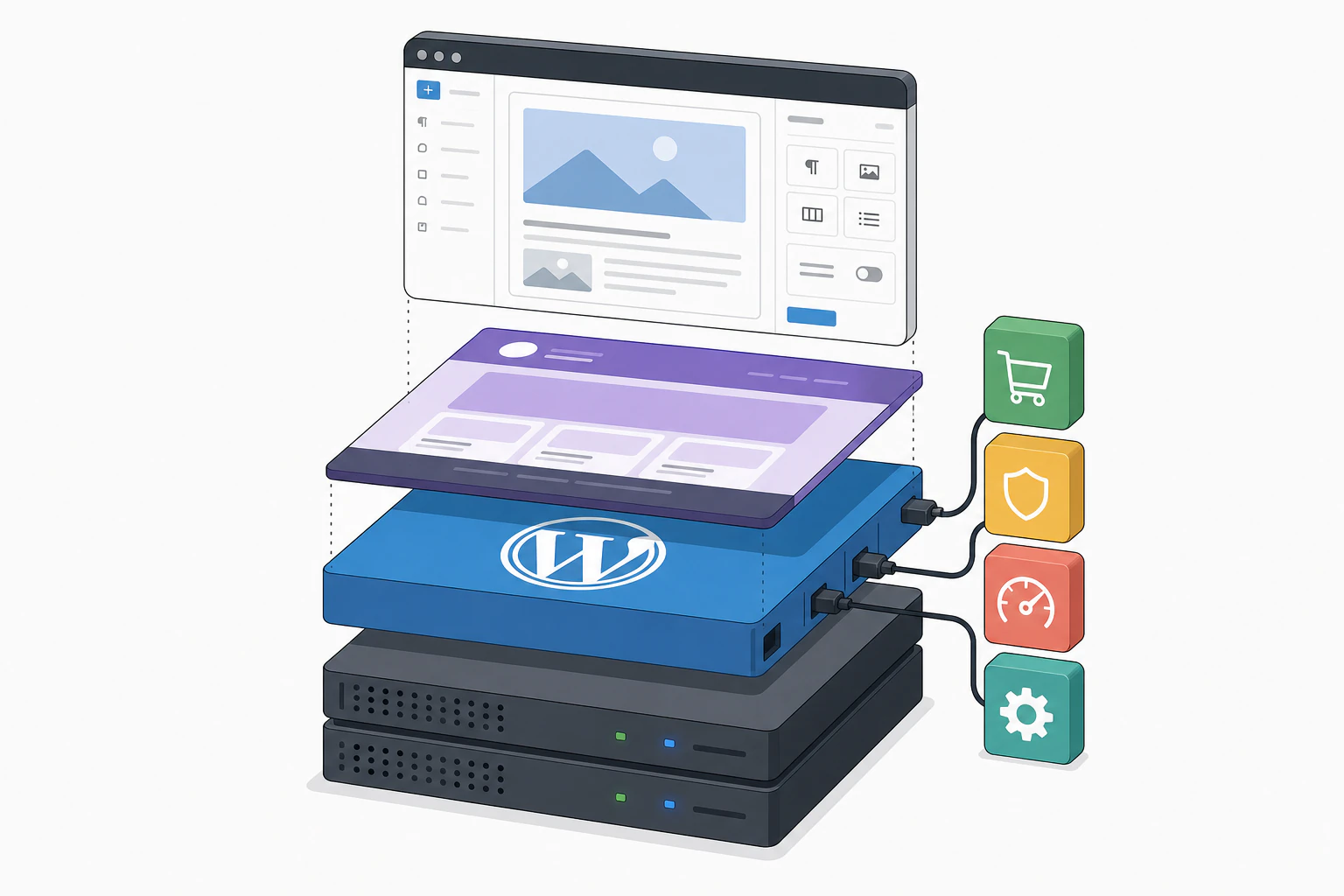
The self-hosted version, WordPress.org, is built from three layers: the core software, a theme that controls the look, and however many plugins you add to extend what it does. That structure has not changed much in a decade, and the stability is part of the appeal. A theme built five years ago mostly still works. The block editor, called Gutenberg internally, is what you type into now: you build a page out of stacked blocks rather than one long text field. It is genuinely fine for straightforward content. For anything pixel-precise, most builds still lean on a page-builder plugin like Elementor, because the native block editor alone can feel limited.
Themes number in the thousands, free ones in the official directory and premium ones typically $30 to $60, occasionally into the hundreds for something from a specialized theme shop. WordPress.com sands most of this down: managed hosting, automatic updates, and a plan structure closer to Wix or Squarespace, at the cost of some flexibility, particularly on the lower tiers where plugin installation is restricted.
Owning your site also means owning its maintenance, permanently, not as a one-time setup cost.
The part the sales pitch skips.
None of these are dealbreakers on their own. Together they are the ongoing job most owners underestimate walking in.
- Maintenance never ends. Core, theme, and plugin updates all need reviewing and applying on some regular cadence, and skipping it is how sites get hacked. I have seen client sites go two years without a single update because nobody was assigned the job, and the fix, once something finally broke, was a full day of triage rather than the ten minutes it would have taken along the way.
- Security sits with you. Core itself is reasonably secure and gets patched fast. The actual break-ins I have dealt with almost never trace to core. They trace to an outdated plugin nobody updated, a theme with a known vulnerability, or an admin password never changed from something guessable. That responsibility sits with whoever owns the site, not with WordPress.
- The learning curve is real. WordPress does not ship with a drag-and-drop builder out of the box the way hosted platforms do. Getting from a blank install to a finished site means choosing a theme, learning the block editor, picking plugins, and probably touching some CSS eventually. More homework than picking a template and filling in text, and anyone telling you otherwise has not watched a first-timer try it.
- Plugin conflicts eat afternoons. Two plugins that both hook into the same part of the page, a theme update that breaks a plugin's expected markup, a page builder and an SEO plugin fighting over the same meta box. It is what happens when a site is assembled from a dozen independently maintained pieces instead of one coherent system, and diagnosing which of the dozen is the culprit is most of the bugs I get called in to fix.
A range, never one flat number.
Any review that hands you a single WordPress speed score is lying to you a little. Speed is driven entirely by the theme, how many plugins are running, and what hosting tier the site sits on.
I ran a real PageSpeed Insights test, cold, on a typical WordPress site running its usual theme-and-plugin stack, not a stripped-down showcase and not a worst-case disaster either.
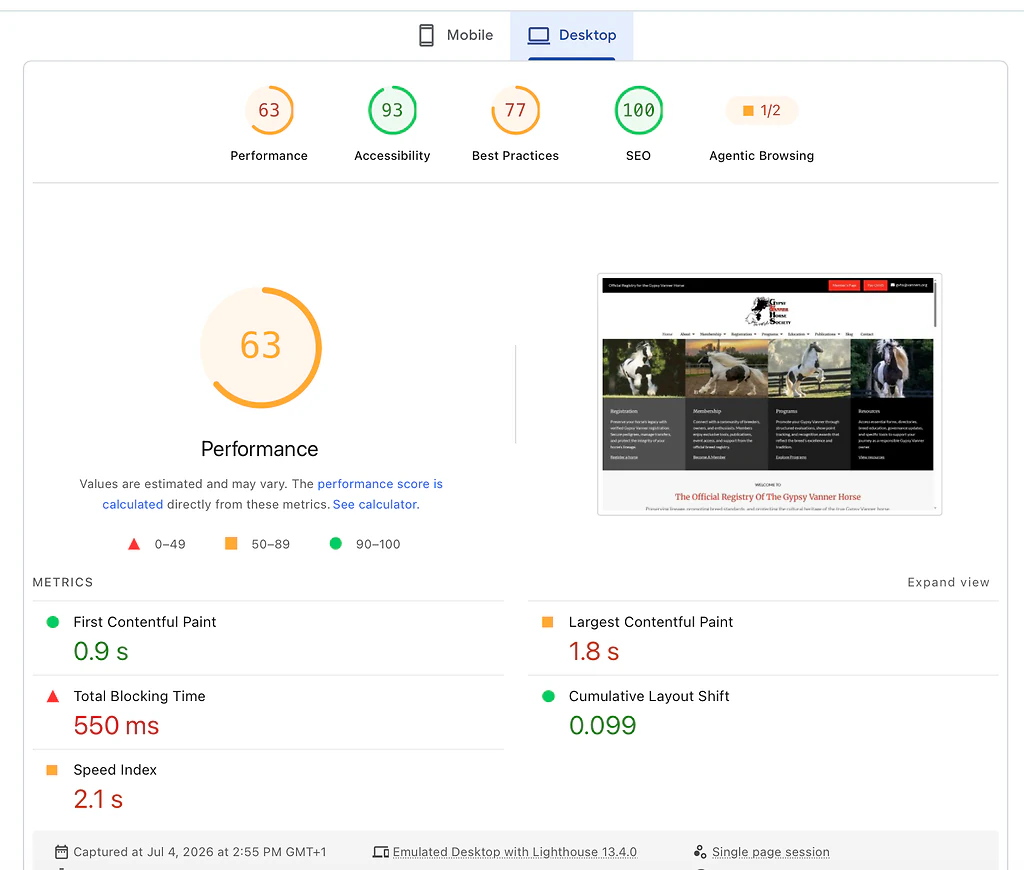
PageSpeed Insights desktop lab results for a typical WordPress site: 63 performance, 0.9s first contentful paint, 1.8s largest contentful paint, 100 SEO
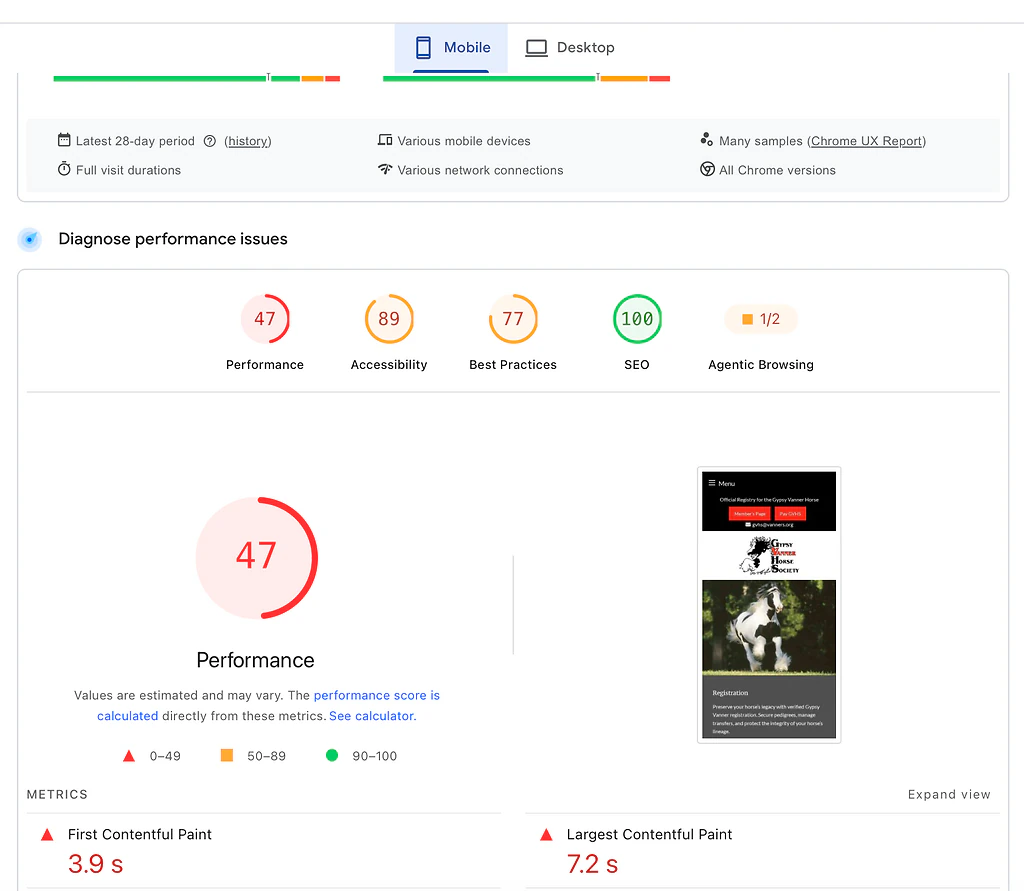
PageSpeed Insights mobile lab results for the same typical WordPress site: 47 performance, 3.9s first contentful paint, 7.2s largest contentful paint
Desktop landed at 63, mobile dropped to 47 with a 7.2-second largest contentful paint. A middling result, and genuinely representative rather than cherry-picked. A lean build on strong hosting with a caching plugin properly configured can score much better than this. Most sites never get there, because that tuning is continuous work fighting the platform's defaults rather than something you set once, and a huge share of real small-business WordPress sites sit on budget shared hosting that caps how fast they can ever be no matter how well the theme is built. If speed is the top priority and nobody wants to own performance tuning as an ongoing job, that is worth knowing before you commit, not after the site is already slow.
Where the maintenance case points somewhere else.
The plugin conflicts and patch cadence above are the actual disease, not a footnote, so it is worth answering directly. Devani, the CMS running this blog, is the honest counterpoint on that one axis.
WordPress
The most extensible CMS, if you own the upkeep.
- ✓ 60,000-plus plugins for almost any function you can name
- ✓ Full ownership and portability, no lock-in
- × You are the permanent maintainer: updates, security, plugin conflicts
- × Speed is a range, often middling on a default theme-and-plugin build
Devani
Free and open source, with no plugin stack to keep current.
- ✓ Nothing installed to patch, so nothing to go stale, conflict with a theme update, or quietly become the door an attacker walks through
- ✓ Database-free: plain files served statically from a CDN, sub-second loads and near 100/100 Lighthouse out of the box
- ✓ Updates run when you decide, every change snapshots with one-click rollback; about $5 a month on ordinary hosting, or a managed free tier if you would rather not run a server
- × No marketplace of 60,000 plugins yet; a build that genuinely needs one specific, obscure WordPress plugin with no equivalent should stay on WordPress
On the AI point, be precise, because this is where WordPress is actively catching up. WordPress.com shipped an MCP integration and the Vibe AI plugin arrived by mid-2026, so connecting an assistant to WordPress is no longer exotic. Both work well only inside the block editor, though. On a Divi or Elementor build the assistant cannot reliably produce the builder's shortcodes, so you get AI-written content plus the standard HTML editor rather than a builder. Devani is MCP-native and works hand in hand with an LLM inside the visual builder: you connect your own ChatGPT or Claude account, no API keys, and it edits live content and layout because Devani's pages are plain HTML the assistant writes easily. Inside the builder versus alongside it.
Free to download, billed in more pieces than you expect.
"WordPress is free" is technically true and a little misleading. The software costs nothing. Everything around it costs something. If you go the WordPress.com managed route, the pricing is at least straightforward:
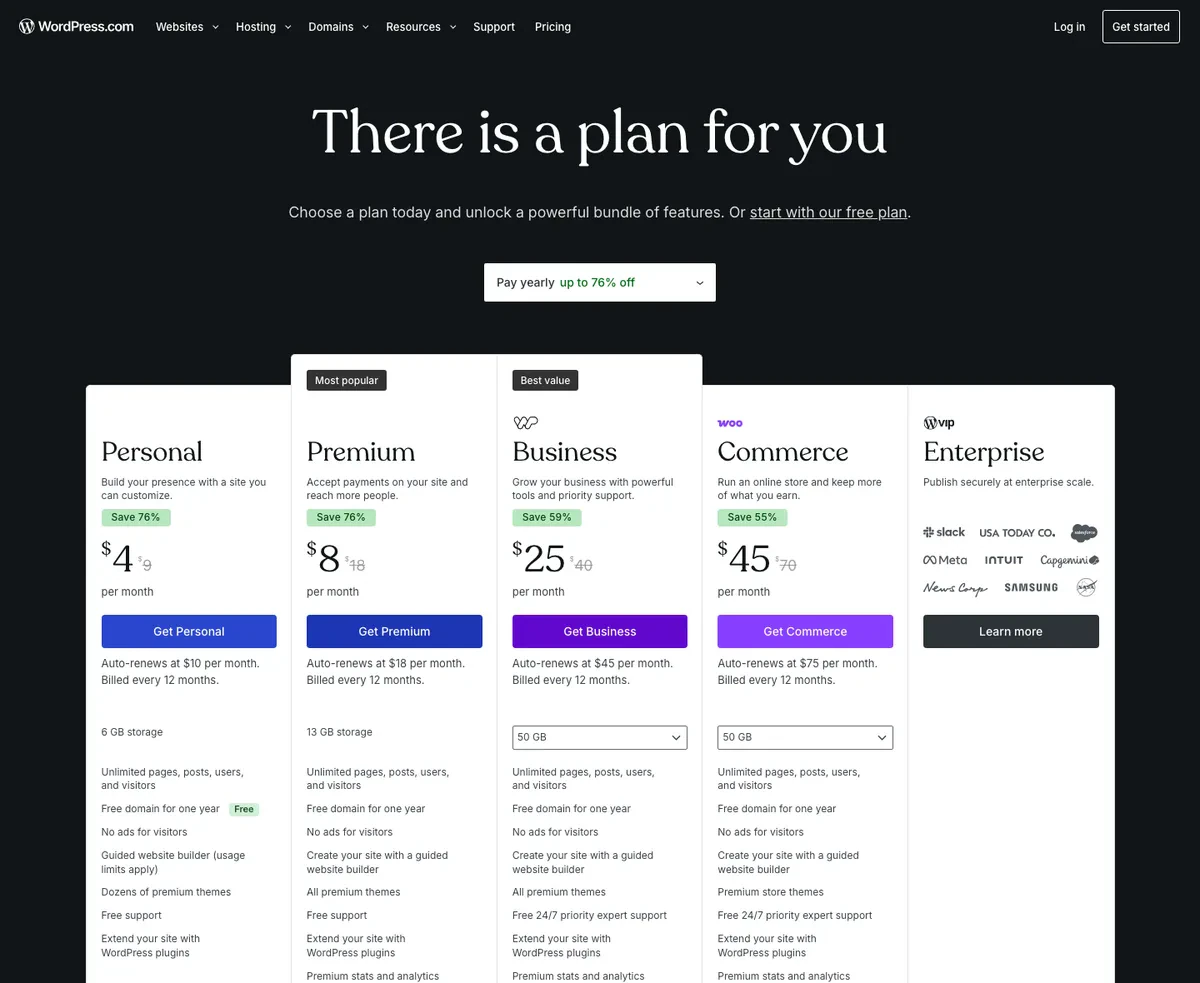
WordPress.com's pricing page in USD, showing the promotional annual rate next to the auto-renewal rate for each plan
Personal runs $4 a month, renewing at $10. Premium is $8, renewing at $18. Business sits at $25, renewing at $45. Commerce tops out at $45, renewing at $75. That renewal jump is the part people budget around wrong and get surprised by a year in, so read the fine print before committing to the first-year rate.
Self-hosted WordPress.org has no plan tiers at all, just a pile of separate line items:
| Line item | Typical cost (USD) | Note |
|---|---|---|
| Shared hosting | $3 to $7 / mo | The cheapest tier is where the sluggish PageSpeed numbers come from |
| Managed WordPress hosting | $15 to $35 / mo | Handles caching and security reasonably well |
| Premium theme | $30 to $60 | One-time, occasionally more from a specialized shop |
| Premium plugins | $50 to a few hundred / yr | Depends entirely on what you need |
| Developer time | $100 to $180 / hr | US rates, for setup or ongoing work |
| Domain | $12 to $20 / yr | Standard across the board |
| Devani, self-hosted | about $5 / mo | One command on ordinary hosting, no plugin line items; managed free tier also available |
The honest total for a real small-business WordPress build, done properly, tends to land somewhere between $30 and $100 a month once hosting, a theme, and a couple of plugins are accounted for. Rarely the dramatically cheap option people expect walking in. It is just billed in more separate pieces than a single plan price makes it look.
Is WordPress good for beginners?
It can be, with effort. WordPress.com's managed tiers behave a lot like Wix or Squarespace and are approachable. Self-hosted WordPress.org asks more of you: choosing a theme, learning the block editor, picking plugins, and eventually touching some CSS. A motivated beginner gets there, but it is genuinely more homework than picking a template and filling in text.
Is WordPress really free?
The core software is free to download and always will be. The total cost comes from everything around it: hosting, a premium theme, premium plugins, a domain, and often developer time. A properly built small-business site usually runs $30 to $100 a month once all of that is added up.
Is WordPress secure?
Core is reasonably secure and patched quickly. The real risk is everything bolted onto it. Nearly every break-in I have cleaned up traces to an outdated plugin, a vulnerable theme, or a weak admin password, not to core itself. Security on WordPress is an ongoing responsibility, not a one-time setting.
Who should not use WordPress?
Anyone who wants to set a site up once and be done with it. If updates, backups, and the occasional plugin conflict sound like someone else's problem you would rather not take on, and nobody on your team is volunteering to own that job, a managed builder, or a CMS with no plugin stack to patch in the first place like Devani, will serve you better than fighting WordPress's defaults for years. If you are weighing WordPress against a hosted builder specifically, WordPress vs Squarespace walks through that exact tradeoff in more depth.
WordPress earns its market share honestly. Powering well over 40 percent of the web is not an accident or inertia, it is a genuinely capable, endlessly extensible platform with the deepest plugin ecosystem and the largest community of any CMS out there, and I would still recommend it without hesitation for the right project. The tradeoff is real and not small: you are signing up to be the site's ongoing maintainer, whether that is you or someone you pay, for as long as the site exists. For a broader look at what else sits between the two extremes, WordPress alternatives covers the rest of the field, and if the maintenance burden itself is what is pushing you toward the exit, what actually happens when you leave WordPress is worth reading first. A closer side-by-side lives at Devani vs WordPress if you want the direct comparison.
Worth sitting with for a day.
If the maintenance side is the question you keep circling back to, that is a fair one to weigh before deciding either way. Go poke around a real site running the no-plugin alternative before you commit to anything.