
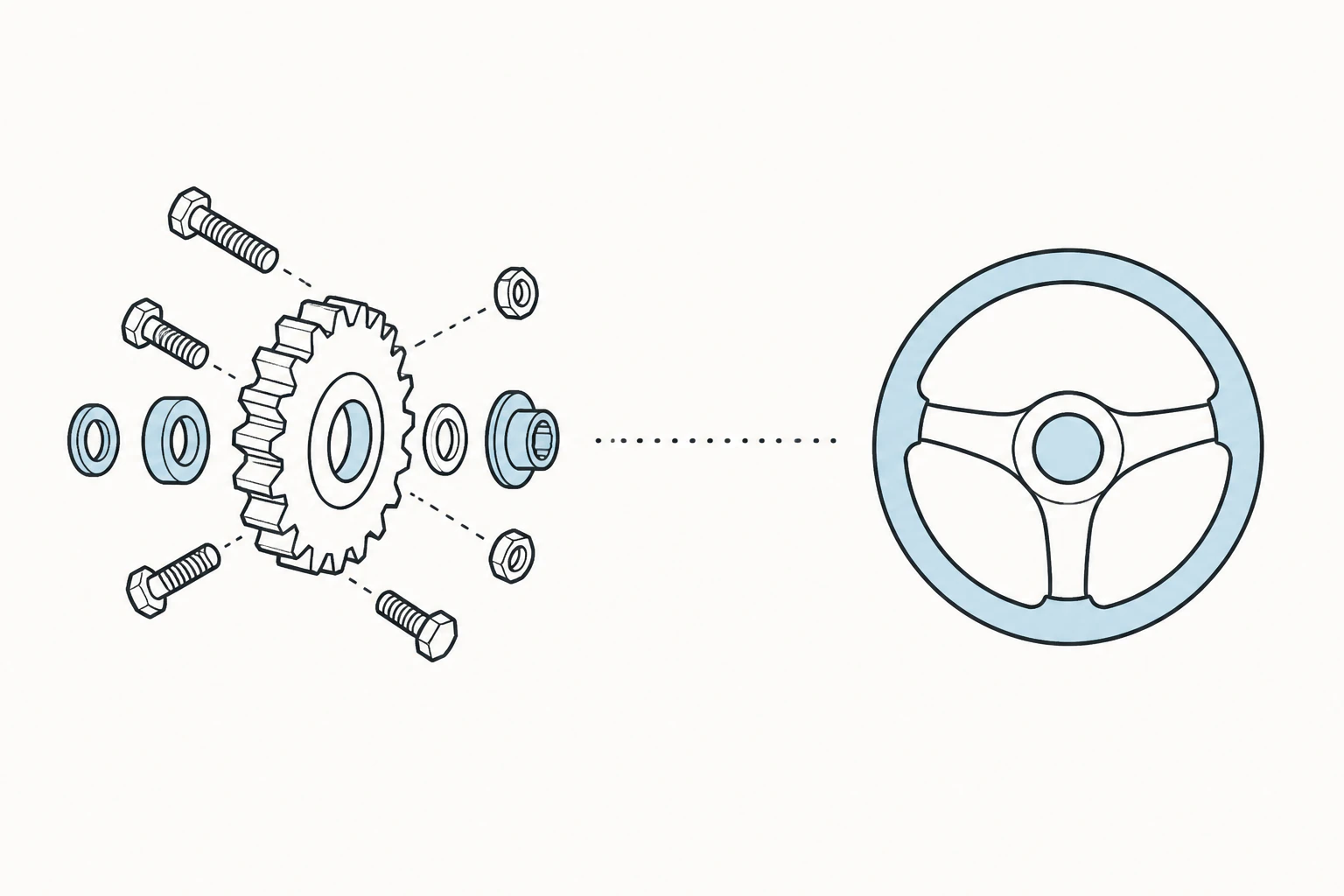
Own the machinery, or let someone else run it.
A bakery owner who wants to post a menu and take bookings, and a membership org that runs on three obscure plugins, should not pick the same platform. WordPress gives you full control and the upkeep that comes with it. Squarespace keeps a good-looking site hosted, patched, and running for you, and asks you to trade some flexibility for that. If one of those already sounds right, you have your answer. If not, keep reading, and note there is now a third shape in this decision: Devani, the free open-source CMS this site runs on, which is built to close the exact tradeoff the other two force.
WordPress
Maximum control, maximum upkeep.
- ✓ Tens of thousands of plugins for almost any niche need
- ✓ Full portability: your files, your database, move it anywhere
- ✓ Deepest blogging toolset of the three
- × Six to ten pieces of third-party software to keep patched
- × Speed depends entirely on theme, host, and plugin load
Squarespace
A finished car with the hood welded shut.
- ✓ Genuinely well-designed templates, mobile handled for you
- ✓ Hosting, SSL, backups, and patching are their problem
- ✓ Predictable pricing with no promo-to-renewal jump
- × No plugin marketplace, so past the built-ins you are stuck
- × No full export: leaving means rebuilding, not migrating
Devani
Hands-off like Squarespace, open like WordPress.
- ✓ Free and open-source, no plugin stack to patch, no per-plugin fees
- ✓ Database-free static pages, near 100/100 Lighthouse by default
- ✓ Connect your own ChatGPT or Claude account and edit the site by asking
- × Younger, smaller ecosystem: no 60,000-plugin marketplace, fewer templates than Squarespace
Why people are moving away from WordPress.
The complaint I hear most traces back to the maintenance loop underneath WordPress rather than the software itself. A typical small-business WordPress site runs a theme, a page builder, an SEO plugin, a caching plugin, a security plugin, a form plugin, and a backup plugin. That is six to ten pieces of third-party software, each shipping its own updates on its own schedule. Update one and something else breaks. A plugin update once changed a hook a client's contact form depended on, and the form stopped submitting for eleven days before anyone noticed. A lead had emailed twice with no reply before we caught it.
That is the real driver. A lot of small-business owners signed up to sell dermatology appointments or wedding cakes, not to manage PHP dependencies. Removing that job is the whole pitch of the platforms built after WordPress, Squarespace and newer AI-native CMSes like Devani among them, and for a meaningful chunk of the market, that trade is worth the loss of flexibility.
Running WordPress well is a part-time job layered on top of whatever the business actually does.
Squarespace's pitch is real, not marketing spin.
Give Squarespace its due here, because a lot of comparison articles either oversell or undersell this. The templates are genuinely well designed: clean typography, sensible spacing, mobile layouts that do not need separate tweaking. You pick one, drop in your own photos and copy, and you have a site that looks like it cost more than it did. Hosting, SSL, backups, and security patching are Squarespace's problem, not yours, and that is not a small thing for someone running a business solo. We go deeper on where that trade holds up and where it does not in our full Squarespace review.
The built-in commerce tools, scheduling, and email campaigns cover what most small businesses actually need without a single plugin. If your site is a portfolio, a menu, a booking calendar, and a contact form, Squarespace will get you there faster and with fewer decisions than WordPress will, full stop.
What WordPress does that nothing has matched.
Two genuine WordPress edges survive every comparison, and neither is close. If either one is load-bearing for your project, that decides it. Our full WordPress review covers the ecosystem in more depth.
The plugin ecosystem
Tens of thousands of plugins, from membership gating to multi-location store locators to obscure tax rules, with no real equivalent anywhere else. When a client needs something specific, there is usually already a plugin for it, or three competing ones. The case that genuinely decides for WordPress is narrow: a specific, load-bearing plugin your business already runs on that exists nowhere else.
Real portability
A WordPress site is your files and your database. You can export it, move it to different hosting, hand it to a different developer, or self-host it forever without asking anyone's permission. A Squarespace site lives entirely inside Squarespace's system: there is no server to point elsewhere, because there is not a server that is yours. That is fine right up until you want to leave.
Where Devani lands between them
Devani has no marketplace either, by design, but it is not stuck the way Squarespace is: the connected AI edits the site's actual content and layout on request, so most beyond-the-built-ins changes are a conversation rather than a dead end. And because it is open-source and exports HTML, Markdown, or JSON any time, it keeps WordPress's portability without WordPress's upkeep.
What you actually pay, past the first year.
Sticker prices on both platforms are a little misleading, and the pricing pages prove it if you read past the big number at the top.
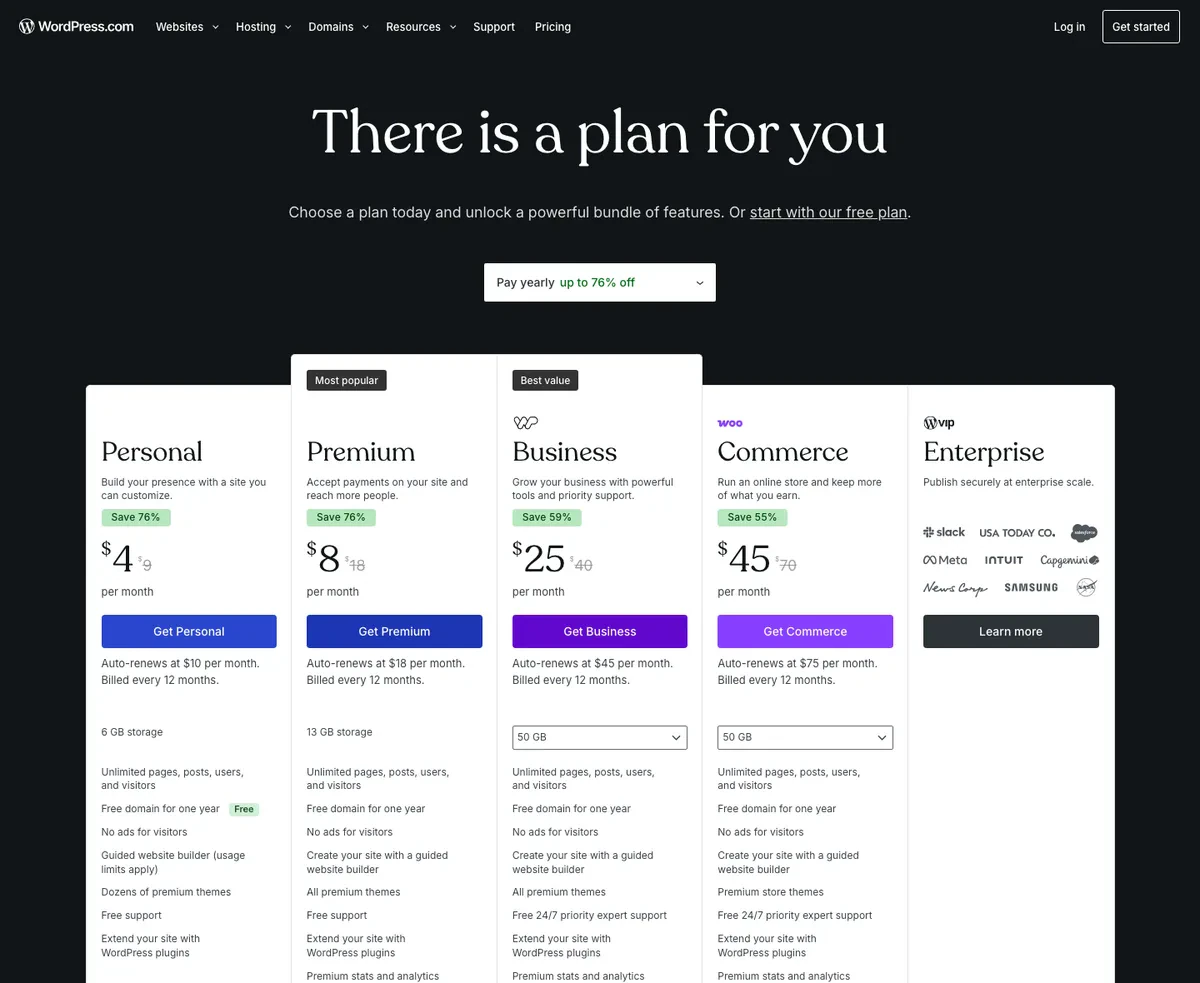
WordPress.com's pricing page in USD, showing the promotional annual rate next to the auto-renewal rate for each plan
WordPress.com's own pricing page is refreshingly upfront about this, if you read the fine print under each plan. Billed annually, Personal runs $4/month but auto-renews at $10/month. Premium runs $8/month, renewing at $18. Business runs $25/month, renewing at $45. Commerce runs $45/month, renewing at $75. That gap between the promo rate and the renewal rate is the number most people budget around and then get surprised by a year later. And that is the managed, Automattic-hosted version of WordPress, worth flagging because the "WordPress is free" claim you will see elsewhere refers to the self-hosted WordPress.org software. That software really is free to download, but it still needs paid hosting, a domain, and usually a handful of paid plugins or a theme once you add up what a real small-business site needs. Total those up and a properly built self-hosted WordPress site tends to land in a similar monthly range to Squarespace's mid tiers, sometimes a bit less, sometimes more, depending how plugin-happy the build gets.
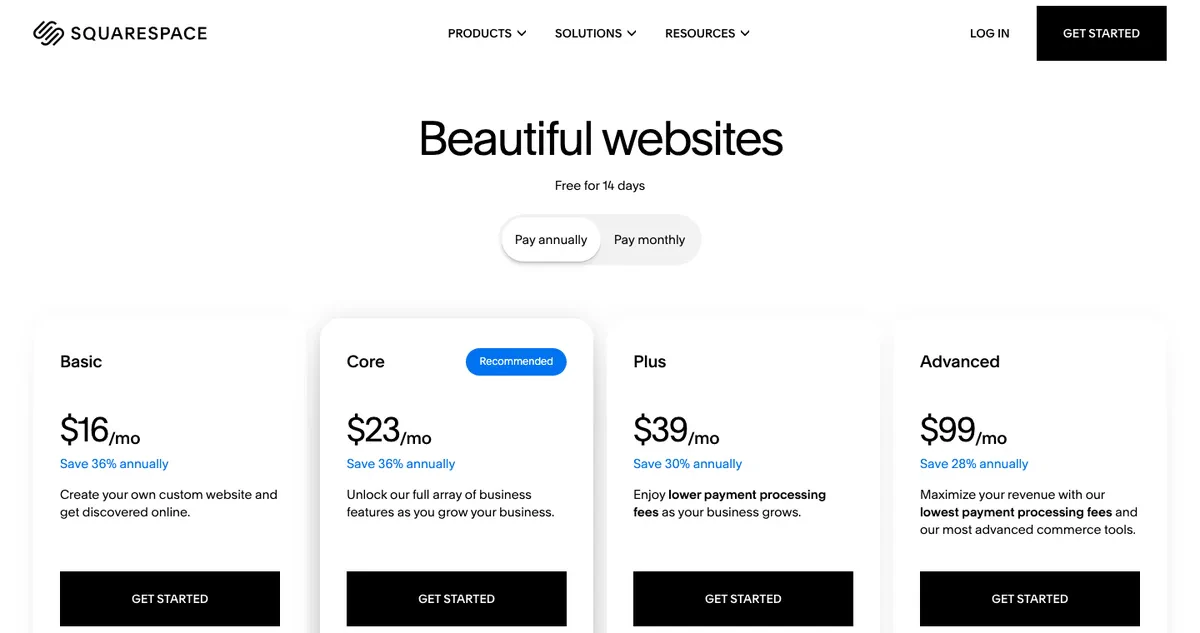
Squarespace's pricing page in USD, showing four plan tiers billed annually
Squarespace's page shows Basic at $16/month, Core at $23, Plus at $39, and Advanced at $99, all billed annually, with a 14-day free trial to test the editor before you commit. Those numbers do not jump between a promo rate and a renewal rate the way WordPress.com's do, which is a real point in Squarespace's favor for predictability. But Squarespace also takes a cut of transactions on its lower tiers, and that percentage does not show up anywhere near the monthly price. If you are planning to sell anything, run the actual payment-processing math before comparing plans on the sticker price alone. It can move a "cheaper" plan into "more expensive than the one above it" territory once real sales volume hits it. For reference, Devani sits outside this table entirely: the CMS is free and open-source, and a cheap VPS at about $5/month, or the managed free tier, is the whole hosting bill.
Speed and search: where the platforms diverge.
Everyone quotes plugin and template counts in these comparisons. Fewer people show actual PageSpeed numbers, so I ran real, live sites through Google's PageSpeed Insights on both desktop and mobile. These are cold first-load runs, the hit a real first-time visitor gets.
The honest headline: on speed, Squarespace pulls ahead of WordPress for most people, and it is not especially close. WordPress can be fast, but its speed is entirely a function of the theme, the plugin load, and the host, and a typical small-business build has none of those tuned. Squarespace serves every site from the same managed, optimized stack, so it lands in a good, consistent place no matter who built it. Squarespace is genuinely fast here; the tradeoff it asks for is customizability, not performance.
Here is a real, typical WordPress site next to a real Squarespace one, on desktop.
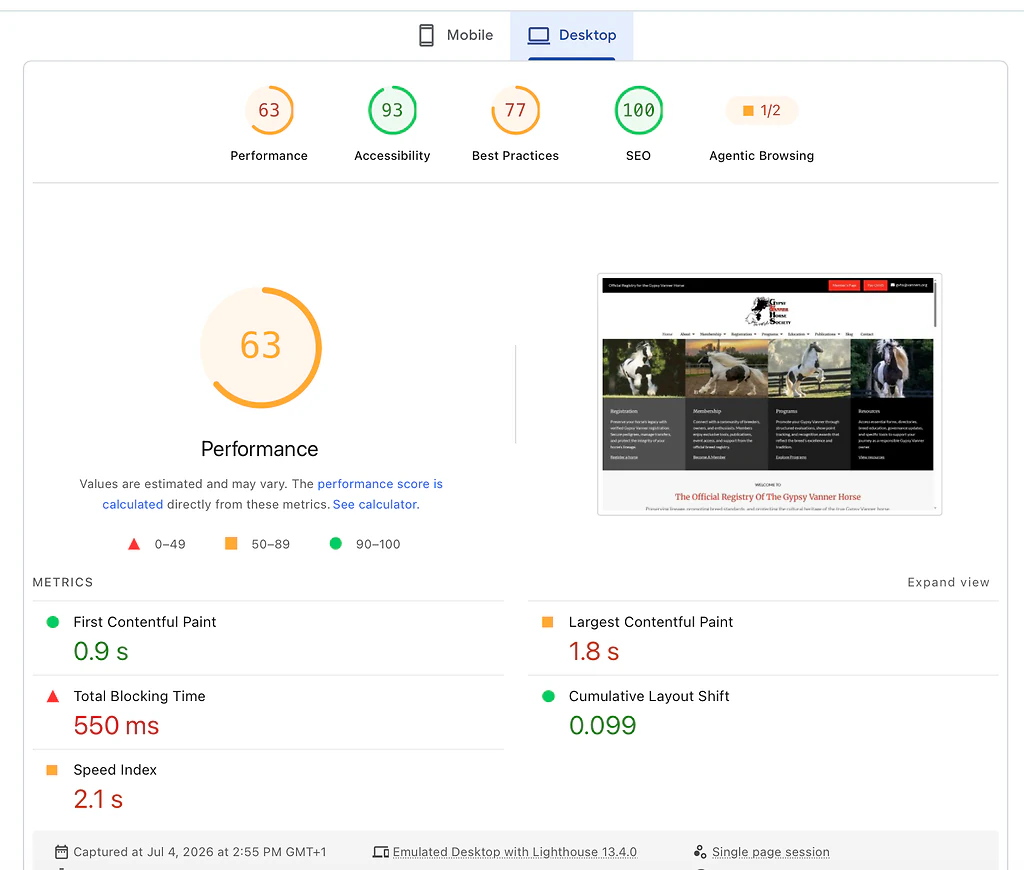
PageSpeed Insights desktop lab results for a typical WordPress site: 63 performance, 0.9s first contentful paint, 1.8s largest contentful paint
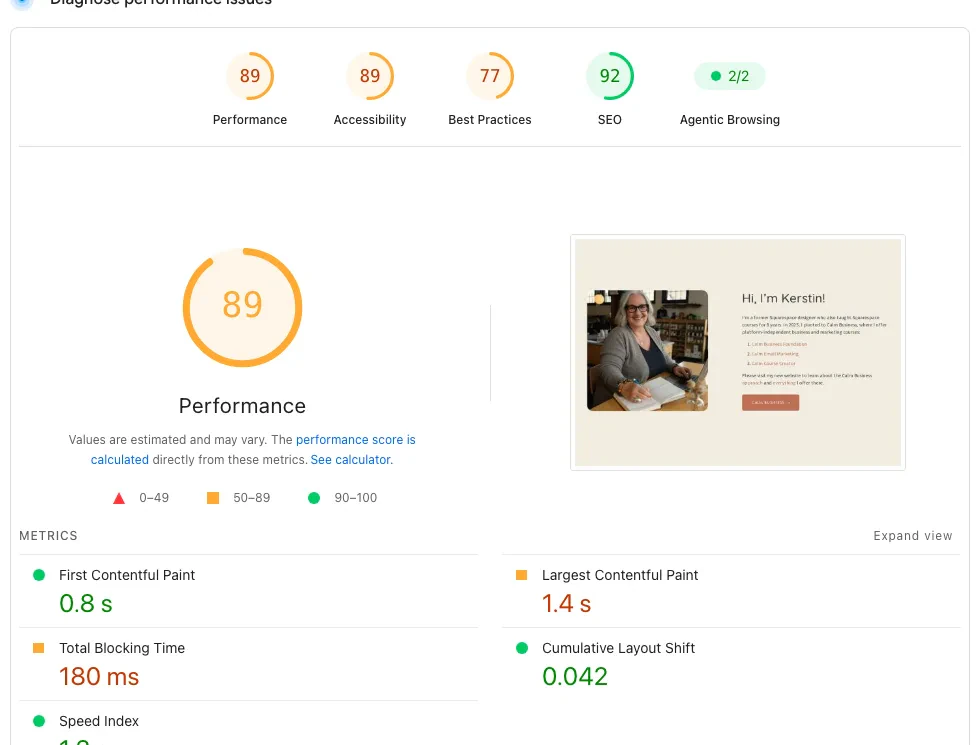
PageSpeed Insights desktop lab results for a real Squarespace-built site: 89 performance, 0.8s first contentful paint, 1.4s largest contentful paint
The WordPress site, a real membership organization on a typical theme-and-plugins build, scores 63 on desktop. The Squarespace site, a professionally designed one, scores 89. Both are usable, but Squarespace is comfortably faster, and it got there with nobody touching a caching plugin. Then mobile, which is the test that matters more, because most small-business traffic arrives on a phone.
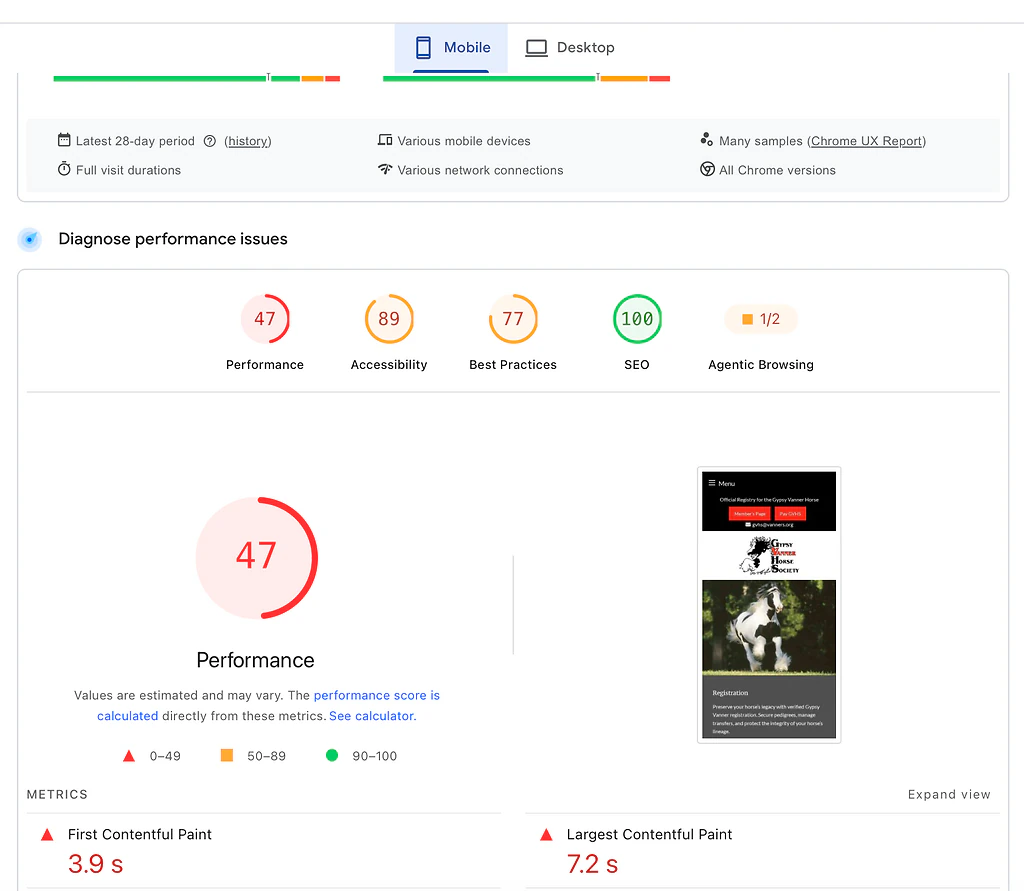
PageSpeed Insights mobile lab results for a typical WordPress site: 47 performance, 3.9s first contentful paint, 7.2s largest contentful paint
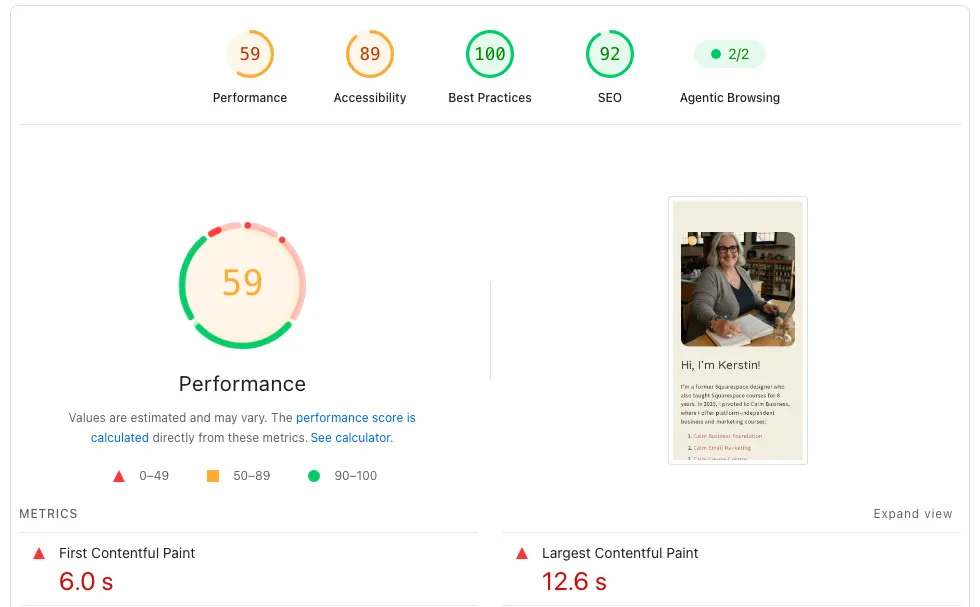
PageSpeed Insights mobile lab results for a real Squarespace-built site: 59 performance, 6.0s first contentful paint, 12.6s largest contentful paint
On mobile the WordPress site drops to 47. The Squarespace site holds 59. These are first-load numbers, which matters for WordPress specifically: its speed is a range, the fast end takes ongoing tuning most small businesses never budget for, and the slow end is what a lot of real visitors actually get, because caching is inconsistent from one WordPress site to the next.
Since this is the Devani blog, one more row, because it changes what "fast" looks like. Devani, the separate CMS this site is built on, sits above both, and the reason is structural: its pages are plain static files served from a CDN with nothing to query, so there is no theme or plugin load to tune in the first place.
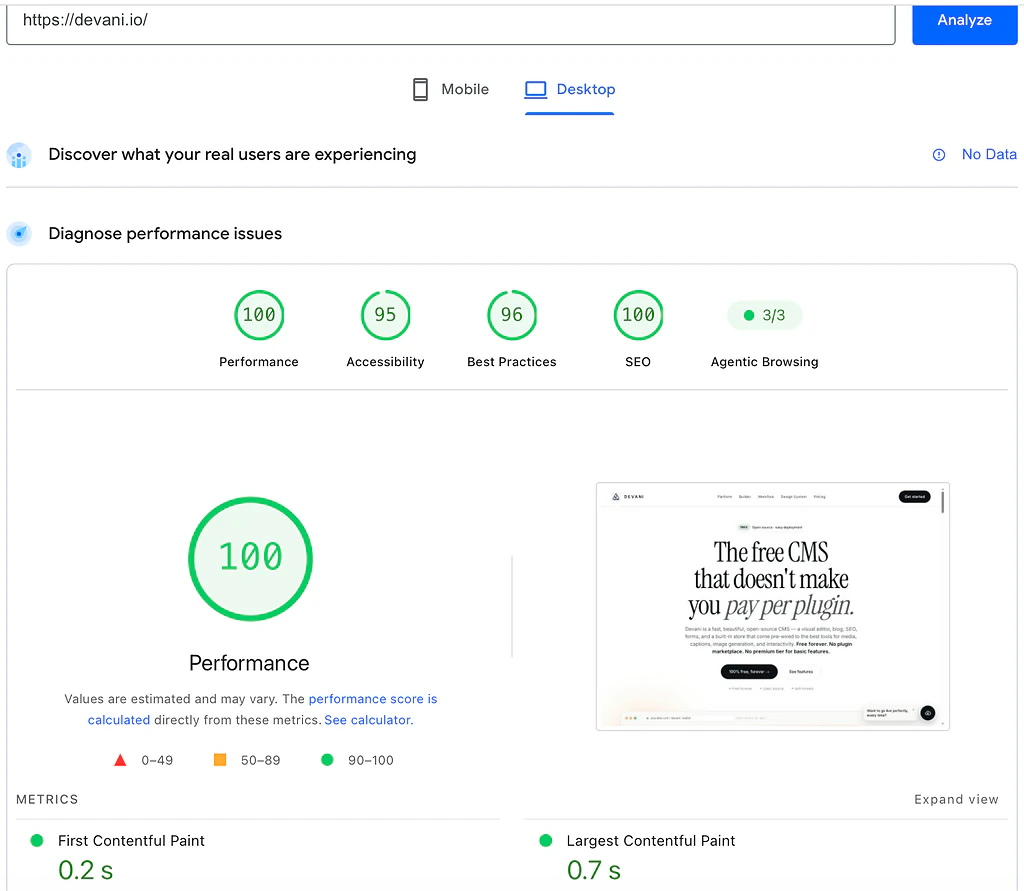
PageSpeed Insights desktop lab results for devani.io: 100 performance, 0.2s first contentful paint, 0.7s largest contentful paint
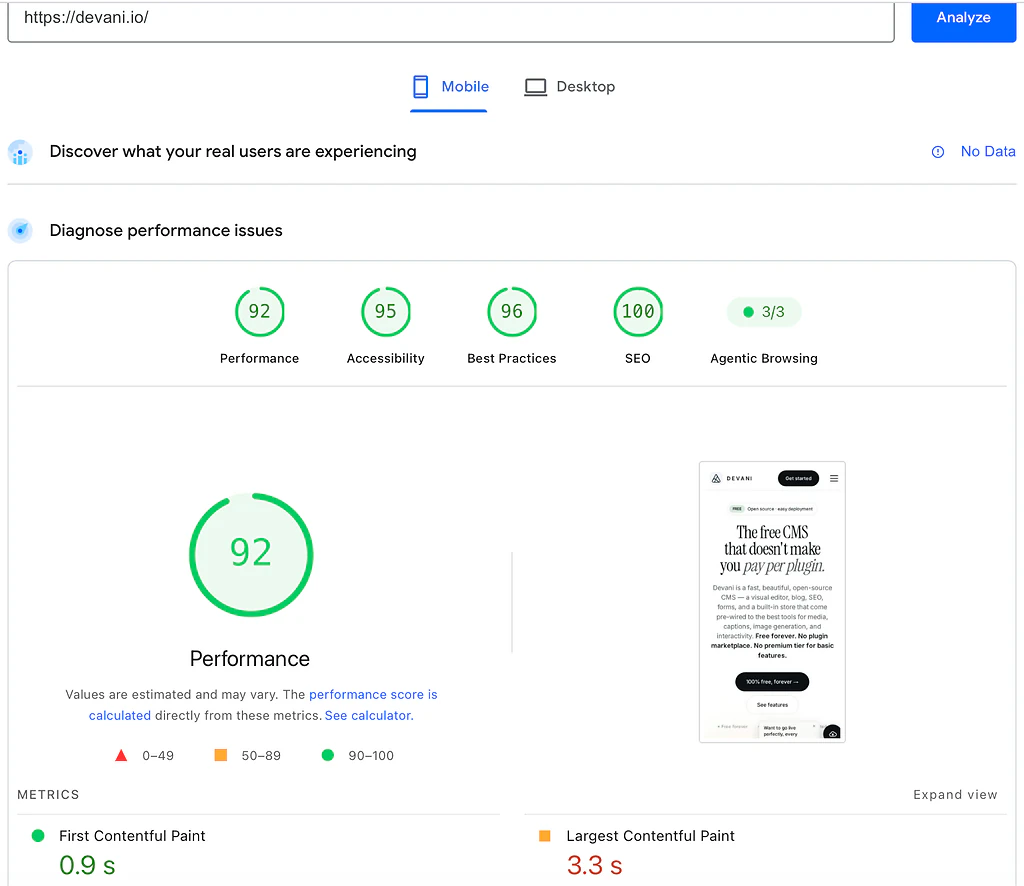
PageSpeed Insights mobile lab results for devani.io: 92 performance, 0.9s first contentful paint, 3.3s largest contentful paint
The most telling column is not the top score, it is how little each platform loses moving from desktop to mobile, where a throttled phone is the harder test.
| Platform | Desktop | Mobile | Desktop to mobile drop |
|---|---|---|---|
| WordPress (typical build) | 63 | 47 | 16 points |
| Squarespace | 89 | 59 | 30 points |
| Devani | 100 | 92 | 8 points |
Squarespace posts the bigger drop on mobile precisely because it is doing more work per page; Devani barely moves because there is little work to do. The WordPress versus Squarespace comparison stands on its own, so treat the Devani row as a footnote if you like. But if speed is high on your list, it is worth knowing that neither mainstream option is the fastest thing you can pick.
Seven seconds is a long time to watch a mostly blank screen on a phone, and it is exactly the wait that sends someone back to the search results.
On the SEO side, the three are closer. All of them produce indexable, crawlable pages, and the typical WordPress site above actually scored 100 on the SEO audit, so nobody here is invisible to Google. The difference is effort: WordPress usually needs an SEO plugin like Yoast to manage titles, meta descriptions, and schema, where Squarespace handles the basics for you and Devani ships per-page SEO (meta, schema, OG, sitemap, 301s) with clean markup and nothing to install. On search the platforms roughly tie on the scoreboard; the split is how much setup it takes to get there.
Straight answers to the ones people ask next.
Is WordPress outdated in 2026?
Not exactly. WordPress still runs a huge share of the web and is still getting security patches, block-editor updates, and continuous plugin development, so "outdated" is the wrong word. What actually happened is its competition got less centralized. It used to be Squarespace and Wix. Now it is Squarespace, Wix, Webflow for design-forward marketing sites, Shopify for physical product at volume, and a newer wave of AI-native builders like Devani that generate and edit a site through a conversation instead of a page builder. Ask what WordPress's biggest competitor is and the honest answer is that there is not one anymore; the market fragmented. If Devani specifically is on your shortlist, Devani vs WordPress lays out that comparison directly.
Do blogs, portfolios, and small-business sites get the same answer?
No, which is why a single verdict does not serve anyone. For blogging, WordPress still has the deeper toolset: categories, tags, scheduled posts, revision history, and a huge ecosystem of blog-specific plugins; Squarespace's blogging is fine for a monthly post but thin against a publication doing several a week. For a portfolio, Squarespace usually wins the practical argument, because its templates are built by people who understand image-heavy layouts and you spend less time fighting the platform. For a small-business site it depends on complexity: a five-page site with a menu and a contact form does not need WordPress's power and should not pay its maintenance cost, while a business with locations, staff bios, a booking system, and an active blog benefits from WordPress's ability to bolt all of that together, assuming someone owns the upkeep.
Is it hard to move a site from WordPress to Squarespace?
Harder than either platform's marketing suggests, and the direction matters. Squarespace's import tool pulls over WordPress blog posts, pages, and images reasonably well, so text content survives. What does not survive is your layout: custom page-builder designs, specific plugin functionality like a booking calendar or membership system, and most SEO configuration have to be rebuilt by hand. I did this for a client who expected an afternoon's work; it took closer to three weeks once we rebuilt forty pages of custom layouts and set up redirects so five years of backlinks did not die. Going the other direction, Squarespace to WordPress, is arguably worse, because Squarespace offers no full database export: you re-create the site page by page rather than migrating it. If leaving WordPress entirely is the real question, our guide to leaving WordPress walks through the migration math.
The choice that skips the tradeoff.
I work on Devani, so weigh this next part accordingly. Everything above keeps landing on the same fork: WordPress gives you real customization at the cost of running the machinery yourself, Squarespace hands you a finished car with a hood that does not open. Devani exists because that fork looks like a false choice. Instead of a fixed set of blocks, you connect your own ChatGPT or Claude account through MCP, using an existing subscription with no API keys, and ask it to change the site: rewrite a section, rework a layout, add a page. It acts on the actual content and structure, and because Devani's pages are plain HTML, the edits land in the visual editor with every change snapshotted and one click from rollback. That is the direct answer to Squarespace's ceiling: the ceiling is the block library, and asking replaces clicking through it.
To be precise about the AI part, since WordPress is in the frame: WordPress has bolt-on options too now, WordPress.com's MCP integration and the Vibe AI plugin among them, but they work inside the block editor rather than across your whole build. Devani's assistant is native, working inside the builder itself. That is the honest distinction, native versus alongside, not "the only platform with AI."
Devani is also free and open-source, so there is no plan to upgrade into and no per-plugin fees stacking the way a fully loaded WordPress build's can. What it does not have is WordPress's twenty-year head start: no marketplace of sixty thousand plugins, a smaller template library than Squarespace's, and none of the decade of freelancer familiarity either competitor has built up. If your project needs one specific, obscure plugin that only exists in WordPress's ecosystem, Devani is not the right fit yet, and I would say so to your face if you asked.
Still stuck between owning it and handing over the keys?
If the whole choice has felt like picking between running the machinery and losing the hood, that is the exact tradeoff Devani was built to close. It is free, so there is nothing to commit to.