
Squarespace is genuinely good, until you want to change more than the grid allows.
Squarespace nails the things it's built for: beautiful templates, an all-in-one setup where hosting and updates are someone else's problem, and a browser editor simple enough that a business owner can run the whole site alone. If you've looked at it and thought "this looks great, I just wish I could change more of it without a rebuild," that instinct is correct, and it's the whole reason this page exists.
The honest shape of the comparison is this. Squarespace's ceiling is a fixed grid: you arrange content inside sections and blocks the platform defined in advance, and once a site is built on a template, there's no setting that swaps it for a different one and carries your content along. Squarespace's own support documentation confirms that. Devani keeps some of that same simplicity, no plugins to patch, updates on your own schedule instead of a forced cadence, and it's fully managed with a genuinely free tier rather than a paid-only all-in-one. On top of that it adds two things Squarespace doesn't have: a real, measured speed advantage on mobile, and an AI assistant that edits your live content and layout because you asked it to, not because you found the right block to drag.
Squarespace
The polished all-in-one, inside a fixed grid.
- ✓ The best out-of-box design polish of any hosted builder
- ✓ Roughly 180 to 200 industry-sorted templates, years refined
- ✓ Hosting, updates, and security handled for you
- × Fixed grid: no template swap that carries your content
- × Cannot be edited with AI
Devani
Genuinely free to start, fully managed, and faster by default.
- ✓ Genuinely free to start on a fully managed tier, no per-site fees
- ✓ Database-free static files on a CDN, near 100 Lighthouse out of the box
- ✓ Connect your own ChatGPT or Claude to edit content and layout natively
- × Younger platform, a smaller template library than Squarespace
Where Squarespace genuinely wins.
Give this its due, because it's real. Squarespace's design quality out of the box is the best of any hosted builder, full stop.
Design polish out of the box
A default template already has type pairings that work, spacing that doesn't need adjusting, and a mobile layout that rearranges sensibly instead of just shrinking. I've watched clients open a template and ask what else they needed to do. The honest answer was often "not much."
A deep template library
Somewhere around 180 to 200 designs sorted by industry, with years of refinement behind them. That is a real head start, and the fixed-grid editor is precisely why Squarespace sites rarely look broken even in inexperienced hands.
Brand perception in creative fields
Photography, architecture, independent design: Squarespace's standing in those fields is a real thing I've had clients ask for by name. Its blogging tools are also genuinely stronger than most hosted builders manage.
Fast on desktop
A professionally built Squarespace site scores 89 on PageSpeed Insights, a genuinely good desktop number, better than most self-hosted WordPress sites manage without real caching work. None of this is manufactured praise. It's why Squarespace has been my most-recommended platform for clients who cared more about how a site looked than what it could technically do.
Squarespace's tradeoff was never speed. It's what happens the day the template genuinely doesn't support the layout you now need.
A faster default, and a way past the fixed grid.
The trade behind Devani runs through this whole page: not simplicity traded for control, and not control traded for simplicity, but a different shape entirely. It's fully managed with a genuinely free tier, so there's no plugin stack to maintain and no forced update cadence eating time.
What that maintenance-free base buys on top is a real, measured speed edge. Devani is database-free: the whole site is plain files, nothing to query, server-rendered as clean semantic HTML, with images auto-compressed to WebP and served statically from a CDN and cached at the edge. That's why the numbers below are the default starting point, not the result of extra tuning. The speed gap opens widest on mobile, and it's worth showing rather than just stating. Here's a professionally built Squarespace site on a cold PageSpeed run, desktop first, then mobile.
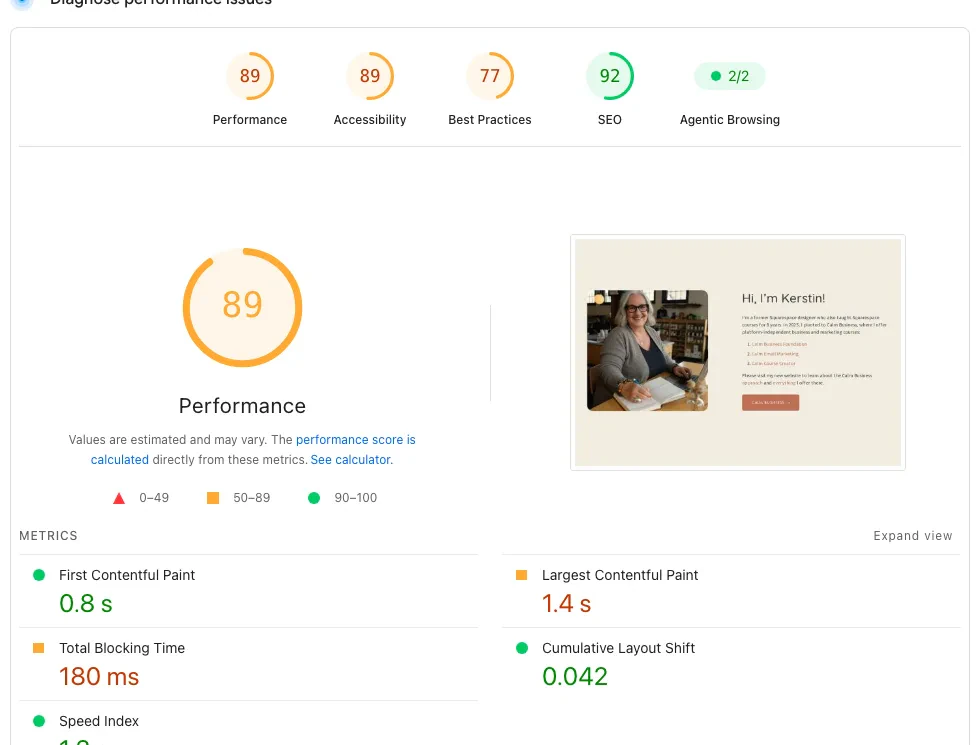
PageSpeed Insights desktop lab results for a professionally built Squarespace site: 89 performance, 92 SEO, 0.8 second first contentful paint, 1.4 second largest contentful paint
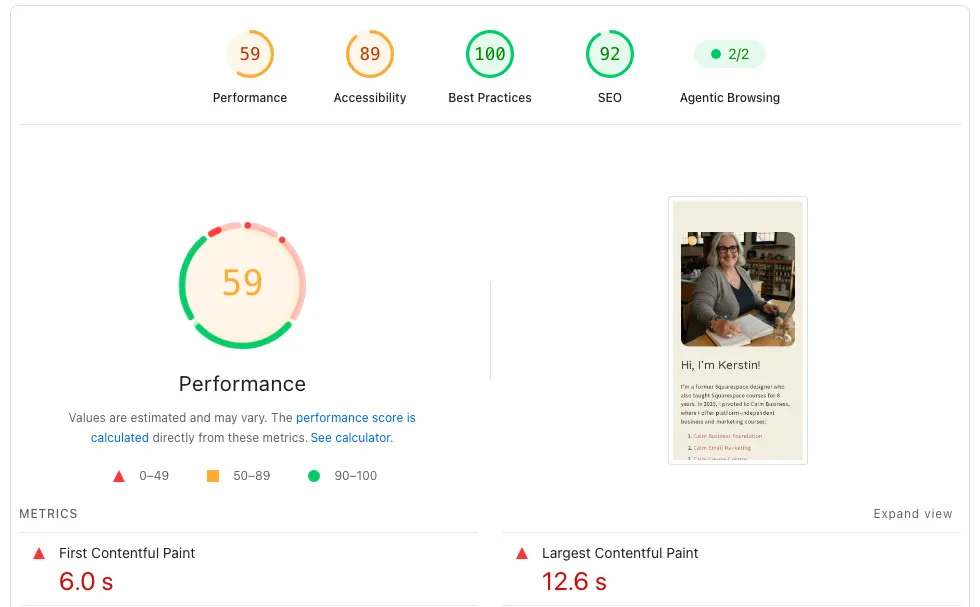
PageSpeed Insights mobile lab results for the same Squarespace site: 59 performance, 92 SEO, 6.0 second first contentful paint, 12.6 second largest contentful paint
That's an 89 to 59, a 30-point drop, and it's not unusual: Squarespace templates lean on large photography, which is a big part of why they look so good, and mobile testing throttles the network and CPU hard enough to punish exactly that. This isn't Squarespace being slow or broken; a real visitor on a real phone isn't sitting through a 12-second load the way the lab test simulates. But it's the honest, like-for-like cold number, and it's where image-forward Squarespace sites take the hit. Here's Devani on the same test.
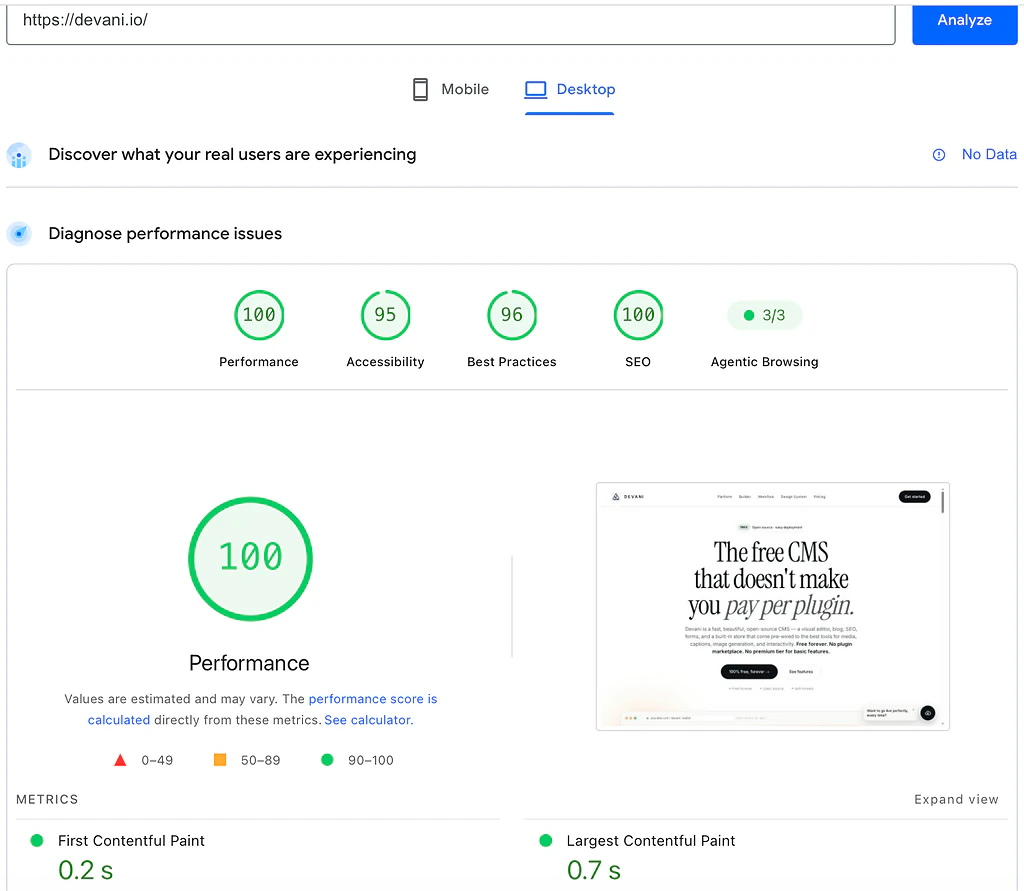
PageSpeed Insights desktop lab results for devani.io: 100 performance, 0.2 second first contentful paint, 0.7 second largest contentful paint
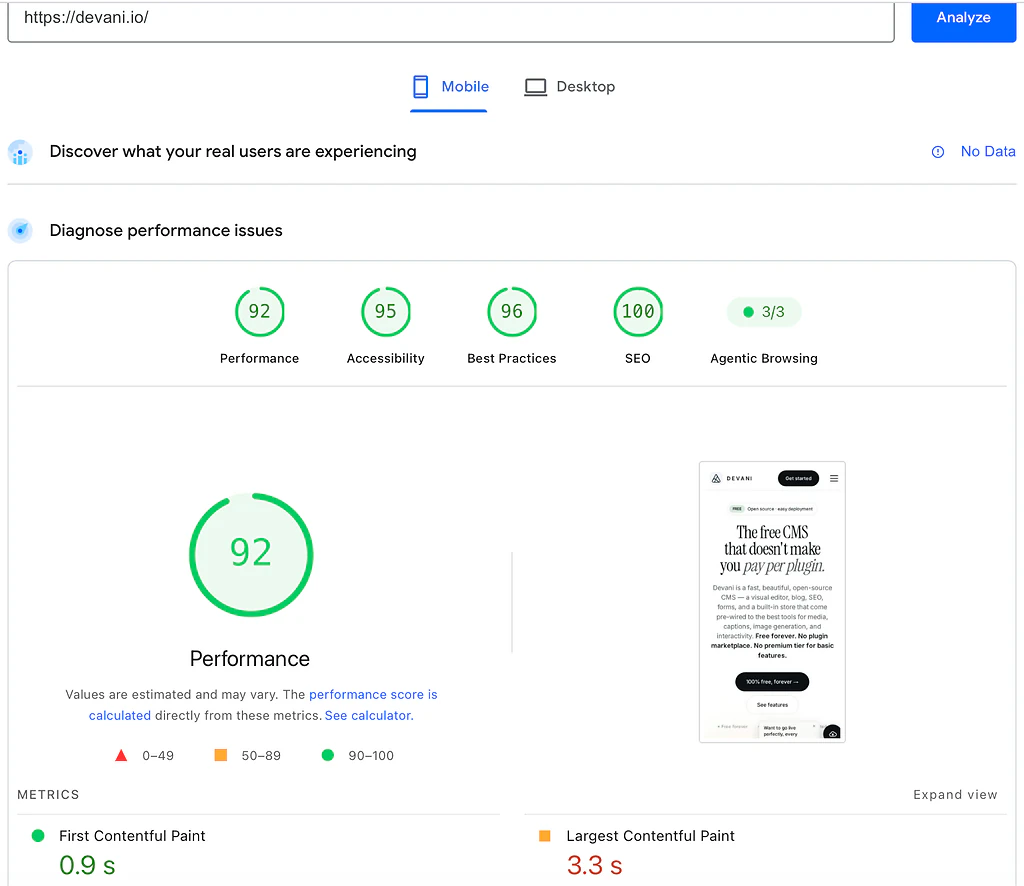
PageSpeed Insights mobile lab results for devani.io: 92 performance, 0.9 second first contentful paint, 3.3 second largest contentful paint
| Platform | Desktop | Mobile | Desktop-to-mobile drop |
|---|---|---|---|
| Squarespace | 89 | 59 | 30 points |
| Devani | 100 | 92 | 8 points |
Same test, same throttling, and the Devani site holds up under it: an 8-point drop instead of 30. The persuasive number isn't the desktop score, it's how little the site loses when the test gets hard. And the underlying markup is clean and SEO-friendly without installing a plugin to get there.
The bigger difference isn't a score, though, it's what happens when the site needs to change. Squarespace's fixed grid means every edit is arranging content inside sections the platform already defined, and a layout the template genuinely doesn't support becomes "we can approximate it" instead of "yes." Devani's answer is that you connect your own ChatGPT or Claude account through MCP, using your existing subscription, no API keys and no copy-paste, and the assistant makes the actual edit on the real content and the real layout, from inside the visual builder. Tell it a page needs a different structure or a section should read differently, and it does that work directly instead of leaving you to hunt for the right block. Every change snapshots and rolls back, so there's no template-switch rebuild waiting down the line: changing how a page is structured is a request, not a project.
Worth being precise here, since this space moves fast. Connecting your own AI account to make live edits isn't unique to Devani anymore; WordPress.com's MCP integration and the Vibe AI plugin have shipped versions of it, and a handful of smaller tools too. What stays true is that Devani is the only MCP-native platform whose builder works hand in hand with the assistant: the AI writes plain HTML that lands directly in the visual editor, reaching both content and layout on one platform. The bolt-on integrations work well inside a block editor, but on a page builder they tend to hand you AI-written content plus a standard HTML editor, not a live builder edit. Squarespace, for its part, cannot be edited with AI at all.
What it actually costs.
Squarespace runs four paid tiers, all billed annually, with a 14-day free trial before you need to commit. Devani starts free, with simple flat plans as you grow.

Squarespace pricing page in USD showing Basic at 16 dollars, Core at 23, Plus at 39, and Advanced at 99 per month billed annually
| Plan | Monthly cost (USD) | Notes |
|---|---|---|
| Squarespace Basic | $16 | Still carries a platform transaction fee on top of card processing |
| Squarespace Core | $23 | Where a store selling with any regularity usually lands in practice |
| Squarespace Plus | $39 | Billed annually |
| Squarespace Advanced | $99 | Billed annually |
| Devani | Free to start | Genuinely free managed tier, then simple flat plans as you grow |
Basic is the only Squarespace tier still carrying a platform-level transaction fee on top of card processing, so a store selling with any regularity usually ends up on Core, not Basic. Devani's honest pricing is that it starts free, always, with a genuinely free managed tier and simple flat plans above it, no per-seat or per-tier gate to weigh against Squarespace's ladder. Hosting, SSL, the media CDN, backups, and updates are all included rather than metered.
Who should pick Squarespace instead
If the priority right now is the deepest template library and the most proven design polish available today, pick Squarespace. Roughly 180 to 200 templates with years of refinement is a real head start a younger platform can't match yet, and if a business needs a specific integration that already exists as a mature, established product in Squarespace's ecosystem, staying put is the honest call, not a compromise.
Devani is younger. The template library is smaller, the extensions ecosystem is a fraction of what Squarespace or an open platform offers, and there isn't yet a decade of freelancer familiarity to lean on. If a business already knows exactly which niche Squarespace integration it depends on, that dependency doesn't disappear by switching platforms, and I'd say so directly if asked. Worth a look too if a wider field is still in play: a roundup of Squarespace alternatives covers more of that ground than a single comparison can, and the WordPress vs Squarespace comparison is the one to read if WordPress is also on the table.
Is Devani faster than Squarespace?
Like for like, yes, and the gap is widest on mobile. On the same cold PageSpeed run a professionally built Squarespace site went from 89 desktop to 59 mobile, a 30-point drop, while Devani went 100 to 8 points down at 92. Devani is database-free static files served from a CDN and cached at the edge, so there's nothing to query on each load. Squarespace isn't slow, its templates just lean on large photography that mobile throttling punishes.
Can you edit a Squarespace site with AI?
No. Squarespace has no way to connect an AI assistant to edit your live content or layout. Devani lets you connect your own ChatGPT or Claude account through MCP and have it make the edit directly inside the builder. That native, in-builder editing is Devani's genuine differentiator here; some other platforms have shipped bolt-on versions, but Squarespace has none.
Can you switch templates on Squarespace without rebuilding?
Not in the sense most people mean. Squarespace's own documentation confirms there's no setting that swaps a live site to a different template and carries the content along. You rebuild inside the new template. On Devani, changing how a page is structured is a request to the connected AI, and every change snapshots and rolls back.
How much does Devani cost compared to Squarespace?
Squarespace runs $16, $23, $39, and $99 a month across Basic, Core, Plus, and Advanced, all billed annually. Devani starts free on a genuinely free managed tier, with simple flat plans as you grow and no per-seat or per-tier feature gates like Squarespace's ladder.
If the fixed grid is the actual problem, not a footnote.
Worth setting up a trial and seeing what happens when you ask Devani to change something instead of arranging it yourself.