
Building on Squarespace is less a blank canvas than a fixed tasting menu: every plate is beautifully composed, and you never get to walk into the kitchen.
Squarespace is genuinely good, right up to the ceiling you'll eventually hit.
What's really at stake when you pick Squarespace is whether it's good enough to run a business on, or whether you're buying a site that only knows how to look nice. It's genuinely good, and the pretty part is not an accident, it's the whole product. The tradeoff underneath everything else in this review is real design polish and real simplicity in exchange for a ceiling you hit the day your site needs to do something the menu wasn't built for. Everywhere that ceiling bites, Devani, the free open-source CMS this blog runs on, is the foil worth knowing about, and I'll get to exactly where.
Squarespace is the platform I've recommended most often to clients who cared more about how the site looked than what it could technically do, and it's the one I've had to talk people out of when their business needed more moving parts than a template was ever going to hold. Both of those things are true, and this review tries to hold them at the same time instead of picking a side for the sake of a clean verdict.
What Squarespace actually is.
An all-in-one website builder with a particular personality: you sign up, pick a template, and edit inside Squarespace's own browser editor, with hosting, SSL, backups, and platform updates handled on their end.
There's nothing to install, nothing to patch, no server to think about. That's the same basic promise every hosted builder makes, but the editor gives it a specific shape. It's called Fluid Engine, and it's grid-based: content snaps into defined zones on the page rather than dropping anywhere you point the cursor, the way a freer drag-and-drop builder works. That's a deliberate constraint, not a missing feature. It's why Squarespace sites rarely look broken, even in the hands of someone who has never designed anything before; the grid won't let two blocks collide or a heading run off the edge of the page.
Squarespace also ships its own AI builder, Blueprint AI, which asks a longer set of questions up front, your industry, your goals, a few style preferences, and generates a working first draft from the answers. It's a genuinely useful starting point. It is still just a starting point. Once Blueprint AI hands you the draft, every change after that happens back inside Fluid Engine, the same fixed grid as everyone else. Templates are where Squarespace spends its real design budget: somewhere around 180 to 200 of them, depending on how you count older legacy designs, sorted by industry and use case. That's a much smaller number than some competitors' libraries, and that's on purpose. Fewer templates, more attention on each one.
Design quality is the real thing
Templates look considered before you've touched a setting: type pairings that already work together, spacing that doesn't need adjusting, mobile layouts that rearrange sensibly on their own instead of just shrinking. A default heading hierarchy reads like a designer already made the hard calls for you. I've watched clients open a template for the first time and ask what else they need to do, and the honest answer was often "not much."
All-in-one simplicity
Hosting, SSL certificates, platform security patches, and uptime are Squarespace's problem, not yours. For an owner who just wants the site to keep working without becoming a second job, that's real value. I've seen enough neglected self-hosted sites, expired certificates, unpatched plugins, a host that went down over a weekend and nobody noticed until Monday, to not take it for granted.
Blogging that holds up
Stronger than most hosted builders manage: multi-author support, scheduling, tags and categories that behave the way an editorial calendar expects, even native podcast hosting on some plans. If a business plans to publish regularly, the blogging tools were clearly built by people who think about how writing looks on a page, not bolted on as an afterthought.
Brand perception
Softer, but real, and I've had clients ask for Squarespace by name for exactly this reason. In creative fields, photographers, architects, independent designers, "built on Squarespace" carries a baseline association with taste, the way certain paper stock or a certain font signals something before a client reads a word of the copy.
Commerce for a light store
Every paid plan, even the cheapest, supports unlimited products, physical and digital, with basic inventory management. For someone selling a modest, single-location catalog, apparel, prints, a handful of downloads, it does the job cleanly without a heavier platform. For a store already outgrowing that lane, Shopify vs Squarespace covers when making that jump actually pays off.
Memberships and courses
A real, built-in option: gated content, paid member areas, and digital product delivery, all inside the same editor rather than a separate bolted-on system. It's not the deepest course platform on the market, but it's there, it works, and it doesn't require stitching together three different tools.
The real weaknesses, named as specifically as the strengths above.
None of these are dealbreakers on their own. They're the things that surprise people the day they actually run into them, so they're worth knowing before you commit to a template rather than after.
- The customization ceiling is the big one. Fluid Engine's grid keeps everything looking clean, but it also means you're arranging content within sections and blocks Squarespace defined in advance. The day a client asked for a layout the template genuinely didn't support, an unusual multi-column comparison table, a specific interactive element, a page structure that mapped to no block type, the honest answer was usually "we can approximate it" rather than "yes." That's a structural limit, not a training issue.
- Template switching surprises more people than any other limit here. Once a site is built on a template, there's no setting that swaps it for a different one and carries your content into the new layout. Squarespace confirms this in its own support documentation. Wanting a different look two years in means rebuilding the layout, not flipping a switch.
- The Basic-tier transaction fee is a real cost most people don't notice until they're already selling. The cheapest paid plan takes a percentage cut of every sale on top of standard card processing fees, and that platform-level cut only goes away once you move up to Core or higher.
- Single-currency checkout is a genuine, underdiscussed limitation. A store runs in exactly one currency, and every charge, order, tax, and shipping line runs in it. Squarespace's own help documentation confirms there's no way to accept a second currency at checkout on the same site, even with a paid display extension; those only change the price a visitor sees, not what they're charged. For anyone selling meaningfully across borders, it's a real ceiling.
- Integrations are thinner than an open ecosystem. The extensions marketplace runs to roughly 50 apps, a fraction of what a plugin-based platform offers. Most small businesses never need more, but the ones that do hit a wall fast, with no equivalent of installing a plugin to bridge the gap.
- Monthly cost adds up faster than the entry price suggests. There's no free plan, only a 14-day trial that requires payment details before the site can go live, and the jump from Basic to Core, the tier most stores actually need once the transaction fee matters, is a meaningful step up.
Squarespace pricing, tier by tier
Squarespace runs four paid tiers, all billed annually, with a 14-day free trial to try the editor first. The tier that actually matters for most stores is Core, not Basic.
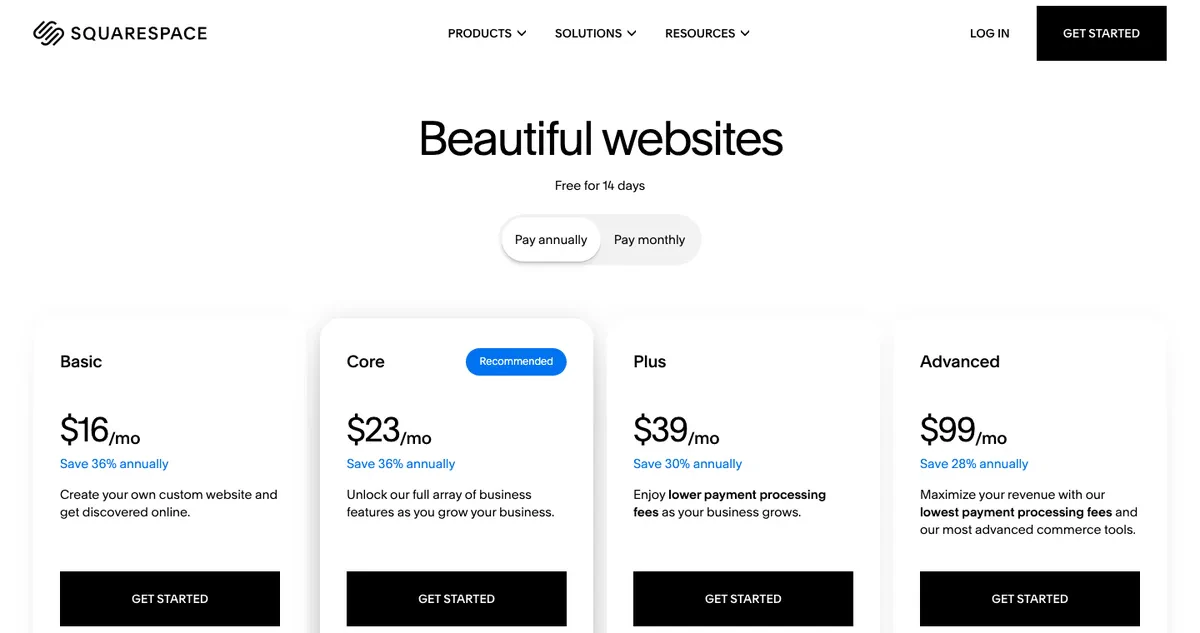
Squarespace pricing page in USD showing Basic at 16 dollars, Core at 23, Plus at 39, and Advanced at 99 per month billed annually
| Plan | Monthly (annual billing) | Best for |
|---|---|---|
| Basic | $16 | Entry point, but the only tier still carrying the platform transaction fee |
| Core | $23 | Where most stores actually land once the transaction fee matters |
| Plus | $39 | More advanced commerce and site features |
| Advanced | $99 | Higher-volume stores needing the deepest built-in tooling |
Basic looks like the cheap entry point, and it is, but it's also the only tier still carrying that platform-level transaction fee on top of card processing. Once a store is selling with any regularity, that fee outpaces the eight-dollar-a-month difference between Basic and Core fast. I've had this conversation with clients more than once: the sticker price says $16, the real price once you account for what you're giving up in fees is closer to $23, and it's worth doing that math before picking a plan rather than after the first month of invoices.
Is Squarespace fast?
Template counts get quoted constantly in Squarespace coverage. Real page speed on a real site gets quoted a lot less, so here's an actual PageSpeed Insights run, cold, on a professionally built Squarespace site, desktop and mobile.
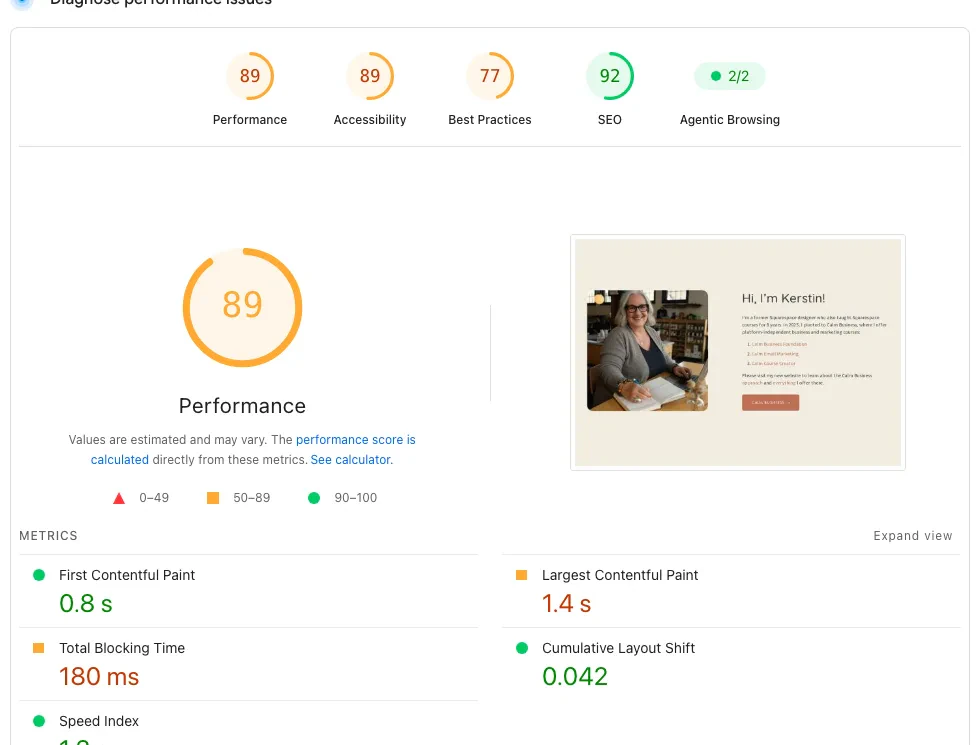
PageSpeed Insights desktop lab results for a professionally built Squarespace site: 89 performance, 92 SEO, 0.8 second first contentful paint, 1.4 second largest contentful paint
An 89 on desktop is a genuinely good score, better than most self-hosted WordPress sites manage without real caching work, and it's the honest, representative number for a well-built Squarespace site, not a cherry-picked best case. Now mobile, the test that matters more in practice, since most small-business traffic arrives on a phone.
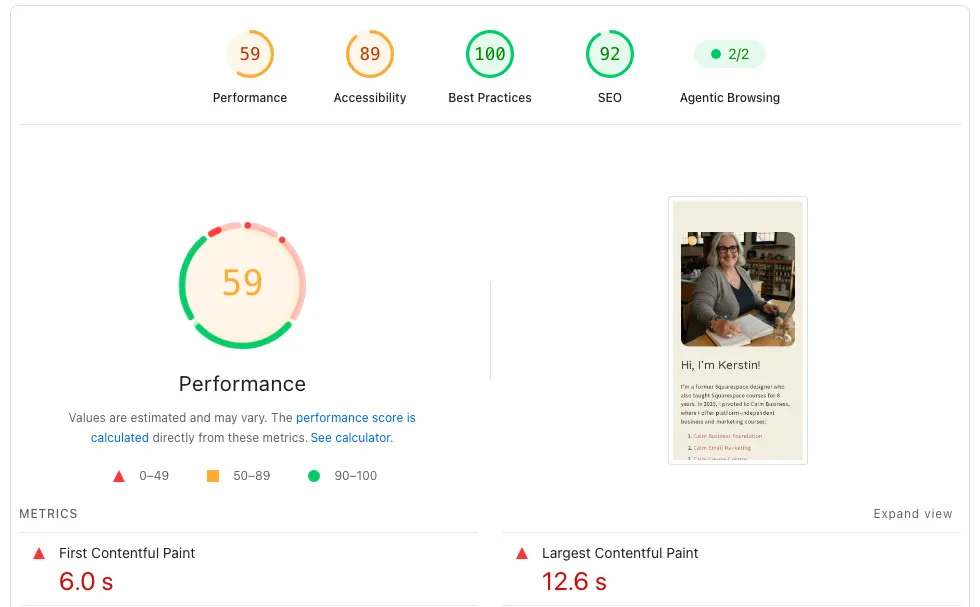
PageSpeed Insights mobile lab results for a professionally built Squarespace site: 59 performance, 92 SEO, 6.0 second first contentful paint, 12.6 second largest contentful paint
That's a 30-point drop from desktop to mobile, and it's not unusual. Squarespace templates lean hard on large photography, which is a big part of why they look so good, and mobile testing throttles both the network and the CPU hard enough to punish that same photography. This isn't Squarespace being slow or broken; a real visitor on a real phone connection isn't sitting through a 12-second load the way the lab test simulates. But it is the honest, like-for-like number, and image-forward Squarespace sites tend to feel the mobile test more than leaner ones do.
Since this is the Devani blog, worth a quick honest aside. Devani, the separate CMS this site runs on, is database-free, plain files served statically from a CDN with nothing to query, and it starts from a different place on the same kind of lab test. The gap that actually persuades isn't the desktop number, it's the size of the desktop-to-mobile drop.
| Platform | Desktop | Mobile | Desktop-to-mobile drop |
|---|---|---|---|
| Squarespace (built site, cold) | 89 | 59 | 30 points |
| Devani (devani.io) | 100 | 92 | 8 points |
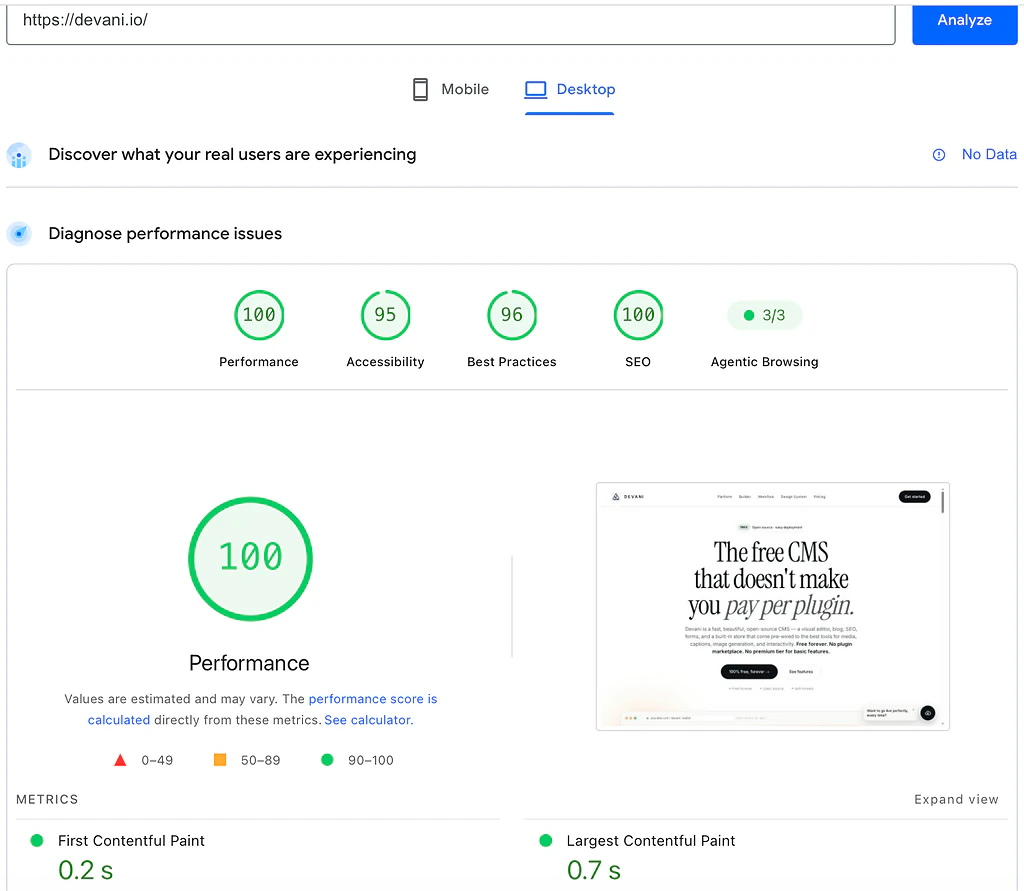
PageSpeed Insights desktop lab results for devani.io: 100 performance, 0.2 second first contentful paint, 0.7 second largest contentful paint
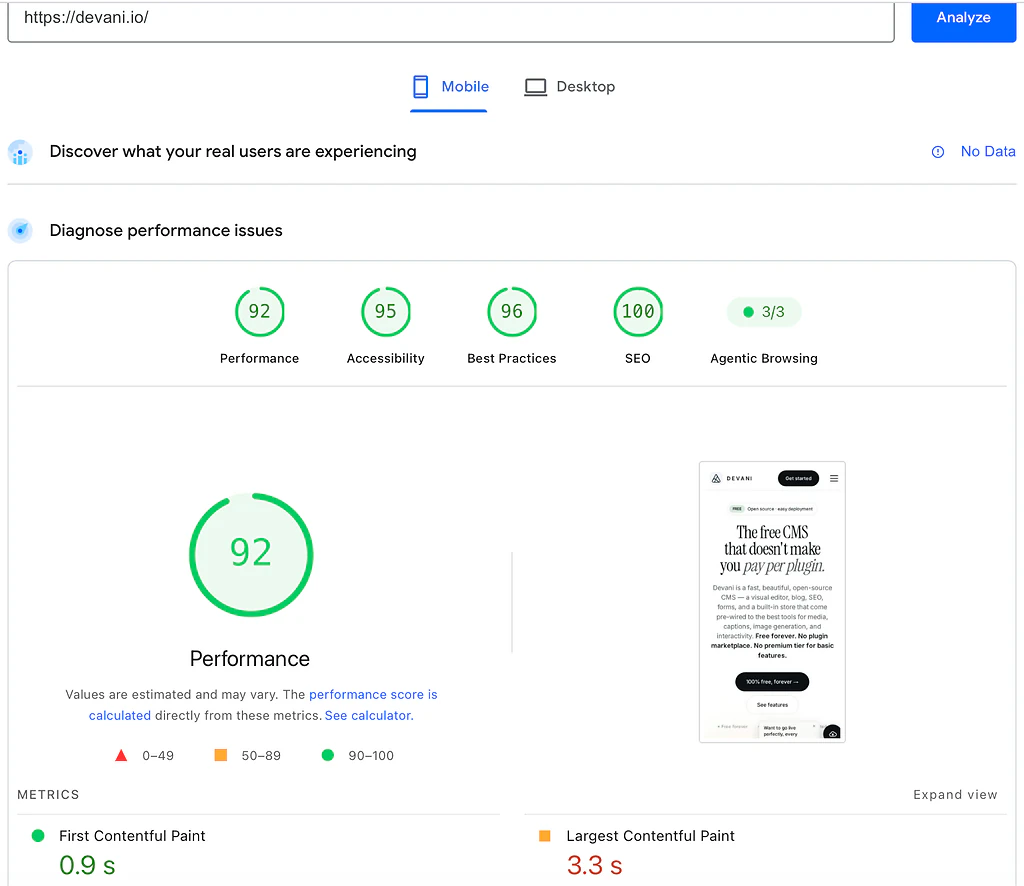
PageSpeed Insights mobile lab results for devani.io: 92 performance, 0.9 second first contentful paint, 3.3 second largest contentful paint
That's one data point among several in this review, not the headline. Squarespace's desktop speed is real and earned, and this review isn't about Devani. But if mobile load time genuinely matters for the business in question, it's worth knowing the gap exists.
Is Squarespace good for SEO?
Yes, for the large majority of small businesses, and the technical basics are handled without touching a plugin: clean, crawlable markup, an automatic XML sitemap, mobile-responsive templates, SSL by default, and an SEO title and description field on every page, post, and product. Both PageSpeed reports above scored 92 on the SEO audit, which tracks with that.
The ceiling shows up if a site needs advanced technical SEO: fine-grained control over structured data and schema markup, for instance, is genuinely more limited than what an open CMS with dedicated SEO tooling gives you. For most small businesses that ceiling never gets hit; the content, the links, and the metadata being filled out correctly matter more than the platform underneath them. For a site competing hard in a technical or highly contested niche, it's a real, worth-knowing limitation rather than a dealbreaker.
Who this is genuinely right for
Squarespace makes the most sense for a business or individual where the site's job is mostly to look credible and communicate clearly, rather than run a lot of custom logic: photographers, designers, architects, consultants, restaurants, service businesses that book appointments (through the paid Acuity add-on), and stores selling a modest, single-currency catalog. If the priority is a site that looks like it was designed by someone who knows what they're doing, without hiring that someone, Squarespace delivers that more reliably than most alternatives.
It's the wrong fit for a business that already knows it needs something the template system won't bend to: a complex multi-vendor marketplace, deep custom logic, cross-border multi-currency sales at real volume, or heavy reliance on niche third-party integrations. Those needs don't get easier over time on Squarespace; they get worked around, which eventually looks a lot like starting over somewhere else. For a closer look at how Squarespace stacks up against another design-forward hosted builder, Wix vs Squarespace covers that decision directly, and a fuller field of Squarespace alternatives beyond either of those is worth a look too.
The fixed grid, the rebuild-to-switch-templates problem, and the "we can approximate it" answer to an unusual layout request all trace back to one thing: you're editing inside a system someone else designed in advance, and every change has to fit inside boundaries that were set before you signed up. That's the exact tension where a different architecture answers the question, so here's the honest side-by-side.
Squarespace
Beautiful by design, fixed by design.
- ✓ A decade of accumulated design and typography polish
- ✓ Hosting, SSL, and updates handled for you
- × Arrange within the grid; the template is close to permanent once chosen
- × One currency at checkout, a Basic-tier transaction fee, a thin marketplace
Devani
The ceiling removed at the root.
- ✓ No fixed template to arrange within or get locked into in the first place
- ✓ Connect your own ChatGPT or Claude account natively, inside the builder, to change real content and layout
- ✓ Free and open source, self-hosted for about $5 a month, or Devani's managed hosting if you'd rather not run a server
- × Younger platform: fewer ready-made templates and a much thinner marketplace than Squarespace
I work on Devani, so weigh this accordingly, but the mechanism is worth naming plainly rather than pitching it. On Devani there's no boundary to fit inside, because there's no fixed template to begin with. You describe what a page needs to a connected ChatGPT or Claude account, your own account, nothing separate to configure, and the assistant makes the actual edit on the real content and the real layout rather than handing you a suggestion to go implement by hand. It works inside the builder rather than alongside it, and every change snapshots so you can roll it back.
The honest tradeoff is that Devani is trading Squarespace's decade of accumulated design polish for that flexibility. What it doesn't have yet is Squarespace's template library or its extensions ecosystem: fewer ready-made looks to start from, a much thinner marketplace to lean on for a niche add-on, and a newer platform without years of freelancer familiarity built up around it. If a business needs a specific, already-proven integration that only exists as a mature product in Squarespace's world, that's a legitimate reason to stay put, and I'd say so directly if asked.
Can you switch Squarespace templates without rebuilding?
No. Once a site is built on a template, there's no setting that swaps it for another and carries your content into the new layout. Squarespace confirms this in its own support documentation. Wanting a different look two years in means rebuilding the layout, so it's worth knowing before you commit to a template rather than after.
Does Squarespace have a free plan?
No, only a 14-day free trial that requires payment details before the site can go live. The paid tiers run Basic at $16 a month, Core at $23, Plus at $39, and Advanced at $99, all billed annually. For most stores the realistic starting point is Core, not Basic, because Basic is the only tier still charging a platform transaction fee on top of card processing.
Is Squarespace fast on mobile?
Desktop speed is genuinely good, an 89 on a cold PageSpeed run of a real, well-built site. Mobile drops to 59 on the same test, roughly a 30-point gap, mostly because Squarespace's image-forward templates get punished by the throttled mobile test. A real visitor on a normal phone connection isn't sitting through the full lab load, but the mobile gap is worth knowing if phone traffic is most of your audience.
Who is Squarespace actually right for?
A business or individual whose site mainly needs to look credible and communicate clearly rather than run custom logic: photographers, designers, architects, consultants, restaurants, service businesses booking appointments through the paid Acuity add-on, and modest single-currency stores. It's the wrong fit for a multi-vendor marketplace, deep custom logic, cross-border multi-currency selling at volume, or heavy reliance on niche integrations.
For the business it fits, that trade is worth making without much hesitation.
For the one that's already outgrown a template, it's worth knowing going in rather than two years into the build. A direct side-by-side lives at Devani vs Squarespace.