
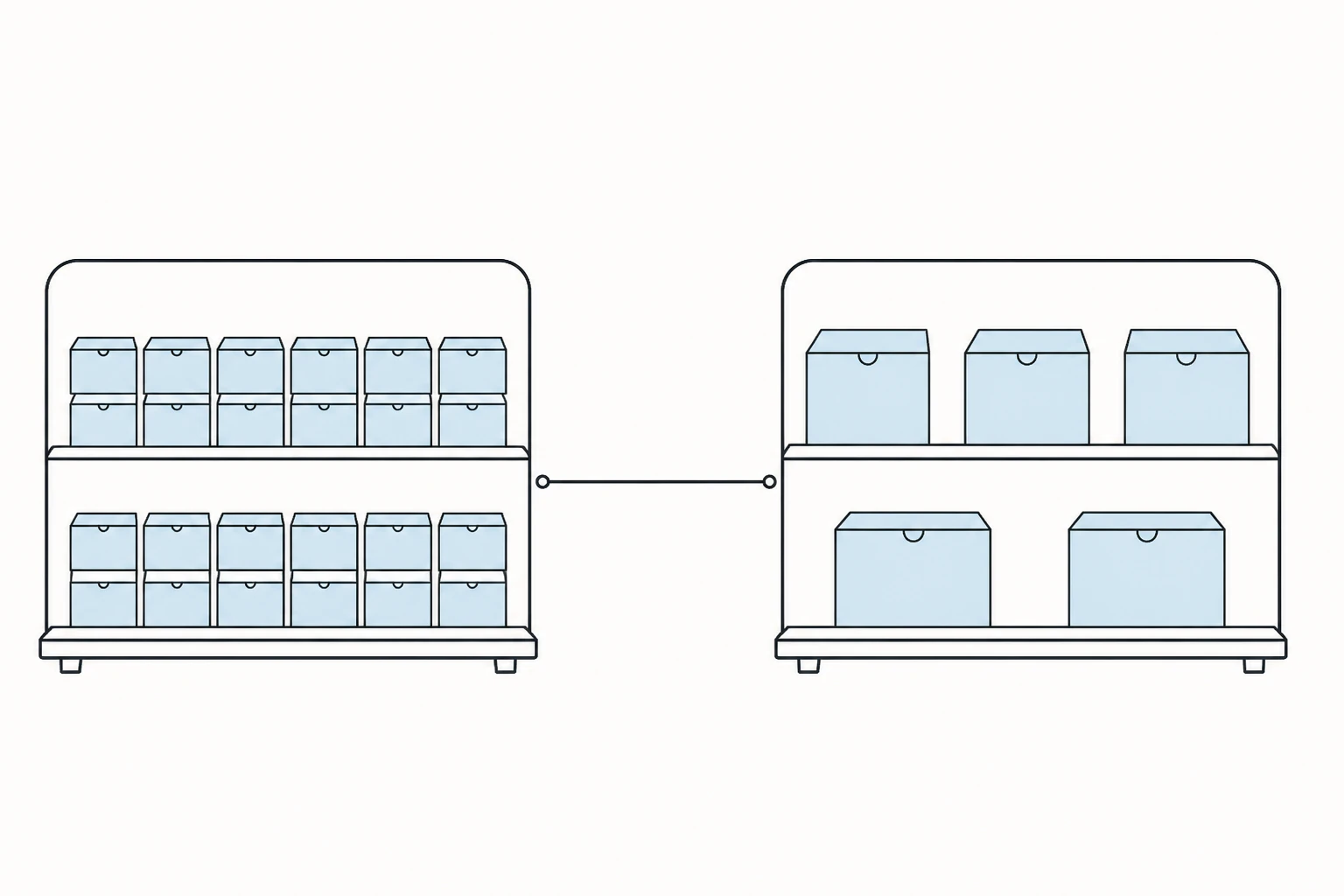
Wix vs Squarespace, and what both leave out.
More room to rearrange, that is Wix. Better default taste, that is Squarespace. What the two of them share is the part most comparisons skip: a fixed set of pieces someone else built, rented monthly for as long as the site exists. That shared ceiling is where a third option, Devani, comes in.
The complaints worth taking seriously about either platform are the structural ones, the limits built into how each system works, not the problems that trace back to a single bad build. Sort the two apart and the real tradeoffs get a lot clearer. Here is the three-way at a glance before we get into what each tradeoff actually costs.
Wix
More room to move, faster onboarding.
- ✓ Bigger template library, north of a thousand designs sorted by business type
- ✓ Drag-anywhere editor, plus a forever-free plan and 24/7 phone and chat support
- ✓ Deeper store tools and native Wix Bookings
- ✕ Template quality swings widely across the library
- ✕ Rented every month, no real export, no owning what you built
Squarespace
Better default taste, on a grid.
- ✓ Curated templates that look considered before you touch them
- ✓ Strong typography, real editorial blogging, cleaner analytics
- ✓ Faster than Wix on desktop, and can sell on the cheapest paid plan
- ✕ Grid editor adds friction on day one, and support is chat and email only
- ✕ Rented every month, same as Wix, and no template swap after launch
Devani
Own it outright, edit it with your own AI.
- ✓ Free and open-source, no license fee, no paying per plugin, ever
- ✓ Roughly 100/100 speed by default, ahead of both on desktop and mobile
- ✓ Connect your own ChatGPT or Claude to edit content and layout inside the builder
- ✓ Self-host for about $5 a month, or a managed free tier if you skip the server
- ✕ Smaller template library, and no app marketplace for a niche feature like Wix Bookings
Is Wix easier to use than Squarespace?
For a true beginner, yes, and it's worth saying plainly first.
Wix's AI Website Builder, the descendant of what used to be a separate tool called ADI, asks a handful of questions about your business and hands you a working draft in minutes, already populated with your business name, a plausible layout, and stock photography you can swap out. From there you land in the regular Wix Editor, which lets you drag an element to nearly any spot on the page and stack sections in whatever order you like without fighting a grid. That freedom is the biggest reason I've pointed first-time site owners toward Wix over the years: they want to nudge a button four inches to the left at eleven at night without asking anyone, and Wix lets them.
Squarespace ships its own AI builder now too, Blueprint AI, but it asks a longer set of questions up front and then drops you into Fluid Engine, a grid-based editor that snaps content into set zones instead of letting you place it anywhere. That constraint is deliberate, and it pays off later, but on day one it means a bit more friction for someone who just wants to move one thing without thinking about the structure underneath it.
Wix also has the bigger template library by a wide margin, north of a thousand free designs sorted into specific business categories, against Squarespace's roughly 100 to 190 depending how you count older legacy templates. More categories means a first-timer is more likely to land on something already close to right for what they actually do, a food truck, a wedding photographer, an HVAC company. It also genuinely costs less to get started, in the sense that matters to someone who isn't ready to pay yet: it has a forever-free plan, no expiration date, where Squarespace only offers a 14-day trial. That free Wix plan carries Wix's own ads and runs on a wixsite.com subdomain, and it can't process a sale of any kind, so it's closer to a test drive than a real launch option, but it's one with no clock running. And Wix answers the phone: 24/7 live chat plus a callback line, where Squarespace's support is chat and email only, no number to dial when something breaks on a Saturday night. Our full Wix review covers the rest of the platform in more depth.
Squarespace's default heading hierarchy reads like a designer already made the hard calls for you.
Squarespace's design edge is real.
Give Squarespace its due here, because a lot of comparisons either oversell or undersell it.
Squarespace templates look considered before you've changed a single thing: type pairings that already work together, spacing that doesn't need adjusting, mobile layouts that rearrange sensibly on their own. Wix's much bigger library is a mixed bag by comparison. With well over a thousand designs built by different teams over many years, quality swings between an older template and one built recently. Squarespace's smaller library is more consistently good largely because there's less of it, and it's been curated harder. Typography is where the gap shows up fastest, where a lot of Wix templates need real hands-on work before they stop reading as a template.
Blogging tilts the same way. Squarespace's post editor, categories, tags, and scheduled publishing are built with an actual editorial workflow in mind, and its blog templates are laid out by people who think about how writing should look on a page, not just a landing page. Wix's blog tools work fine for an owner posting once a month; against several posts a week, they start to feel thin.
Brand perception is softer, but real. In a lot of creative fields, photographers, designers, architects, clients associate "on Squarespace" with a baseline of taste, the way certain fonts or paper stocks signal something before anyone reads a word. It's closer to reputation than a hard feature, but I've had clients specifically request Squarespace for that reason. The analytics dashboard is also more usable day to day: Squarespace collects the numbers an owner actually checks, visits, top pages, traffic sources, into one clean view, where Wix spreads similar data across more separate panels. Our full Squarespace review covers the rest of what it does well.
The one place they genuinely converge
Can you switch your template after you publish? No, on either platform, and this trips up more people than any other limitation in this comparison. Once a Wix site is built on a template, Wix doesn't let you swap it for a different one and carry your content into the new layout; your only path is a new site, a new template, and rebuilding or re-importing pages and media by hand. Squarespace works the same way: switching template families means rebuilding the layout, not flipping a setting.
Both companies confirm this in their own support documentation, and both frame it as a feature, your content stays structurally consistent, as much as a limitation, which is true, but doesn't make the rebuild any less real when you want a different look two years in. This is the one place the two platforms stop trading strengths and land in exactly the same spot. If that lock-in is a dealbreaker, our Wix alternatives roundup covers what else is worth considering.
What does Wix cost, compared to Squarespace?
Line up the entry tiers and Squarespace is a dollar cheaper a month, close enough that it shouldn't decide anything on its own.
| Plan | Squarespace | Wix |
|---|---|---|
| Free | None, 14-day trial only | Forever-free, ads, subdomain, no sales |
| Entry | Basic, $16/mo | Light, $17/mo |
| Mid | Core, $23/mo | Core, $29/mo |
| Higher | Plus, $39/mo | Business, $39/mo |
| Top | Advanced, $99/mo | Business Elite, $159/mo |
| Platform sale fee | On Basic only, gone at Core and up | None on any tier |
All tiers are billed annually on both platforms. Squarespace's Basic plan takes a percentage cut of every sale on top of standard payment processing; that cut goes away once you move up to Core or higher. Wix adds no transaction fee of its own on any tier, though you still pay your payment processor's standard cut regardless of platform. The real cost question is which plan you actually need once ecommerce, storage, and collaborator seats are factored in, and that depends more on what you're building than on either sticker price.
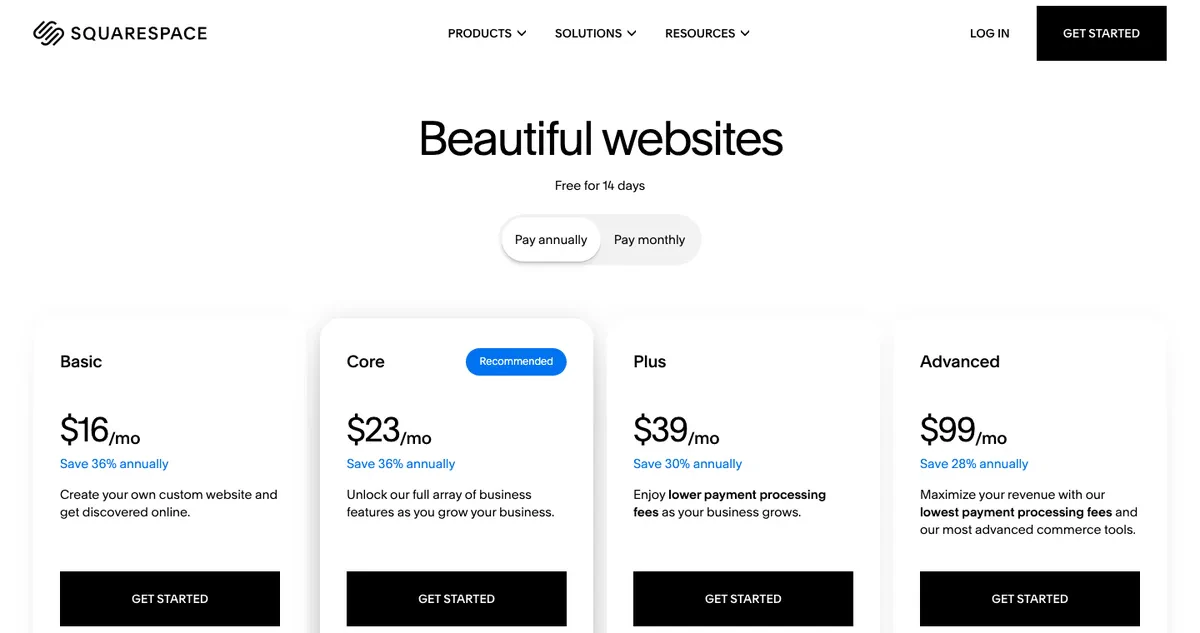
Squarespace pricing page in USD showing Basic at 16 dollars, Core at 23, Plus at 39, and Advanced at 99 per month billed annually
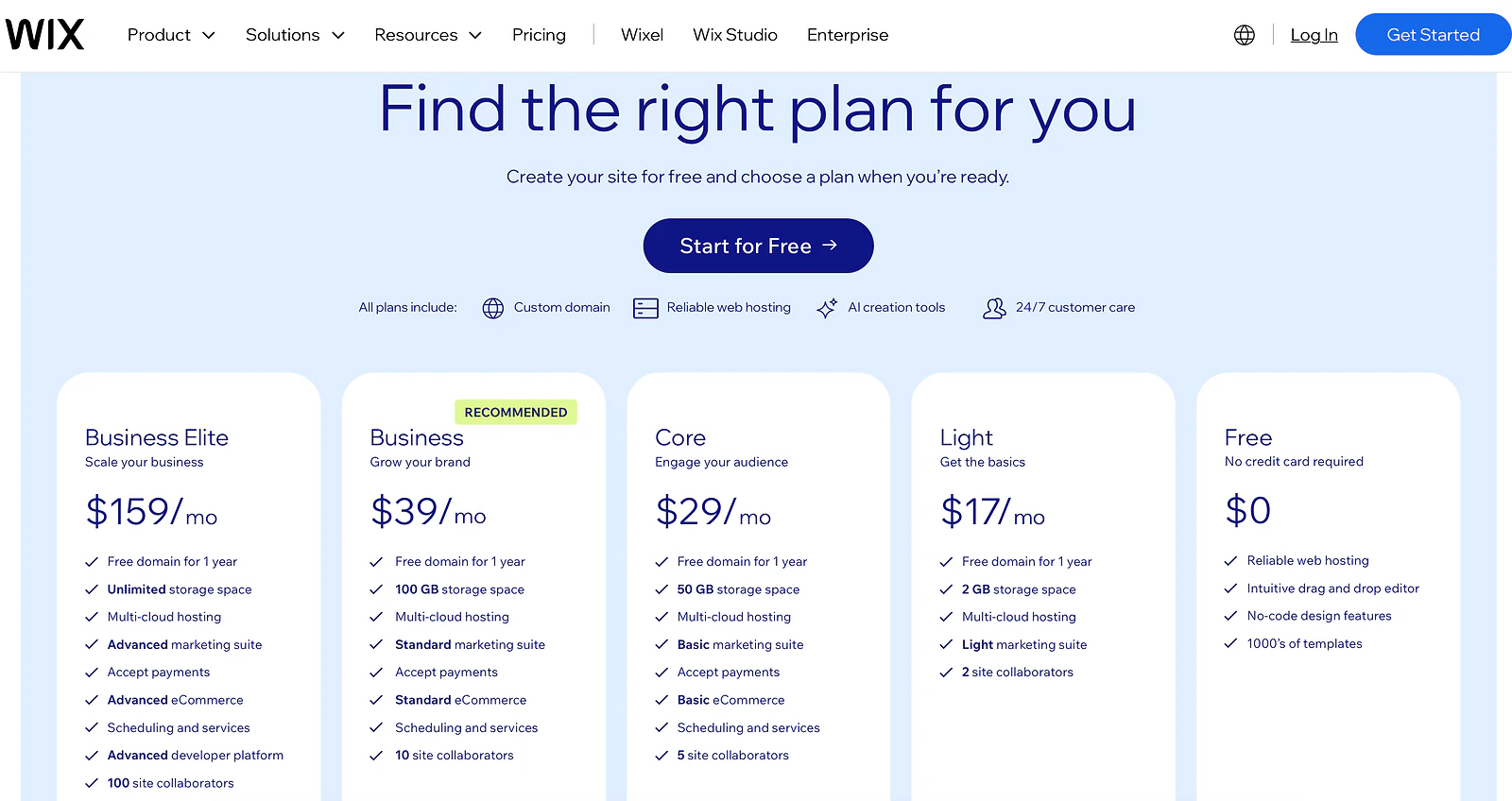
Wix pricing page in USD showing Free, Light at 17 dollars, Core at 29, Business at 39, and Business Elite at 159 per month billed annually
Which is faster, Wix or Squarespace?
Everyone quotes template counts in these comparisons. Almost nobody shows a real PageSpeed run, so I ran one on each, cold, on desktop and mobile.
I tested a genuinely typical small-business Wix site, not a showcase example, and a real, professionally-built Squarespace site. On desktop, Squarespace clearly wins: 89 against Wix's 69, a real gap and not a rounding error.
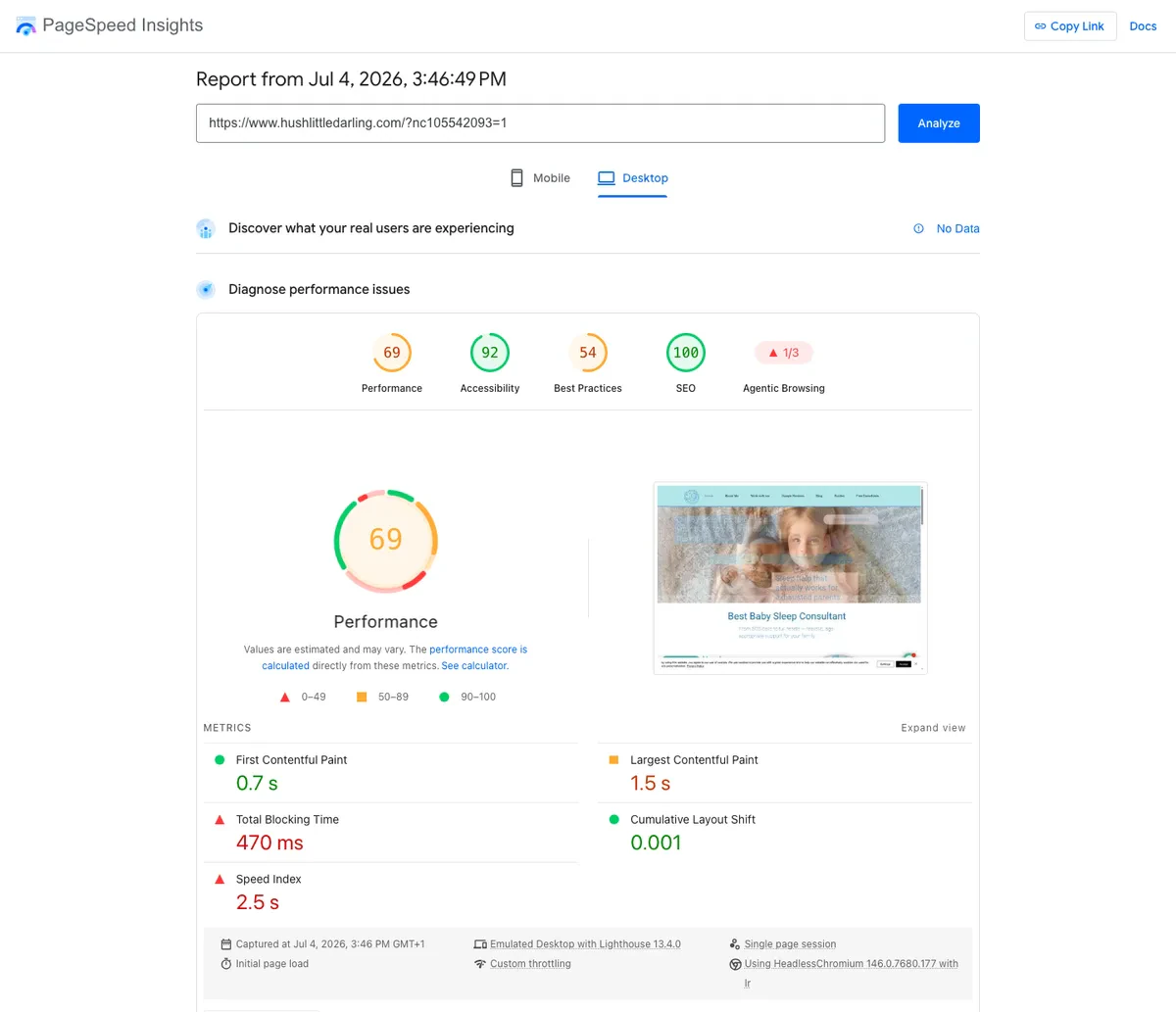
PageSpeed Insights desktop lab results for a typical Wix small business site: 69 performance, 0.7 second first contentful paint, 1.5 second largest contentful paint
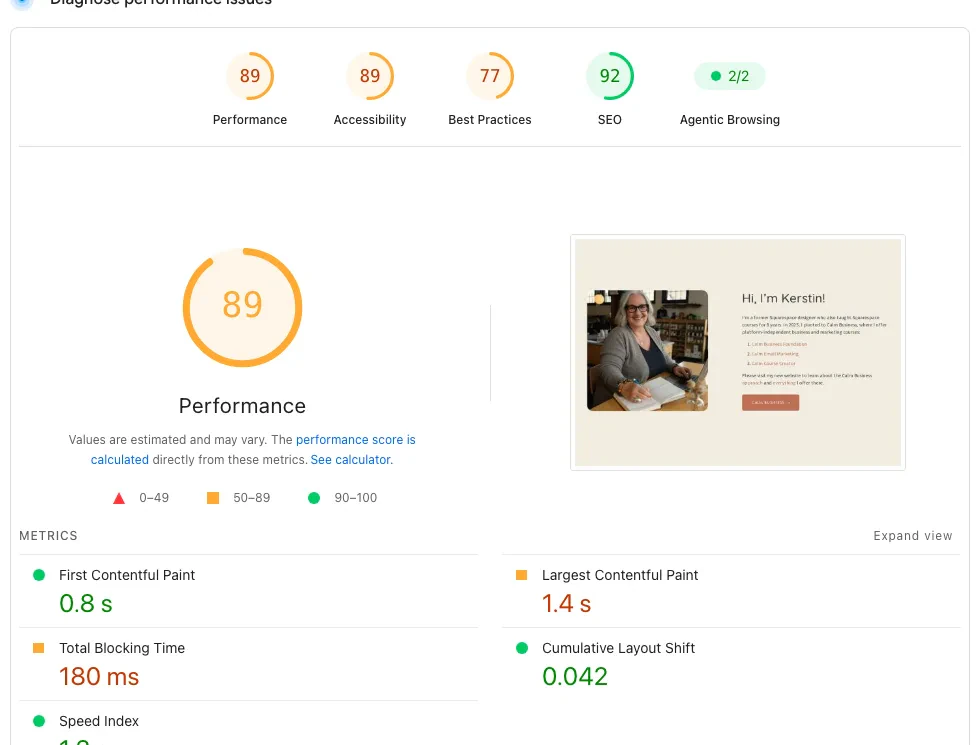
PageSpeed Insights desktop lab results for a professionally built Squarespace site: 89 performance, 0.8 second first contentful paint, 1.4 second largest contentful paint
Now mobile, the test that matters more, since most small-business traffic is a phone in someone's hand. The two nearly tie, Wix at 62 and Squarespace at 59, and both drop hard under mobile throttling. But look at how far each one falls from its own desktop score.
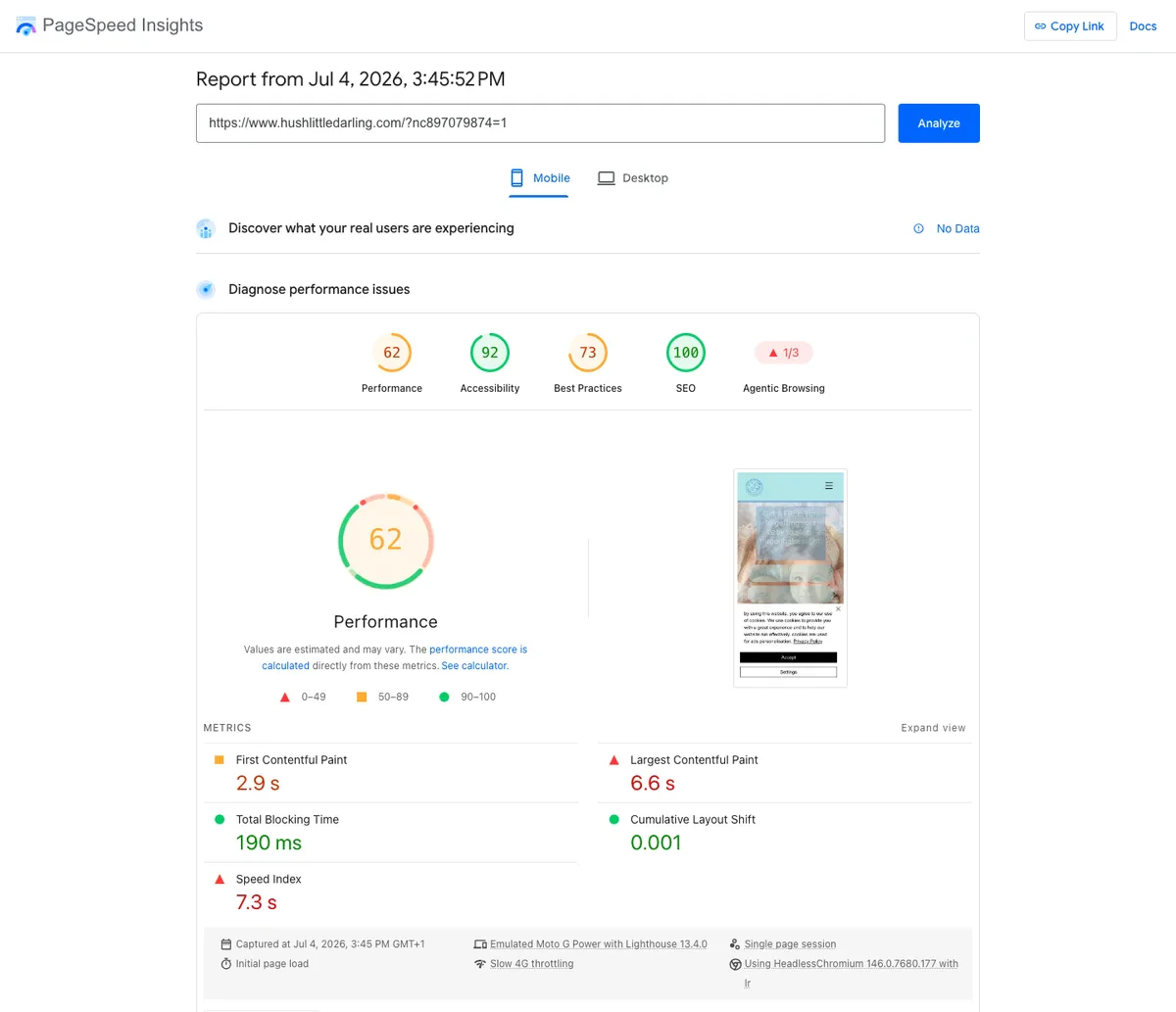
PageSpeed Insights mobile lab results for a typical Wix small business site: 62 performance, 2.9 second first contentful paint, 6.6 second largest contentful paint
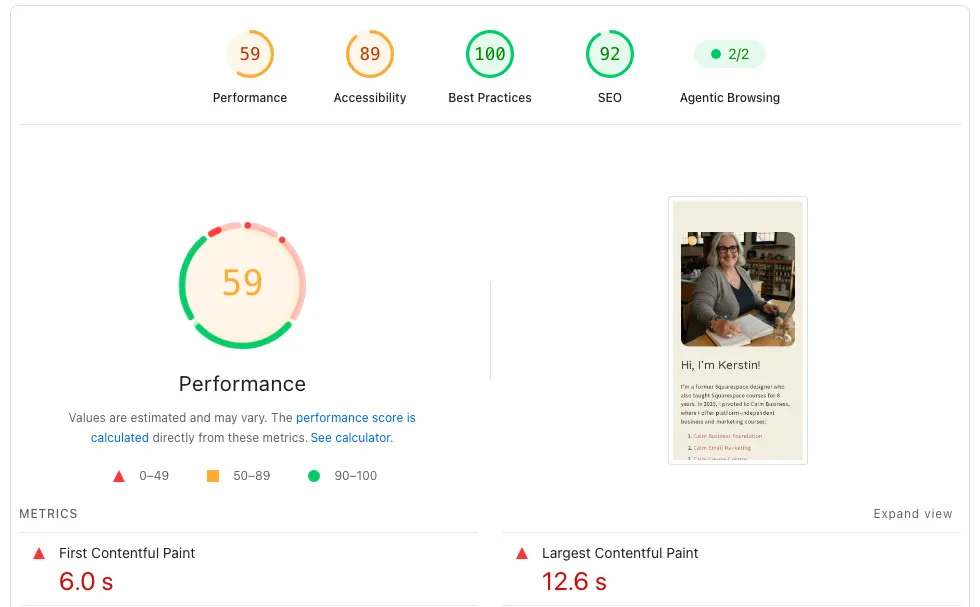
PageSpeed Insights mobile lab results for a professionally built Squarespace site: 59 performance, 6.0 second first contentful paint, 12.6 second largest contentful paint
Squarespace's desktop speed is real and it earns that 89 fairly, but a lot of it depends on conditions a phone on a slower connection doesn't get. Wix starts lower on desktop and holds up more evenly when the network gets worse. Neither platform claims a clean win here. Squarespace is faster when everything's ideal; Wix degrades less when it isn't. Since this is the Devani blog, one more row in the same test, then back to the two platforms you came here to compare. Devani, the separate CMS this site runs on, sits above both.
| Platform | Desktop | Mobile | Drop to mobile |
|---|---|---|---|
| Wix | 69 | 62 | 7 points |
| Squarespace | 89 | 59 | 30 points |
| Devani | 100 | 92 | 8 points |
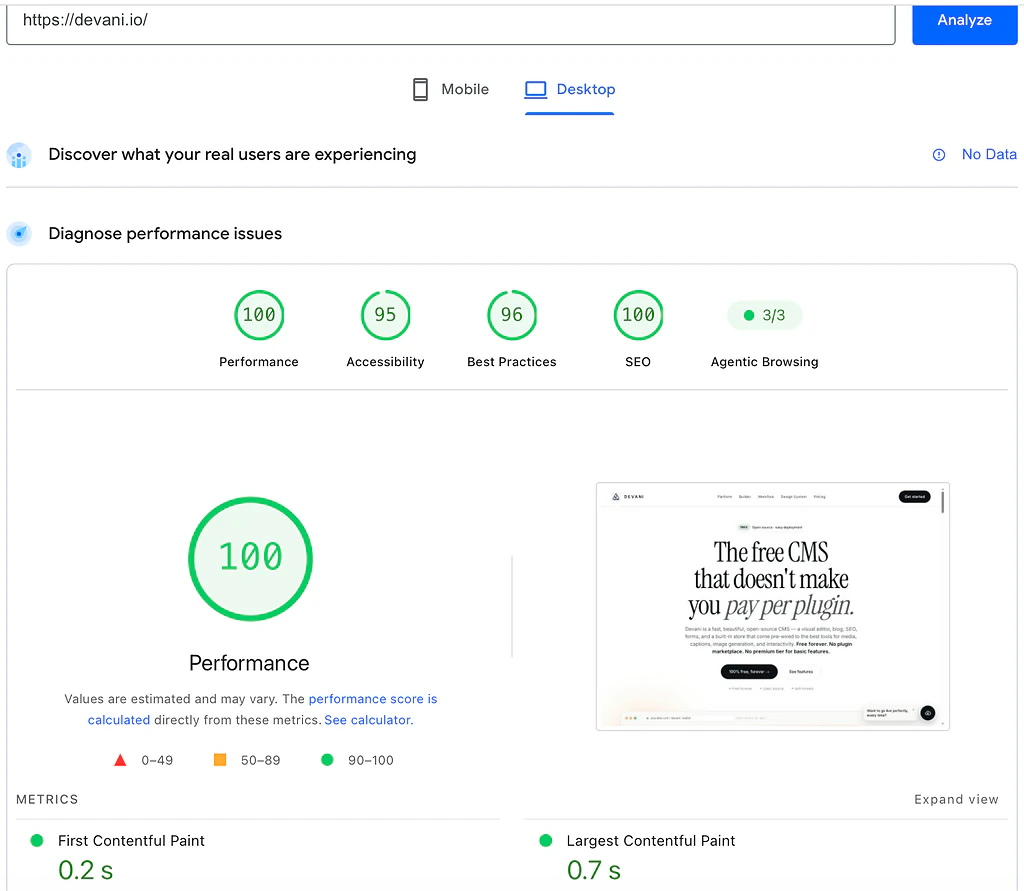
PageSpeed Insights desktop lab results for devani.io: 100 performance, 0.2 second first contentful paint, 0.7 second largest contentful paint
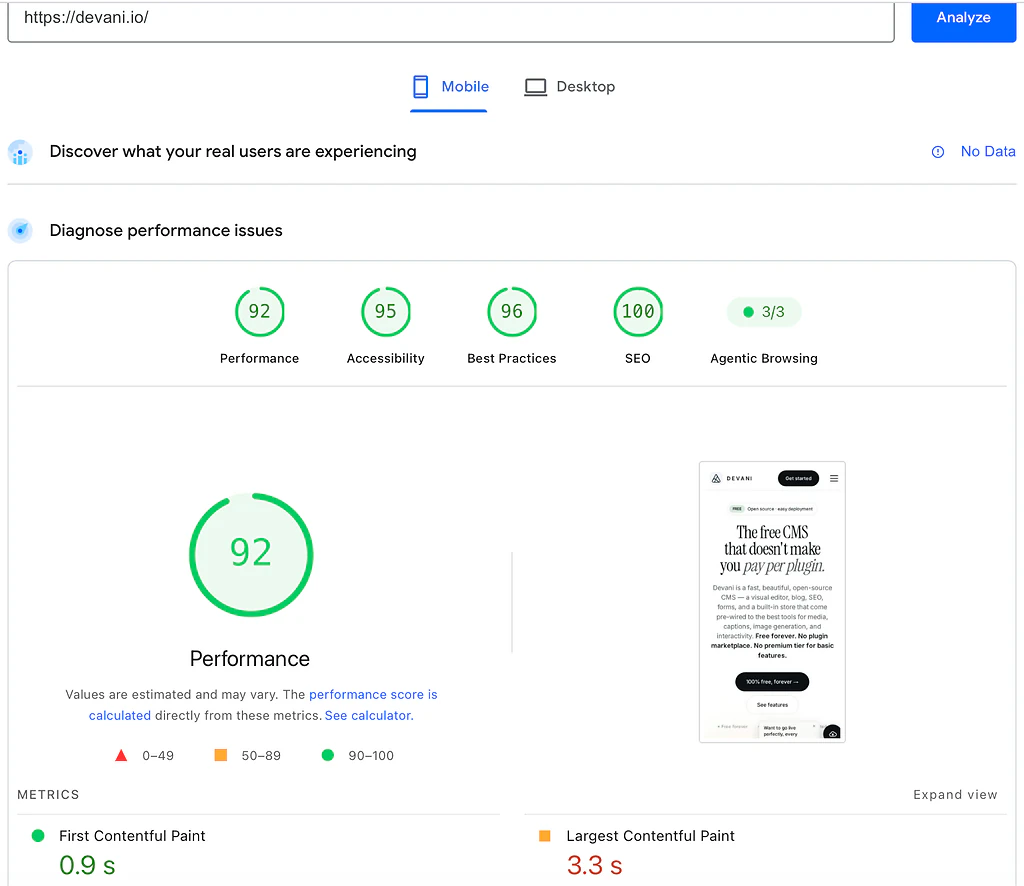
PageSpeed Insights mobile lab results for devani.io: 92 performance, 0.9 second first contentful paint, 3.3 second largest contentful paint
Devani scores 100 on desktop and 92 on mobile, ahead of both on both counts, and it drops only 8 points from desktop to mobile, close to Wix's small drop rather than Squarespace's steep one. That is the database-free design working as intended: the whole site is plain static files served from a CDN, so there is nothing to query on the way to the visitor. The Wix versus Squarespace question stands on its own regardless of where Devani lands: pick Squarespace if the ideal case matters most, pick Wix if consistency under bad conditions matters more, and don't let anyone sell you a single clean winner on speed between the two of them. If Devani is on your shortlist too, Devani vs Squarespace lays out that comparison directly.
The questions people ask right after speed.
Is Wix or Squarespace better for SEO?
Closer than either platform's fans usually admit. All three sites tested above, Wix, Squarespace, and Devani, scored 100 on PageSpeed's SEO audit, so nobody here is invisible to Google on the basics: crawlable markup, mobile-friendly tags, valid titles and descriptions. Both Wix and Squarespace ship built-in SEO tools on every paid plan, title tags, meta descriptions, basic schema, an automatic sitemap, nothing to install. Wix's SEO panel walks you through a checklist item by item, genuinely useful for someone who has never touched a meta description before. Squarespace's is more understated but covers the same ground. Devani's markup is clean by default the same way, with per-page meta, schema, and sitemap handling built in and no plugin required. On the scoreboard the three roughly tie; the difference is how much hand-holding you get through setup.
Which is better for ecommerce, Wix or Squarespace?
It depends on the stage you're at. Squarespace lets you start selling on its cheapest paid plan, Basic at $16 a month, where Wix requires the Core plan at $29 before ecommerce is available at all, a real difference in what it costs to find out if selling online works for you. Once you're actually running a store, Wix pulls ahead on feature depth: in-person point-of-sale hardware, multi-channel selling across marketplaces, no platform-level transaction fee on any tier. Squarespace's commerce tools are solid but built more for a single online storefront than an omnichannel operation with a physical register involved. Appointment-based businesses lean Wix too. Wix Bookings is native and deeply integrated, where Squarespace bundles Acuity Scheduling, which it acquired rather than built, and it still feels like a separate product bolted on next to your site.
How hard is it to move a site off Wix or Squarespace?
Harder than either platform's marketing suggests, true in both directions equally, which is unusual among the comparisons I've done. Neither Wix nor Squarespace offers a real export of the actual site, the layout, the block structure, the way WordPress exports a portable database. Moving from one to the other means rebuilding page by page in the new editor by hand. Text sometimes survives an import in recognizable form; layout and anything built with either app marketplace does not. I've run this migration in both directions for clients, and it's never the afternoon project people expect going in. Budget real days for it, more on a bigger site, and preserve your URLs carefully or years of search rankings go with the old one.
Both feel different, and are the same kind of system.
Wix's editor feels freer day to day, and Squarespace's feels more polished, but structurally they're the same thing.
A fixed set of sections, blocks, and template rules someone else built, and you arrange within it. That's why the template-switch problem hits both the same way, why moving between them means a rebuild rather than a migration, and why both app marketplaces exist: a release valve for whatever the core block system doesn't do on its own. The day you need something outside that fixed set, you're not extending the platform, you're working around it. And underneath the design differences, both are rented platforms, a monthly bill for as long as the site exists, with no version of stop paying and keep what you built. I build Devani, so factor that in, but the fact holds regardless: it answers both of those at once.
Free, and actually yours
Open-source software, no license fee at all, no paying per plugin. Self-host on ordinary hosting with a one-command installer, a cheap VPS runs around $5 a month, or use Devani's managed hosting free tier if running a server isn't for you.
Your own AI, in the builder
Instead of a fixed set of blocks, connect your own ChatGPT or Claude account and ask it to change the actual content and layout. It's native and MCP-based, working inside the builder rather than a chatbot bolted alongside it, and every change snapshots so you can roll it back.
Fast without the upkeep
The database-free build served the 100 and 92 above, ahead of both platforms on both counts. There's no plugin stack to keep patched either, so updates are opt-in on your own schedule instead of a forced treadmill.
What Devani doesn't have is either competitor's years of runway: a smaller template library than both, no app marketplace to fall back on for a niche feature like Wix Bookings, and a newer platform without a decade of freelancer familiarity behind it. If you need a specific booking flow or app integration that already exists as a polished, battle-tested product on Wix or Squarespace, that's a real reason to stay put, and I'd say so directly if you asked.
If you're deciding between Wix and Squarespace, everything above should get you most of the way there on its own: Wix for faster onboarding, a freer editor, stronger booking and ecommerce tools; Squarespace for design polish, blogging, and a cleaner day-to-day. If what's actually bothering you is paying forever for a fixed set of pieces you don't own, that's the specific question Devani was built to answer.
The fastest way to judge it honestly.
Watch it make an actual edit on a real site rather than take my word for any of this.