

Wix, honestly, past the sales pitch.
Wix is the right call if you don't write code, you want a wizard to hand you a populated first draft instead of a blank canvas, and you want a real person to call when something breaks. It's the wrong call if you think you'll want to swap the whole look two years from now, or if you keep bolting on one more app until the site crawls, because the choices you make in the first afternoon are mostly permanent. Everywhere that permanence bites, Devani, the free open-source CMS this blog runs on, is the foil worth knowing about, and I'll get to exactly where.
Wix is not a newcomer. It's one of the largest website builders on the planet, and it earned that by being the easiest on-ramp for someone with no technical background to get a real, working site online in an afternoon. That's still true in 2026. What's changed is how much company it has, and how much the platform now leans on AI to get you there even faster.
There are two real ways in. The first is Wix's AI-driven setup: a short questionnaire about your business, your goals, and your style preferences that generates a working first draft in a few minutes. For someone who has never built a site before, it removes the blank-page problem entirely. The second is the freeform editor underneath it, where you drop elements anywhere on the page rather than snapping into a fixed grid. That freedom is the whole personality of the platform, for better and for worse.
Same-afternoon launch
Answer the AI wizard's questions or start from a template and a real site can be live the same day. For a business that needs something up now, not in three weeks once a developer gets to it, that wizard-to-draft flow matters more than almost any other feature here.
24/7 phone support
I've tested it directly more than once on a client's behalf. Wix offers round-the-clock customer support, including for people on the free plan, which is not universal in this category. When something breaks at 11pm on a Sunday and the owner doesn't know anyone who can fix it, an actual line to call is worth more than another template.
Wix Bookings
Genuinely one of the better built-in scheduling systems I've used on any platform, hosted or self-hosted. Staff-level calendars, automated reminders, class packages, and payment collection all live inside the same editor. I've set it up for service businesses in under an hour where the WordPress equivalent meant testing four plugins and hoping none conflicted.
Roughly 900 templates
Sorted by industry and genuinely well designed as a starting point. Between the templates and the freeform editor, most first-time builders can get to something that looks intentional without touching a line of markup.
App Market add-ons
Wix's own marketplace covers hundreds of apps, live chat, advanced forms, inventory add-ons, and more. It's a closed ecosystem rather than an open one: if an app isn't in the marketplace, there's no equivalent of installing a third-party plugin to bridge the gap.
No transaction cut
There's no per-transaction fee on ecommerce sales, a real advantage over some competitors here. What a store makes on a sale is what it keeps, minus standard payment processing.
Speed used to be the standing knock against Wix, so I tested a real, live Wix site carrying a full design, cold and cache-busted, the way a first-time visitor actually hits it.
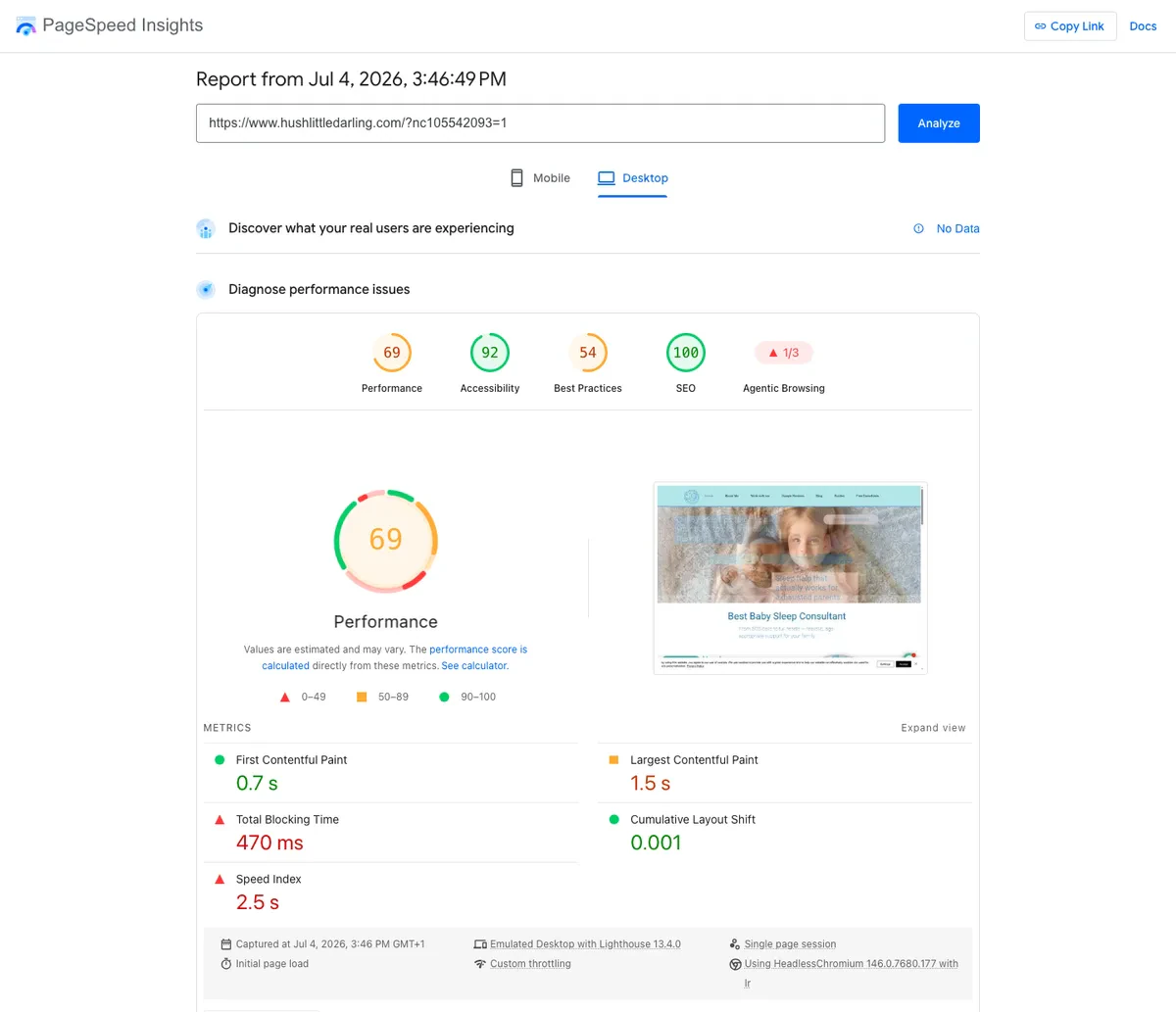
PageSpeed Insights desktop lab results for a real Wix site tested cold: 69 performance, 100 SEO, 0.7 second first contentful paint, 1.5 second largest contentful paint
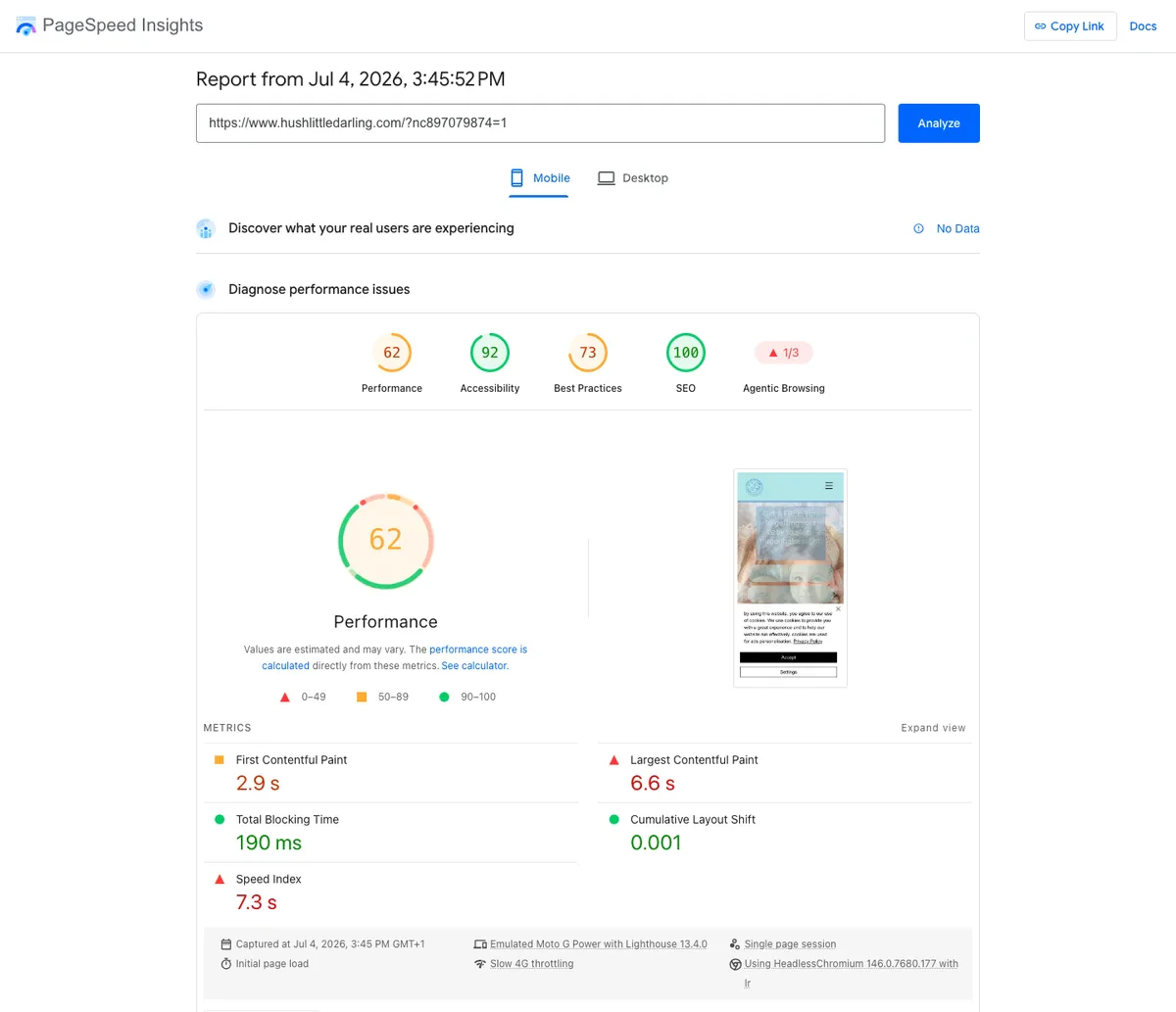
PageSpeed Insights mobile lab results for the same Wix site: 62 performance, 100 SEO, 2.9 second first contentful paint, 6.6 second largest contentful paint
Sixty-nine on desktop, 62 on mobile. That's a respectable result for a hosted, all-in-one builder carrying a real design, and it holds up better than a lot of people expect walking in with a "Wix is slow" assumption from a few years back. The number is fair. What drags it down over time is a separate story, and that's the first of the real weaknesses.
The limits that only bite after you've committed.
None of these are dealbreakers on their own. They're the things that surprise people the day they actually run into them, so they're worth knowing before the first afternoon of setup rather than after.
Template lock-in is the single biggest one, and it surprises more people than any other limitation in this review. Once a Wix site is published on a template, there's no setting that swaps it for a different one and keeps your content. Wix confirms this in its own support documentation. Wanting a different look in two years means starting a new site and rebuilding it, not flipping a switch.
The freeform editor cuts both ways depending on who's holding it. Because you can place any element anywhere, there's nothing structurally stopping a beginner from producing a page that looks cluttered, misaligned, or inconsistent from section to section. A grid-based competitor prevents that kind of mess by design. Wix trusts you not to make it, and watching first-time users build their own sites, plenty of them do, without realizing until someone points it out.
App-bloat is the quiet one, and it's the reason "Wix is slow" became a stereotype in the first place. The App Market makes it easy to add a chat widget here, a reviews plugin there, an announcement bar, each one small on its own, each one adding its own script to every page load. I've seen client Wix sites that started fast and degraded steadily over a year of well-meaning additions, with nobody connecting the dots until the site felt noticeably sluggish.
The template you pick and the day you try to leave are the same problem, seen from two ends of the timeline.
The free plan is genuinely usable to try the editor, but it comes with Wix branding, a wixsite.com subdomain instead of your own domain, and no ecommerce at all. It's a real trial tier, not a real free plan for an actual business, and treating it as one is a common mistake I've had to walk people back from. Monthly cost also climbs faster than the entry price suggests, especially once a business needs the ecommerce-capable tiers or Business Elite's higher storage ceiling.
And getting a site off Wix later is worth naming plainly, because it's the kind of thing that only matters the day you actually need it. Wix doesn't offer a clean, one-click export of a site's design and layout the way some self-hosted platforms allow. You can export a store's product catalog and customer data reasonably well, and blog content is portable in a basic sense, but the visual build itself, the actual page layouts inside the editor, stays inside Wix. Moving platforms down the road generally means rebuilding the design from scratch on the new system.
Template lock-in and the rebuild-from-scratch exit are really the same problem viewed from two points in the timeline. That's the exact tension where a different architecture answers the question, so here's the honest side-by-side.
Wix
Easiest on-ramp, closed by design.
- ✓ Wizard-to-draft setup and 24/7 phone support
- ✓ Wix Bookings depth no self-hosted plugin matches easily
- × Template is close to permanent once published
- × No clean export of the layout; leaving means rebuilding
Devani
The lock-in problem removed at the root.
- ✓ No closed template set to get locked into in the first place
- ✓ Content lives as plain files you can export as HTML, Markdown, or JSON any time
- ✓ Connect your own ChatGPT or Claude account natively, inside the builder, to change content and layout
- × Younger platform, smaller ecosystem, nothing that matches Wix Bookings' scheduling depth today
Instead of picking a template or reaching for an App Market add-on, Devani lets you connect your own ChatGPT or Claude account, natively, with nothing separate to install, and ask it to change the site's actual content and layout. The assistant works inside the builder rather than alongside it, which is where it differs from the bolt-on AI now available in WordPress's block editor. It runs on ordinary hosting for about $5 a month through a one-command installer, or on Devani's own managed hosting if a server isn't something you want to run yourself. On raw time-to-live, the managed free tier has a subdomain up in under a minute, quicker than any builder wizard. What Devani doesn't have is Wix's maturity: no App Market of hundreds of ready-made add-ons, and nothing that matches Wix Bookings' depth. If a service business leans hard on scheduling and needs that today, Wix is the better fit, plainly.
Is Wix good for SEO?
For the large majority of small businesses, yes, and the basics are handled without hunting down a third-party plugin. Wix's built-in SEO tools include an assistant that walks you through the fundamentals, page titles, meta descriptions, alt text, structured data for common page types, and it flags obvious gaps before you publish. Both PageSpeed reports above scored a full 100 on the SEO audit, which tracks with what I've seen across real Wix builds: clean, crawlable markup out of the box.
The ceiling shows up where it does on most hosted builders. Fine-grained control over advanced schema, custom robots directives, or unusual technical needs is more limited than what an open platform with dedicated SEO tooling gives you. For a business competing on ordinary local or service-based search terms, that ceiling never gets hit. For a site competing hard in a technical or heavily contested niche, it's worth knowing the limitation exists rather than assuming Wix handles everything a specialist plugin would.
Wix pricing, tier by tier
Wix runs four paid plans, all billed annually. The jump worth budgeting around is Light to Core, not the eye-catching $17 headline. If a business plans to sell anything at all, Core is the realistic starting price, not Light.
| Plan | Monthly (annual billing) | Best for |
|---|---|---|
| Free | $0 | Kicking the tires only: ads, wixsite.com subdomain, no ecommerce |
| Light | $17 | A simple informational site; removes ads and the subdomain |
| Core | $29 | Where most small businesses land; adds real ecommerce |
| Business | $39 | More advanced store features and automations |
| Business Elite | $159 | Larger catalogs, higher volume, the only tier with unlimited storage |
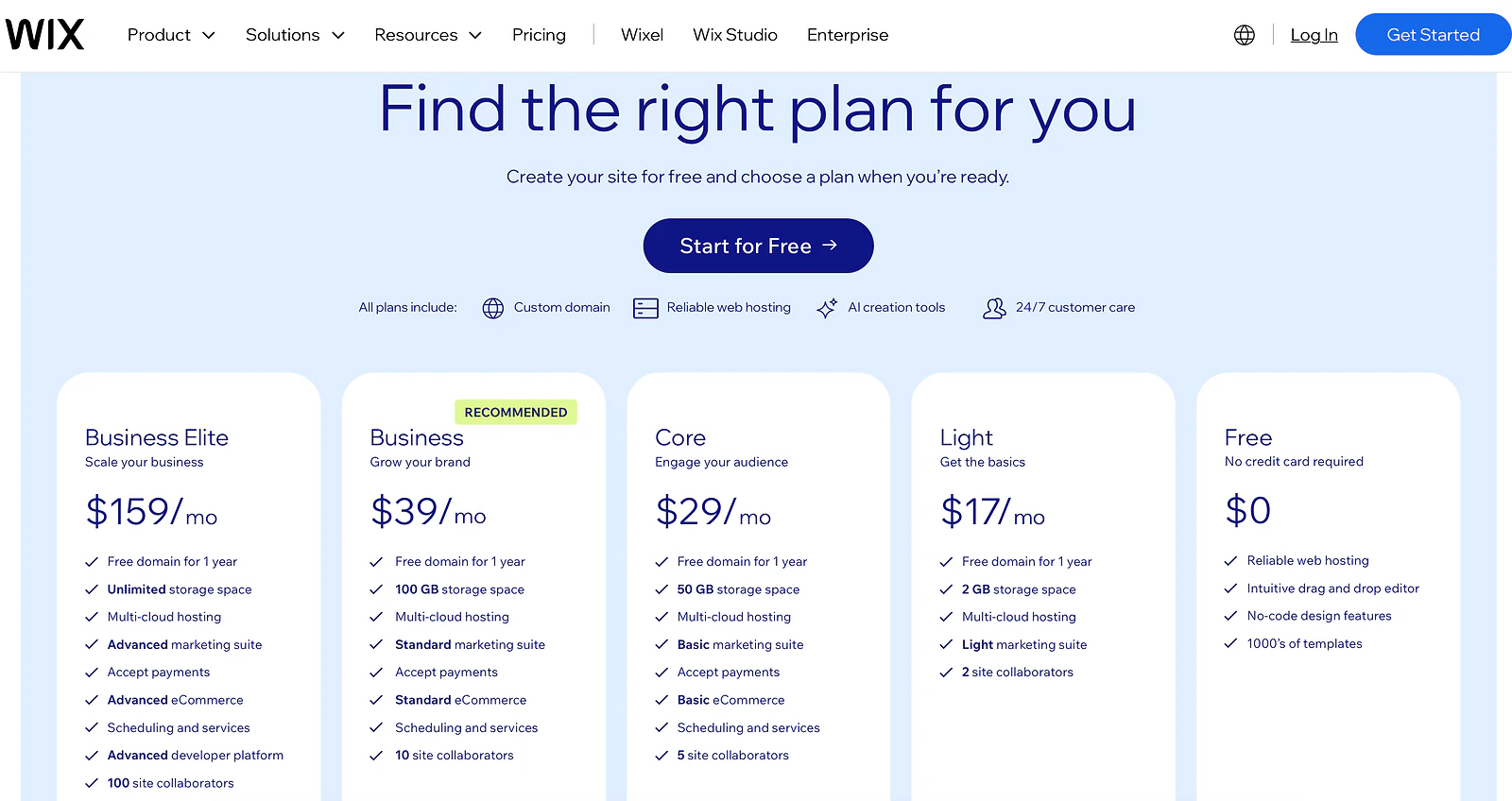
Wix's pricing page in USD, showing Free, Light at 17 dollars, Core at 29, Business at 39, and Business Elite at 159 per month billed annually
Can you move a site off Wix later?
Not cleanly. You can export a store's product catalog and customer data, and blog content is portable in a basic sense, but the visual layout stays inside Wix. Moving platforms generally means rebuilding the design from scratch. Worth knowing before you invest heavily in a highly customized layout, not after you've decided to leave.
Is the Wix free plan good enough for a real business?
It's a trial tier, not a free business plan. It carries Wix branding, a wixsite.com subdomain instead of your own domain, and no ecommerce. Genuinely useful for learning the editor, not for running an actual storefront.
Does Wix charge transaction fees on sales?
No per-transaction cut of its own. What a store makes on a sale is what it keeps, minus standard payment processing. That's a real edge over some competitors in the category.
Who is Wix actually right for?
A small business or solo operator who wants a real site live fast, doesn't have a developer on staff, and values a support line more than infinite design freedom. Service businesses that need scheduling and people building their first-ever site get real, immediate value. It's the wrong fit for anyone who expects to redesign significantly without starting over, or who wants an open ecosystem rather than a closed marketplace. For that tradeoff against a more open platform, WordPress vs Wix covers the decision directly.
Since app-bloat dragging a fast site down over time was named above as a real risk, here's the same lab test run on devani.io itself, the CMS this blog runs on, a separate platform from Wix entirely.
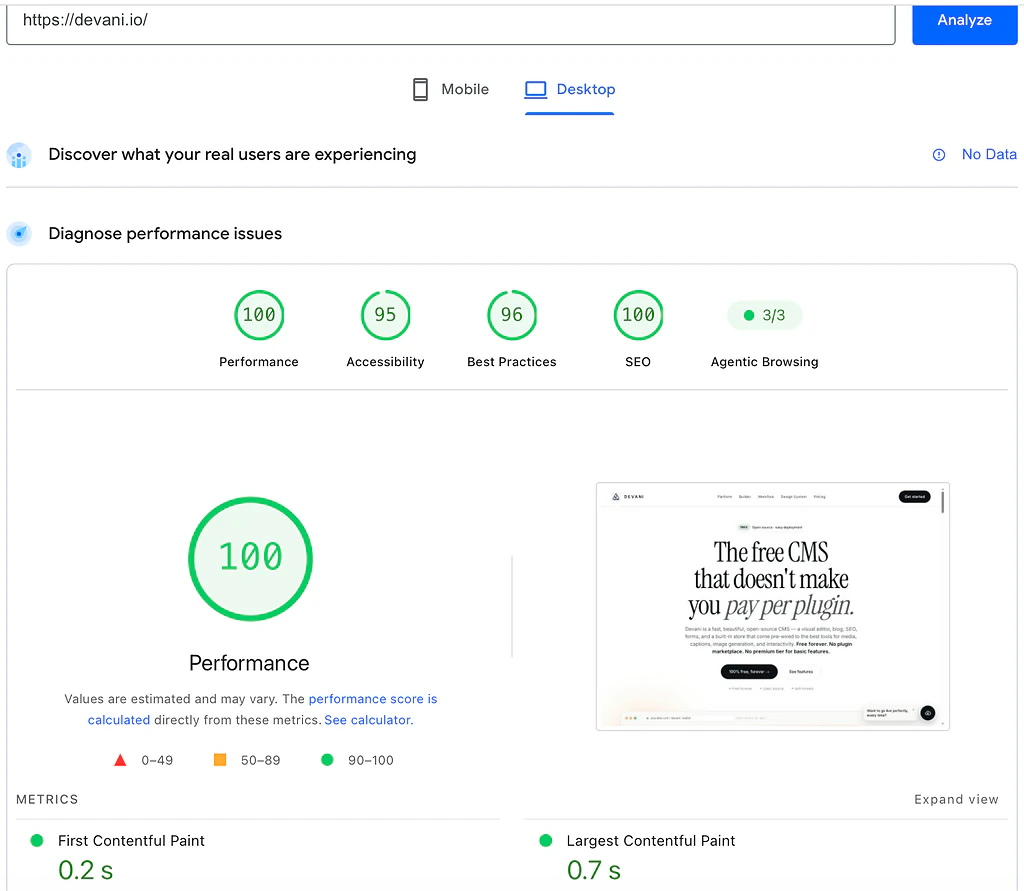
PageSpeed Insights desktop lab results for devani.io: 100 performance, 0.2 second first contentful paint, 0.7 second largest contentful paint
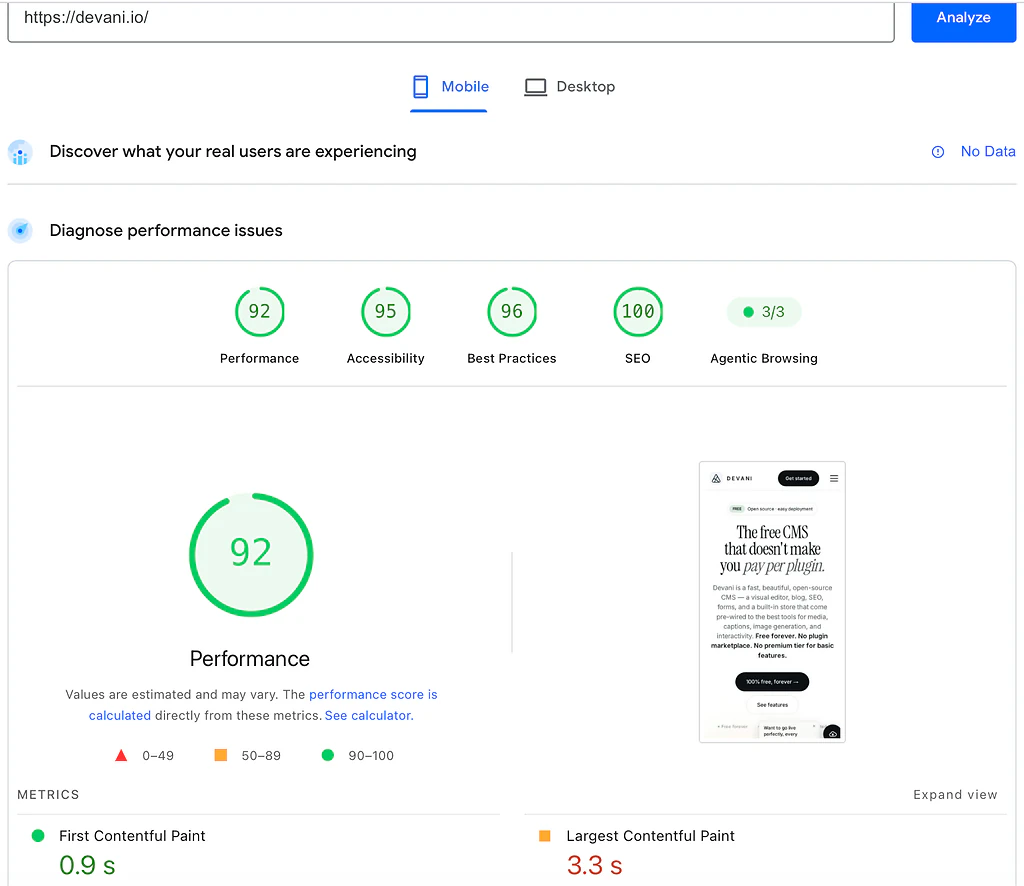
PageSpeed Insights mobile lab results for devani.io: 92 performance, 0.9 second first contentful paint, 3.3 second largest contentful paint
Wix's 69 and 62 are a genuinely fair result for a hosted builder. Devani's numbers are simply what a database-free platform, plain files served statically from a CDN with nothing to query, starts at by default. It's one more way the portability story above holds up rather than a separate point to win on its own.
Wix's tradeoffs are the ones you'll live with for a year.
Worth sitting with honestly before signing up for annual billing. A direct side-by-side lives at Devani vs Wix, and the fuller field of options is at Wix alternatives.