
Live this week, or able to do anything you want later.
A bakery owner sits with two tabs open at eleven at night: Wix's signup page in one, a how-to guide for installing WordPress in the other. She needs a working site by the weekend. Wix would have her live by tomorrow afternoon and keep it patched for as long as she pays the bill. WordPress would hand her an empty lot and a full toolbox, where nothing is built until she builds it and nothing is off limits either. Which tab she closes depends on whether she values being live this week or being able to do anything she wants later, and there is now a third shape in that choice: Devani, the free open-source CMS this site runs on, built to close the exact gap the other two force.
The honest version of that choice has more going on underneath than either signup page admits.
I have built and kept sites alive on both of these platforms, and run migrations in both directions, so what follows leans on how they actually behave over time rather than on a single build. None of that makes me neutral, but it does mean the failures I point to are patterns I have watched repeat, not one unlucky project.
WordPress
Maximum flexibility, maximum upkeep.
- ✓ Over 60,000 free plugins for almost any niche need
- ✓ Your files and database: move it, export it, self-host it forever
- ✓ Change themes without a rebuild: content stays, only the look changes
- × Hosting, security patching, and updates are your job
- × Speed depends entirely on theme, plugin load, and host
Wix
Live this week, hosted for you.
- ✓ AI-assisted builder puts a presentable site up the same day
- ✓ Hosting, SSL, backups, and patching handled permanently
- ✓ Close to a thousand professionally designed templates
- × Cannot swap templates without starting a new site from scratch
- × No full export: leaving means rebuilding by hand, not migrating
Devani
Owned like WordPress, hands-off like Wix.
- ✓ Free, open-source, self-hosted: your files, export any time
- ✓ Database-free static pages, near 100/100 Lighthouse by default
- ✓ Built with AI in 10 to 15 minutes, live in under a minute on the free tier
- × Younger, smaller ecosystem: no plugin marketplace, fewer templates than Wix
Why everyone recommends Wix to beginners.
Because for a huge share of small businesses the recommendation is correct, and it is worth saying so before picking anything apart. Wix's AI-assisted builder (the successor to what used to be a separate tool called ADI) asks you a handful of questions about your business and generates a working draft in a few minutes, already populated with your business name, a plausible layout, and stock imagery you can swap out. You land in the regular Wix Editor from there, drag sections around, and you have a live, presentable site the same day, often before lunch. Hosting, SSL, backups, and security patching are Wix's problem, not yours, permanently, not just for a launch period.
The template library is genuinely deep, close to a thousand free designs across every business category you would expect, built by people who do this for a living, so the typography and spacing look considered before you touch anything. Support is a real 24/7 operation: live chat, callback, a help center that answers the question you typed instead of routing you to a forum. For a solo owner who wants a guided setup, a polished template, and a real support line to call when something breaks, Wix delivers that combination as well as anyone. I have recommended exactly that setup to clients myself, more than once, and meant it. Our full Wix review goes deeper on where that setup holds up and where it does not.
What WordPress does that nothing has matched.
Two WordPress edges survive every comparison, and neither is close. If either one is load-bearing for your project, that decides it. Our full WordPress review covers the ecosystem in more depth.
The plugin ecosystem
Over 60,000 free plugins in the official directory alone, before you count premium ones, covering functionality with no Wix equivalent: tiered membership gating, multi-location store locators, drip-fed course platforms, obscure booking logic. Wix's own app market, a few hundred curated apps, covers the common cases well and then thins out fast, with no open marketplace behind it as a fallback. The case that genuinely decides for WordPress is narrow: one specific, load-bearing plugin your business already runs on.
Real ownership
A self-hosted WordPress site is your files and your database, full stop. You can move it to different hosting, hand it to a different developer, or self-host it indefinitely without asking anyone's permission. A Wix site lives entirely inside Wix's system: there is no server to point elsewhere, no file export that reconstructs the working site, because there is not a server that is yours to begin with. That is a fine trade right up until you want to leave.
Where Devani lands between them
Devani has no plugin marketplace either, by design, so it will not cover WordPress's most obscure niche integrations. But it keeps WordPress's ownership without WordPress's upkeep: it is open-source and exports HTML, Markdown, or JSON any time, your content stays genuinely yours, and there is no plugin stack to keep patched in the first place.
Can you switch a Wix template after you publish?
No, and this trips up more people than any other Wix limitation I hear about. Once a site is built on a template, Wix does not let you swap it for a different one and keep your content in the new layout. Your only path is to start an entirely new site, pick the new template, and manually rebuild or re-import pages, media, and content into it. Wix's own support documentation confirms this directly. Apps do not carry over either; anything you installed from the app market has to be reinstalled from scratch, and a template swap can quietly cost you SEO ground in the process.
On WordPress, changing themes is a setting, not a rebuild. Your posts, pages, and media stay exactly where they are; only the presentation layer changes, and a bad theme swap is an afternoon of CSS fixes rather than a from-scratch rebuild. If that limitation is a dealbreaker, our Wix alternatives roundup covers what else is worth considering.
Outgrowing your first template choice on Wix means starting a new site, not restyling the one you have.
What Wix actually costs, compared to WordPress.
Wix currently runs four paid tiers, all billed annually at these monthly rates: Light at $17/month (no ecommerce, 2GB storage, ads removed from the free tier), Core at $29/month (the one most small businesses actually land on: full ecommerce, 50GB storage, five collaborator seats), Business at $39/month (100GB, automated sales tax handling, advanced shipping rules), and Business Elite at $159/month (unlimited storage, priority support). Paying monthly instead of annually adds a real premium on every tier. There is also a genuinely free plan, but it displays Wix's own ads, runs on a wixsite.com subdomain instead of your own domain, and cannot process a sale of any kind, so it is a trial more than a real option for a business.
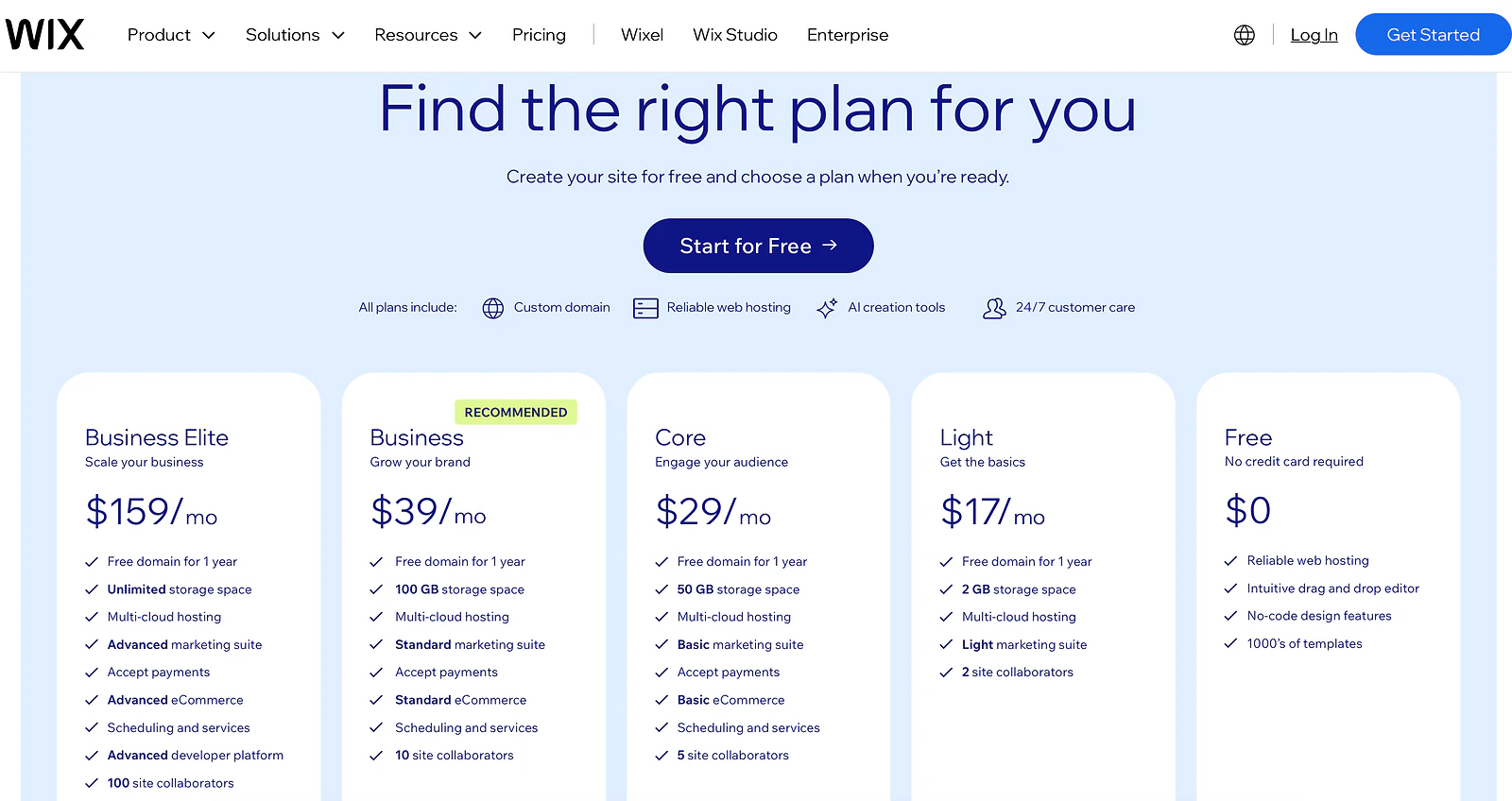
Wix's pricing page in USD, showing Free, Light at 17 dollars, Core at 29, Business at 39, and Business Elite at 159 per month billed annually
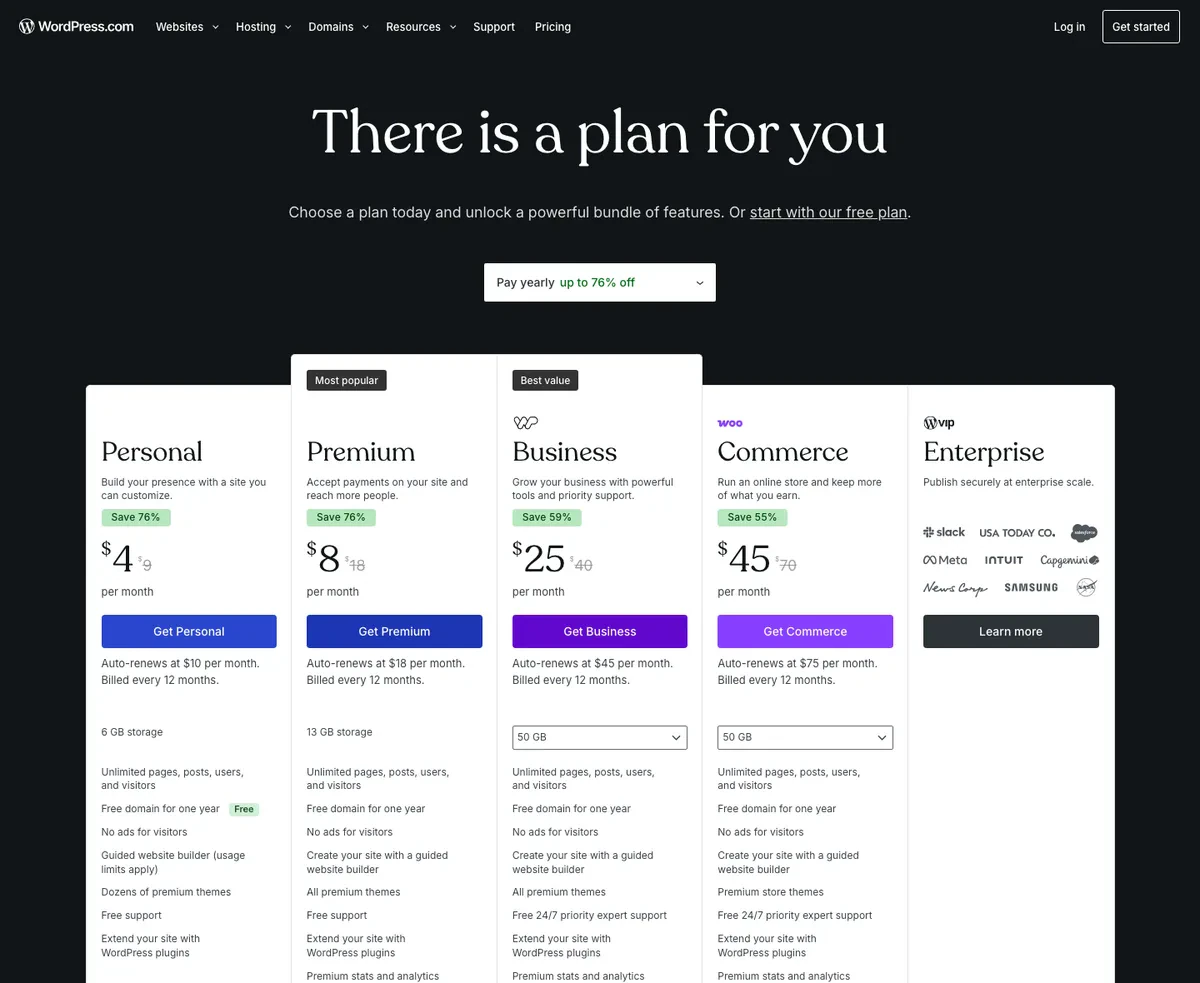
WordPress.com's pricing page in USD, showing the promotional annual rate next to the auto-renewal rate for each plan
WordPress's pricing is a genuinely different shape, and it is worth untangling rather than comparing sticker to sticker. The software itself, from WordPress.org, is free. What you pay for is hosting, a domain, and usually a theme or a handful of plugins, and that total varies enormously depending on the host and how plugin-heavy the build gets. If you would rather have Automattic handle the hosting the way Wix does, WordPress.com's own managed plans run Personal at $4/month (renewing at $10), Premium at $8/month (renewing at $18), Business at $25/month (renewing at $45), and Commerce at $45/month (renewing at $75), and that renewal jump is the number people budget around and get surprised by a year later. Self-hosted WordPress, done properly with decent hosting and a couple of paid plugins, tends to land in a similar monthly range to Wix's middle tiers once you total everything up. It is rarely the dramatically cheaper option people expect going in; it is just billed in more pieces. For reference, Devani sits outside this table entirely: the CMS is free and open-source, and a cheap VPS at about $5/month, or the managed free tier, is the whole hosting bill.
Which one is actually faster, WordPress or Wix?
Everyone quotes template and plugin counts in these comparisons. Fewer people show a real PageSpeed run, so I ran an actual PageSpeed Insights test on both, cold, on desktop and mobile. These are cold first-load numbers, the hit a real first-time visitor gets.
I picked a genuinely ordinary small-business Wix site for this rather than one of Wix's own showcase examples: a solo-operator baby sleep consultant's site, built on a standard template, doing exactly what most small Wix sites do. Here is its cold, first-load desktop result next to a real, typical WordPress site running its usual theme-and-plugins stack.
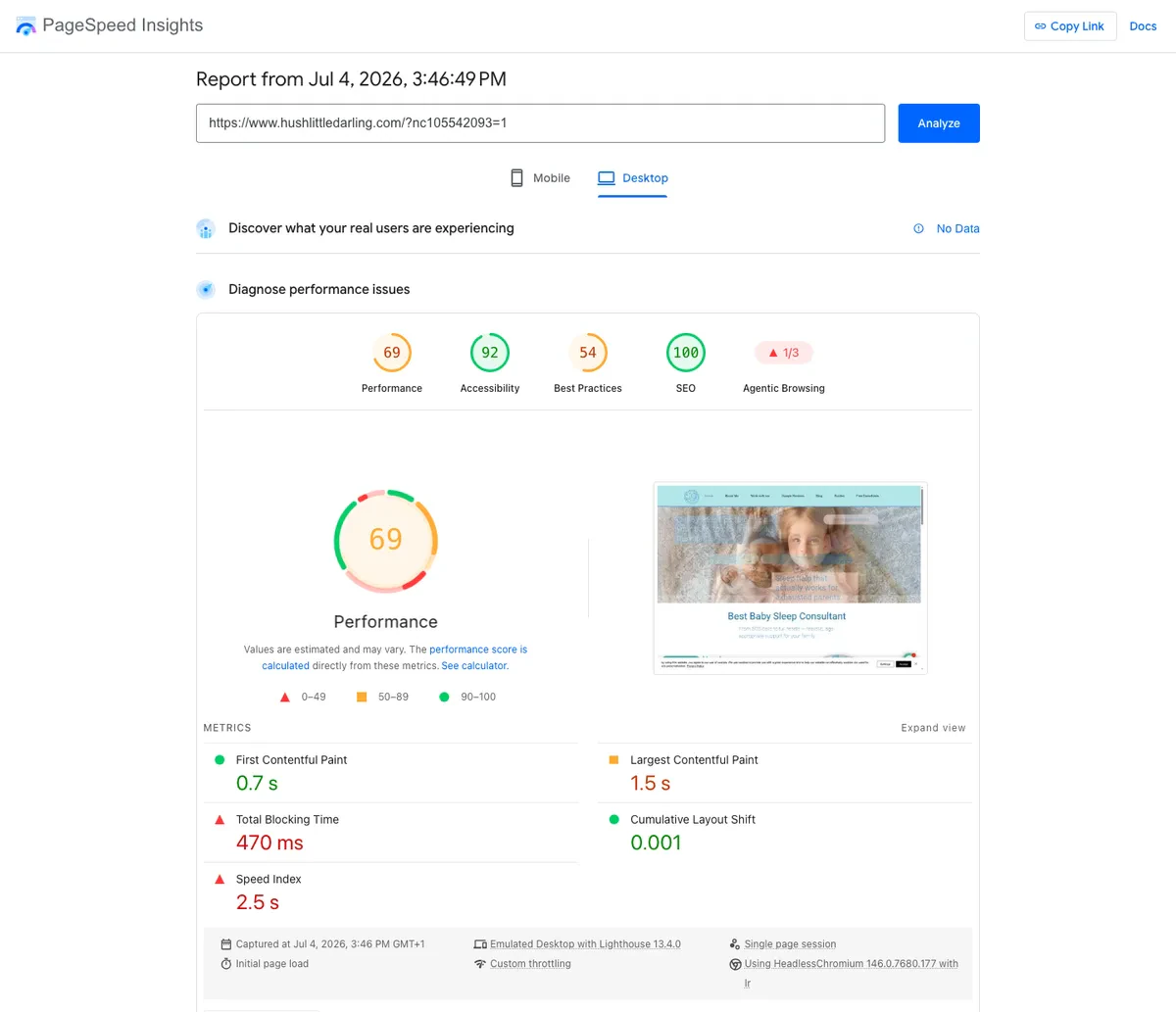
PageSpeed Insights desktop lab results for a typical Wix small business site: 69 performance, 0.7s first contentful paint, 1.5s largest contentful paint
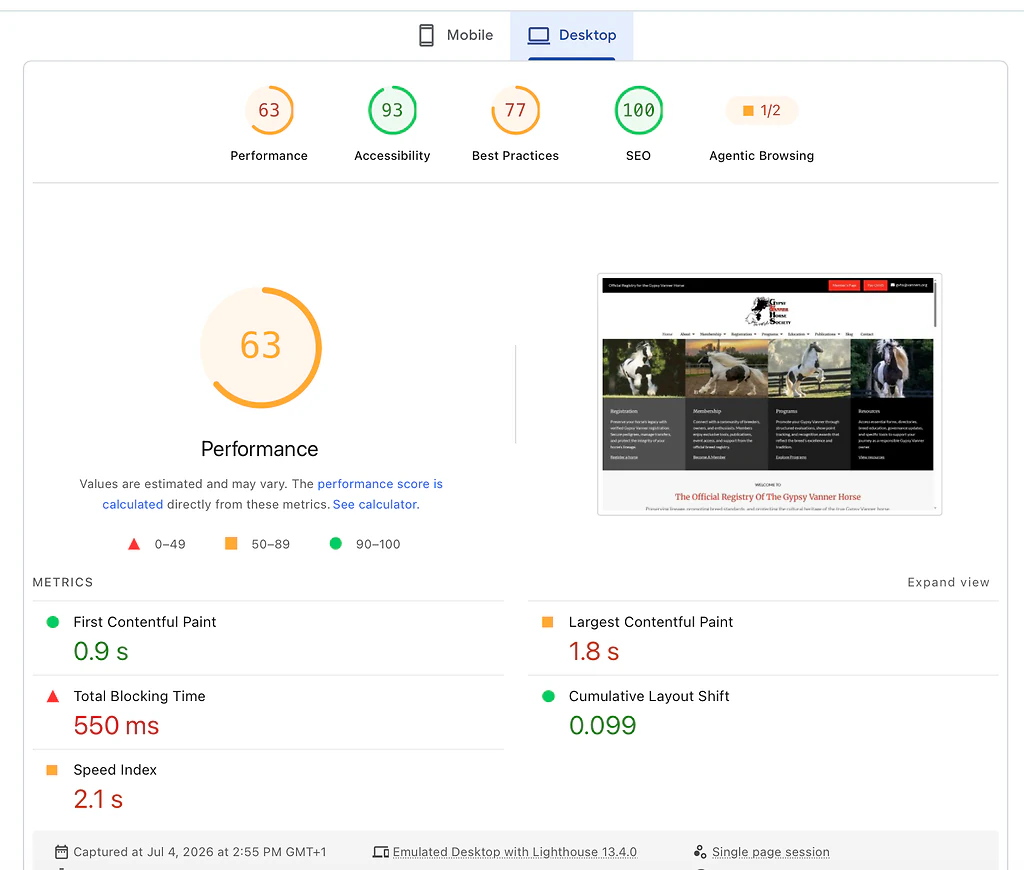
PageSpeed Insights desktop lab results for a typical WordPress site: 63 performance, 0.9s first contentful paint, 1.8s largest contentful paint
On desktop, the Wix site scored 69 and the WordPress site scored 63. Close enough that I would not call it a real win either way. Now mobile, the test that matters more, since most small-business traffic is a phone in someone's hand.
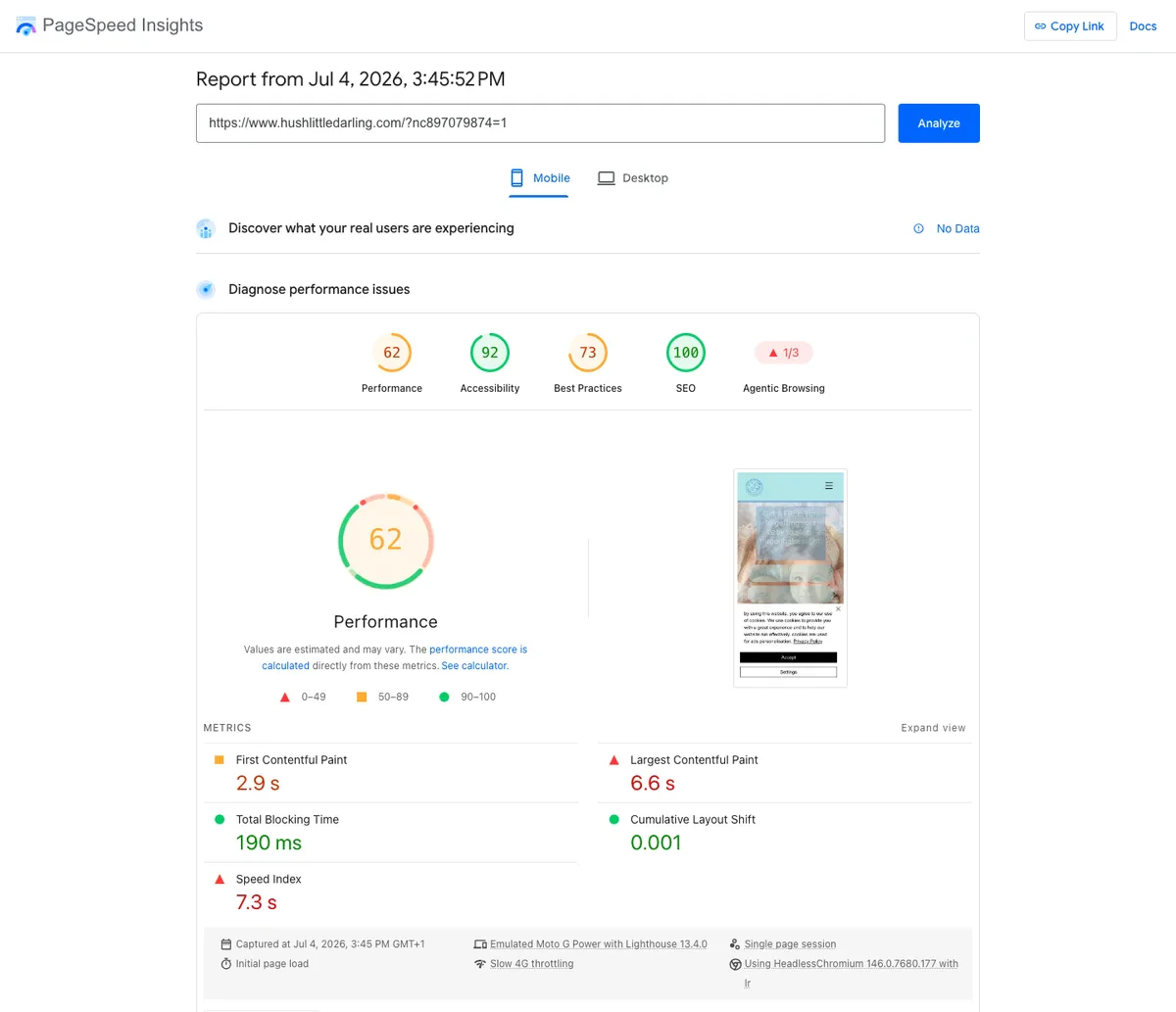
PageSpeed Insights mobile lab results for a typical Wix small business site: 62 performance, 2.9s first contentful paint, 6.6s largest contentful paint
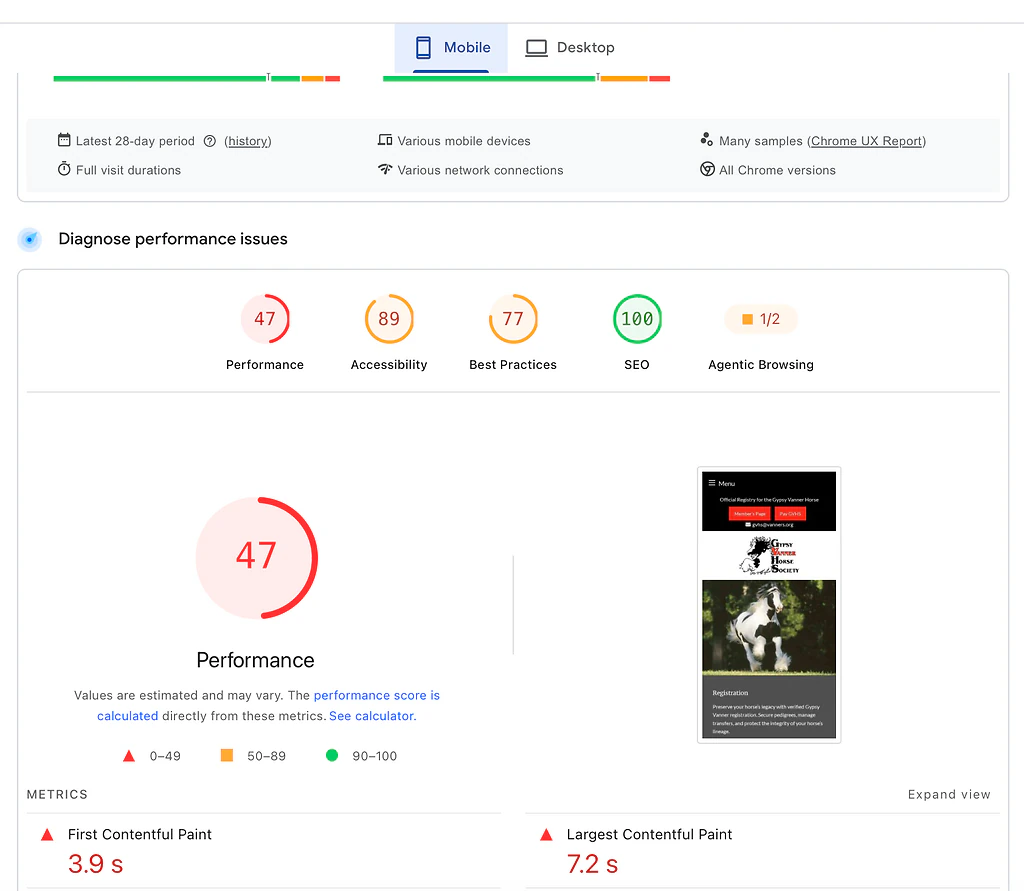
PageSpeed Insights mobile lab results for a typical WordPress site: 47 performance, 3.9s first contentful paint, 7.2s largest contentful paint
On mobile, Wix held at 62 while the WordPress site dropped to 47, with a 7.2-second largest contentful paint against Wix's 6.6. Wix's advantage here is real: it is running the same managed, CDN-backed stack under every site regardless of who built it, where WordPress's number is entirely a function of the theme, the plugin load, and the hosting tier underneath it, and most small-business builds have none of those tuned. WordPress speed is a range, not a number: it can be fast, but reaching it takes ongoing work most owners never budget for, while a mediocre build on cheap shared hosting is what a lot of real visitors actually get.
Seven seconds of a mostly blank screen on a phone is exactly the wait that sends someone back to the search results.
Since this is the Devani blog, one more data point, then back to the two platforms you came here to compare. Devani, the separate CMS this site runs on, sits above both, and the reason is structural: its pages are plain static files served from a CDN with nothing to query, so there is no theme or plugin load to tune in the first place.
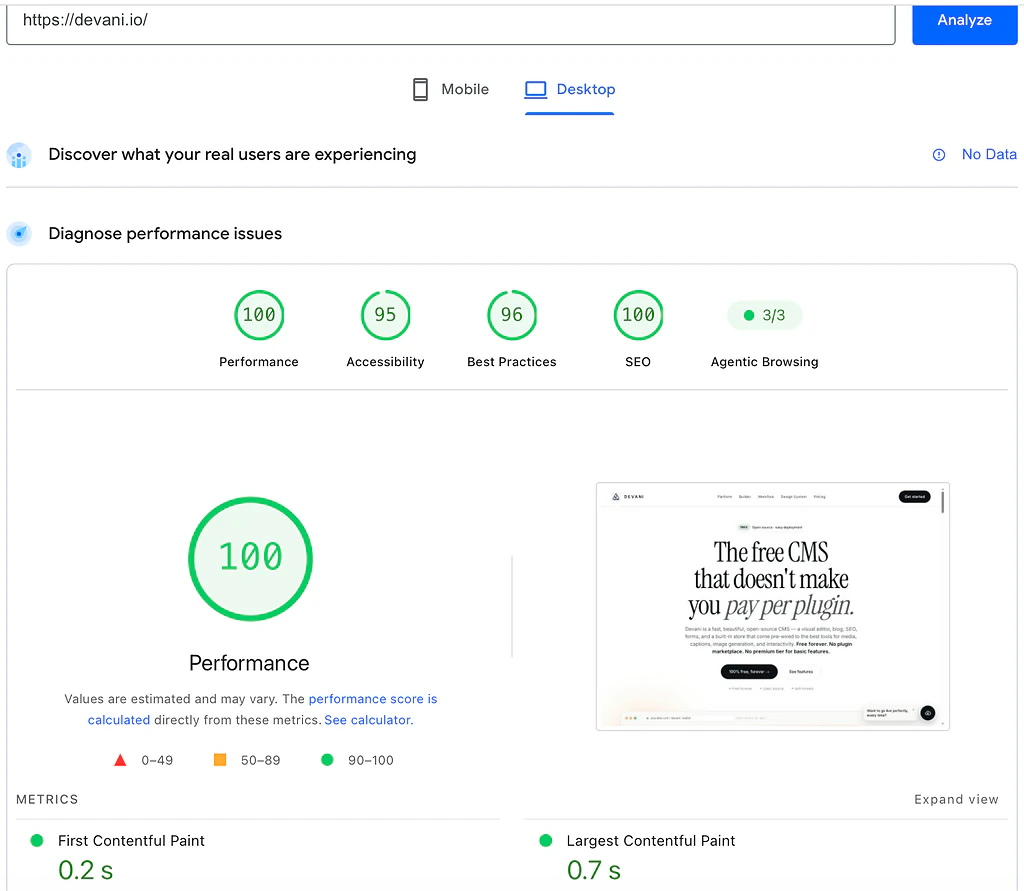
PageSpeed Insights desktop lab results for devani.io: 100 performance, 0.2s first contentful paint, 0.7s largest contentful paint
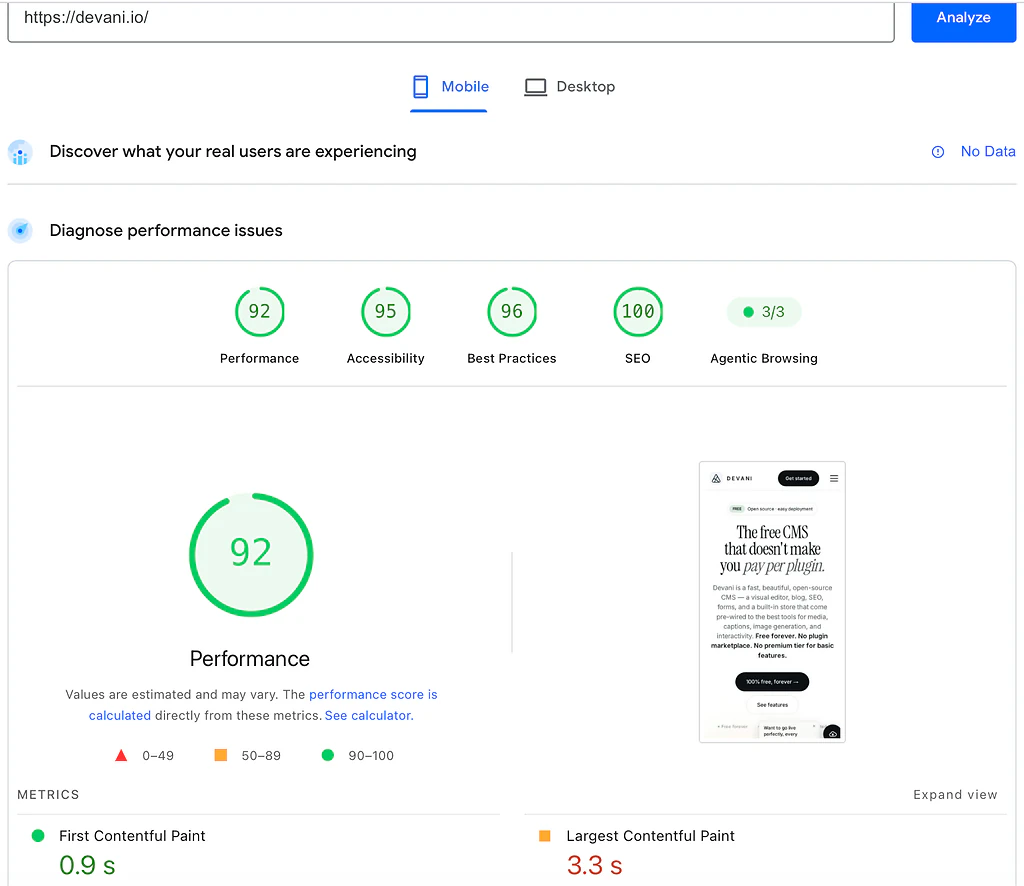
PageSpeed Insights mobile lab results for devani.io: 92 performance, 0.9s first contentful paint, 3.3s largest contentful paint
The most telling column is not the top score, it is how little each platform loses moving from desktop to mobile, where a throttled phone is the harder test.
| Platform | Desktop | Mobile | Desktop to mobile drop |
|---|---|---|---|
| Wix (typical build) | 69 | 62 | 7 points |
| WordPress (typical build) | 63 | 47 | 16 points |
| Devani | 100 | 92 | 8 points |
WordPress is the one that visibly collapses on a phone, a sixteen-point drop, where Wix and Devani both stay within single digits of their desktop score. The WordPress versus Wix question stands on its own regardless: on real hardware, in a real cold test, Wix is a modest but consistent step ahead of a typical WordPress build, especially on phones. If Devani is on your shortlist too, Devani vs Wix lays out that comparison directly.
Straight answers to the ones people ask next.
Is Wix good for SEO, or is WordPress better?
Closer than either platform's fans want to admit. All three sites above scored 100 on PageSpeed's SEO audit, so nobody here is invisible to Google on the technical basics: crawlable markup, mobile-friendly tags, a valid title and description. Wix ships built-in SEO tools (title tags, meta descriptions, basic schema, an XML sitemap) to every paid plan without installing anything. WordPress can get to the same place, but it usually takes a plugin, Yoast or RankMath being the common picks, and someone has to configure it correctly, a step a lot of small-business builds skip or half-finish. Devani ships per-page SEO (meta, schema, OG, sitemap, 301s) with clean markup and nothing to install. On the scoreboard the three roughly tie; the difference is how much setup it takes to get there, and Wix's built-in tools genuinely save a step WordPress makes you take yourself.
Blog, online store, or small local business: does the answer change?
Yes, and a single verdict does not serve any of these well. For a blog with real editorial ambitions, multiple posts a week, categories, tags, a content calendar, WordPress still has the deeper toolset and a much larger ecosystem of blogging-specific plugins; Wix's blogging tools are fine for a monthly post and start to feel thin against a real publishing schedule. For an online store, the honest minimum Wix plan for real ecommerce is Core at $29/month, and once you add standard payment-processing fees, budget closer to $35 to $45 a month before you have sold a thing; WooCommerce on WordPress goes further at real scale but demands real technical investment to set up and keep patched, and for a shop under a few hundred SKUs Wix covers the actual need without the overhead. For a small local business site, a five-page site with hours, a menu, and a contact form, Wix will get you there today with nobody touching a line of code, and that is usually the right call; a business with locations, staff bios, a booking system, and a blog that gets used starts to benefit from WordPress's ability to bolt all of that together, provided someone owns the maintenance.
How hard is it to move a site from Wix to WordPress?
Harder than it should be, and the direction matters a lot. WordPress has a real export function: your posts, pages, and media come out in a portable format another platform can read. Wix has nothing equivalent going the other way. There is no database export, no content dump that reconstructs your site elsewhere. Moving off Wix means rebuilding the site by hand, page by page, image by image, while trying to preserve your URLs so years of search rankings and backlinks do not die in the process. I have done this migration for a client who budgeted an afternoon and lost most of a week to it, mostly rebuilding a booking system and chasing down redirects. Going the other direction, WordPress to Wix, is a little easier since Wix has an import tool that pulls over blog content reasonably well, but custom layouts, specific plugin functionality, and most SEO configuration still need to be rebuilt in Wix's own tools by hand. That asymmetry, easy in and hard out, is worth knowing before you commit to Wix, not after.
Where Devani sits between these two.
Read the template-lock and migration answers again: Wix will not let you swap a template without starting a new site, and moving off Wix means rebuilding everything by hand because there is no export that reconstructs the working site elsewhere. That is the same wall from two angles, and it is the specific thing Devani does not have. I work on Devani, so weigh the rest of this with that in mind, but the shape of it holds regardless. Devani is free, open-source, and self-hosted, so your content is genuinely yours, files you hold and can export or move at any time, the way WordPress works and Wix structurally cannot. You get there without inheriting WordPress's upkeep job: there is no plugin stack to keep patched, updates are opt-in on your own schedule, and a cheap VPS with a one-command installer runs about $5 a month, or Devani's own managed hosting (free tier included) if running a server is not something you want to take on. That free tier puts a site live in under a minute, and a full build with the AI doing the work takes 10 to 15 minutes, so the live-this-week timeline that sends people to Wix is not actually a reason to pick Wix.
The other half answers the template-lock problem directly rather than by avoiding it: you connect your own ChatGPT or Claude account through MCP, using an existing subscription with no API keys, and it makes real edits to your site's content and layout on request, so a design that no longer fits gets reworked in place instead of forcing a new site the way a Wix template swap does. To be precise, since WordPress is in the frame: WordPress has bolt-on AI options now too, WordPress.com's MCP integration and the Vibe AI plugin among them, but they work inside the block editor rather than across your whole build. Devani's assistant is native, working inside the builder itself, with every change snapshotted and one click from rollback. That is the honest distinction, native versus alongside, not "the only platform with AI."
What Devani does not have is either competitor's years in the market: a smaller template library than Wix's, no plugin marketplace anywhere close to WordPress's size, and none of the decade of freelancer familiarity both have built up. If your build depends on one of WordPress's more obscure plugins, Devani will not cover that yet, and I would say so directly if you asked me. But if owning what you build, being able to walk away with it, matters as much as speed does, that is the specific gap Devani was built to close.
Still stuck between live this week and able to leave?
If the whole choice has felt like picking between being up fast and actually owning what you build, that is the exact tradeoff Devani was built to close. It is free, so there is nothing to commit to.