

Two platforms built for two different jobs.
Picture the same small business on each platform. Shopify was engineered around the order: the cart, the checkout, inventory, shipping, the machinery that has to keep working when sales get busy. Squarespace was engineered around the page: the design, the typography, the layout a visitor lands on and decides whether to stay, and it can still get a product to someone's door. Both run a store. The real question is which side of that split you are building for, a serious store first, or a well-designed site that also sells. There is a third answer too, and I will get to it, since this is the Devani blog and Devani lands squarely in that second case.
The comparison below is about patterns, the things that show up again and again once a store has been live for a year, not the first week of setup, which flatters everything. Before the prose, here is the shape of it at a glance.
| Platform | Commerce depth | Payment options | Platform transaction fee | Best fit |
|---|---|---|---|---|
| Shopify | Deep: variants, multi-location inventory, abandoned cart, multi-currency via Markets | 100+ gateways | +0.6% to 2% off-Payments; 0 on Shopify Payments | The store is the business and needs to scale |
| Squarespace | Light to mid: single currency, POS on iOS | 5 processors | Percentage cut on the Basic tier only | Design-led site that also sells |
| Devani | Light store with Stripe checkout, not deep commerce | Stripe | None | Fast, well-built site with a modest store |
Is Shopify better than Squarespace for selling online?
For anything beyond a light side of a website, yes, and it is worth conceding plainly up front.
Shopify's ecommerce tooling is deeper everywhere that matters once a store gets real: product variants that handle size and color combinations without workarounds, inventory that syncs across locations, abandoned cart recovery built in, and multi-currency selling through Shopify Markets so a customer overseas sees prices in their own currency instead of doing math in their head. Squarespace sells in a single currency only, which is fine for a US-only shop and a real limitation the moment international orders start showing up.
Payment options tell the same story. Shopify supports more than 100 payment gateways worldwide, the major global names plus a long tail of regional processors that matter if you are selling outside the US. Squarespace supports five: its own Squarespace Payments, Stripe, PayPal, Square, and Afterpay. Five is plenty for most small stores and a real ceiling for anyone selling into markets where none of those five are the local norm.
Dropshipping leans hard toward Shopify too. Its catalog of sourcing and fulfillment apps, DSers, Spocket, and hundreds of others, dwarfs Squarespace's extension list for the same job, which is closer to a handful, Printful and Syncee among the more usable ones. If your business model is dropshipping specifically, Shopify is where that model actually lives. And the app ecosystem generally is not close: Shopify's app store runs to well over eight thousand listings covering tax automation, loyalty programs, subscription billing, and every niche a store owner eventually needs, against Squarespace's roughly 50. For a business that expects to keep adding store functionality over years, that gap compounds. Our full Shopify review covers the rest of the platform in more depth.
Shopify
The store is the whole business.
- ✓ 8,000+ apps, 100+ gateways, multi-currency
- ✓ Android and iOS POS with real retail hardware
- × Smaller free theme set; premium themes run $100 to $500
Squarespace
Design-led site that also sells.
- ✓ Templates that look considered out of the box
- ✓ Deeper blogging, memberships, unlimited contributors
- × Single currency, five processors, ~50 extensions
Devani
Fast site, light store attached.
- ✓ Free and open source, no platform transaction fee
- ✓ Database-free, static files, sub-second loads by default
- × Light store with Stripe checkout, not deep commerce
Does Squarespace have a POS system, and can you dropship on it?
Both exist, both work, and both are clearly the smaller offering next to Shopify's. Squarespace POS runs on iOS only, iPhone or iPad, and it is gated to the Commerce plans rather than available everywhere. It handles the basics well: ring up a sale in person, sync inventory back to the online store, take a card payment. Shopify's POS runs on both Android and iOS, offers a genuinely built-out retail hardware lineup, and supports the kind of business running a real register alongside an online store, multiple staff logins, shift reports, hardware that scales past one counter. If you are opening a physical location alongside your online store, or already have one, Shopify's POS is the more complete answer. If Shopify's depth is more than your business actually needs, our Shopify alternatives roundup covers lighter options.
Dropshipping on Squarespace is possible but thin, covered above. It is not a reason to avoid Squarespace if dropshipping is a small piece of a broader content-and-sales site, but it is not the platform to pick if dropshipping is the whole business.
Squarespace's design and content edge is real.
Give Squarespace its due here, because it is the actual reason a lot of people choose it over Shopify despite the ecommerce gap. Our full Squarespace review covers the rest of what it does well.
Templates that look designed
Type pairings that already work together, spacing that does not need adjusting, image-heavy layouts that read as intentional rather than assembled. Roughly 100 to 200 templates against Shopify's 13 free themes.
Fluid Engine editing
The drag-and-drop editor still feels like the more natural fit for someone thinking visually rather than in terms of store settings. Shopify's admin is more structured and less flexible day to day, though it has improved.
Editorial blogging
Categories, tags, scheduled posts, layouts built for reading. Meaningfully deeper than Shopify's blog, which exists mostly to support a store rather than to run a content operation.
Memberships and gated content
Native memberships, gated content, and course-style sales are built in, where the same thing on Shopify usually means a third-party app. Squarespace also allows unlimited contributors even on lower tiers; Shopify limits staff accounts by plan.
A business that wants a real blog next to a product line, or a portfolio next to a shop, fits Squarespace's shape better.
What does Shopify cost, compared to Squarespace?
Squarespace runs four paid tiers, all billed annually: Basic at $16 a month, Core at $23, Plus at $39, Advanced at $99, with a 14-day free trial to try the editor first. Squarespace's Basic plan also takes a percentage cut of every sale on top of standard payment processing; that cut goes away once you move up to Core or higher, which matters the moment you are actually selling anything on the entry tier.

Squarespace pricing page in USD showing Basic at 16 dollars, Core at 23, Plus at 39, and Advanced at 99 per month billed annually
Shopify's pricing is a different shape and worth reading carefully rather than sticker-to-sticker. Billed annually, Starter runs $5 a month (a link-in-bio and checkout tool more than a full site), Basic runs $29 a month ($39 if you pay monthly), Grow runs $79 ($105 monthly), Advanced runs $299 ($399 monthly), and Shopify Plus, the enterprise tier for real volume, starts around $2,300 a month. Paying annually saves roughly 25% across the board against the monthly rate, a bigger swing than Squarespace's annual discount.
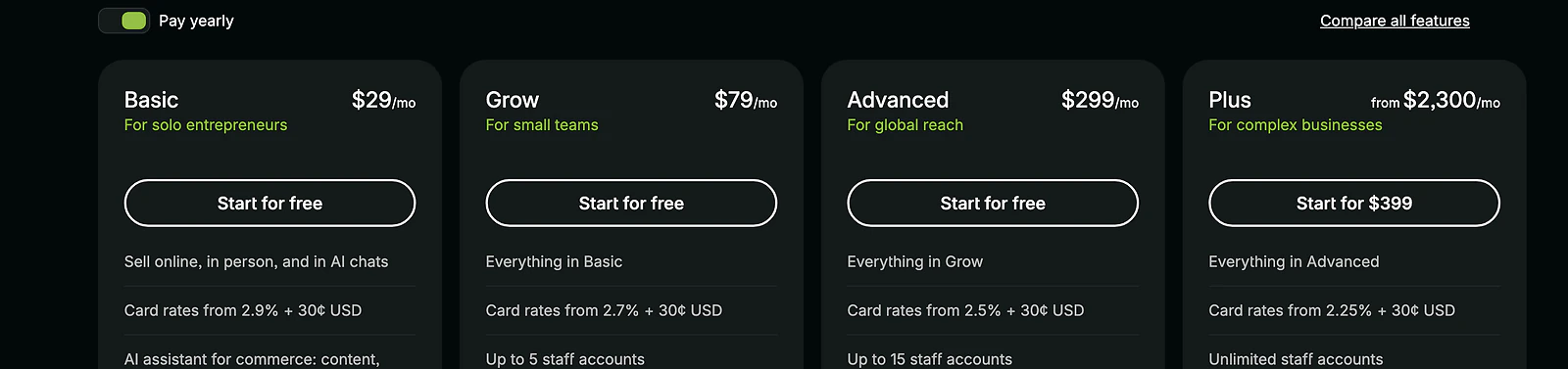
Shopify's pricing page in USD, showing Basic at 29 dollars, Grow at 79, Advanced at 299, and Plus from 2,300 per month billed yearly
The part people miss is Shopify's transaction fee structure if you do not use Shopify Payments, its own built-in processor. Run a third-party processor instead and Basic adds 2% on top of that processor's own 2.9% plus $0.30 per transaction, Grow adds 1% on top of 2.7% plus $0.30, and Advanced adds 0.6% on top of 2.5% plus $0.30. Use Shopify Payments and that extra percentage disappears entirely, which is why almost every Shopify store I have set up in recent years just uses Shopify Payments rather than fighting the surcharge. It is a real cost either way, it is just easy to miss when you are comparing headline plan prices and forgetting the fee sits underneath them.
Line the entry tiers up and Squarespace's Basic at $16 is cheaper than Shopify's Basic at $29, but that is not really the comparison that matters. Squarespace's cheapest plan with no ecommerce transaction cut is Core at $23; Shopify's cheapest plan with full store features and no extra fee (once you are on Shopify Payments) is Basic at $29. Six dollars a month apart once you are comparing what each one actually gets you to sell without a surcharge attached.
Which is faster, Shopify or Squarespace?
Most comparisons quote template counts and app totals and skip an actual speed test. I ran real PageSpeed Insights checks, cold, on desktop and mobile, starting with a genuinely typical small Shopify store rather than one of Shopify's own showcase examples: an image-heavy candle shop running a standard theme, doing exactly what most small Shopify stores do.
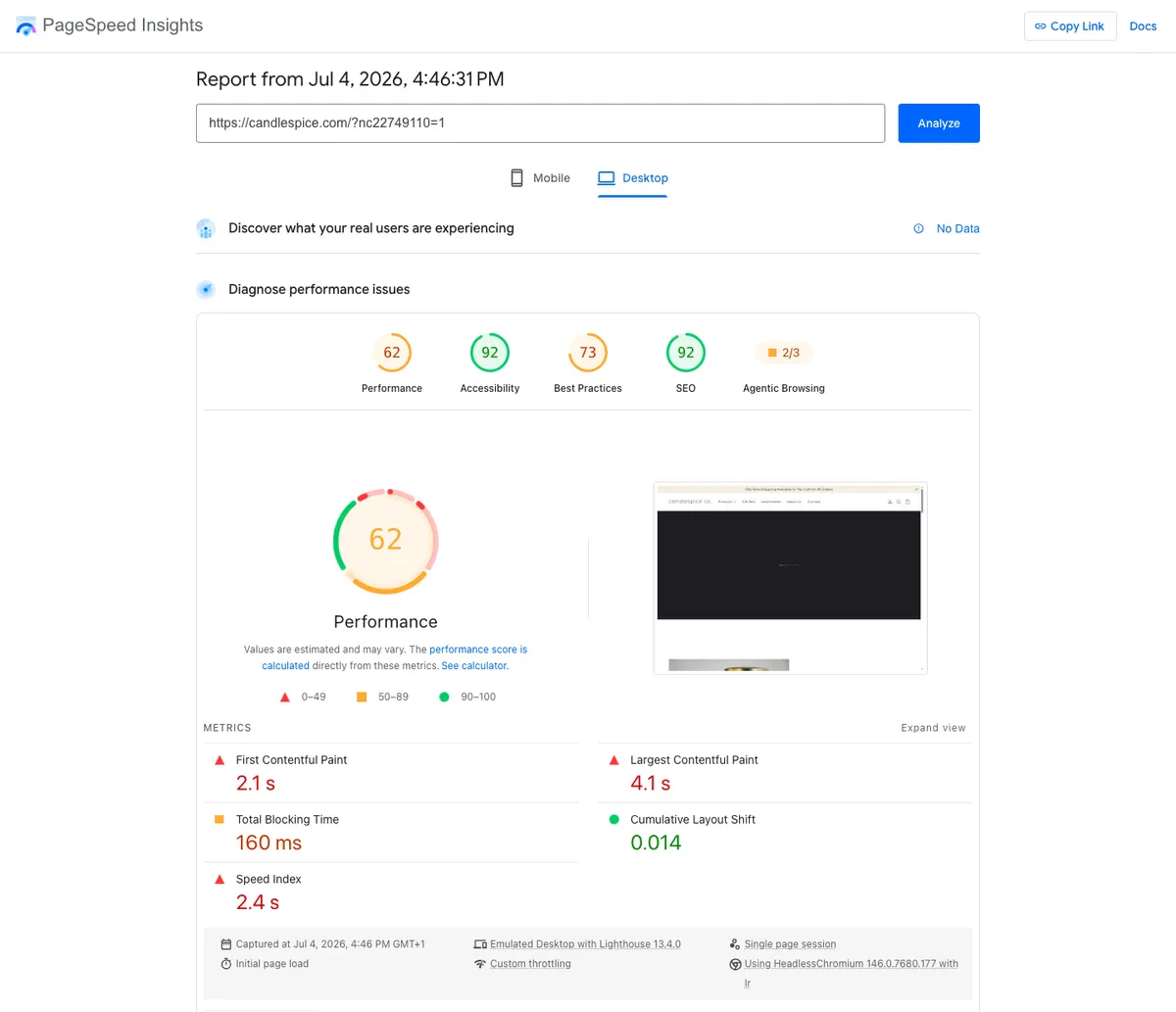
PageSpeed Insights desktop lab results for a typical Shopify store: 62 performance, 2.1 second first contentful paint, 4.1 second largest contentful paint
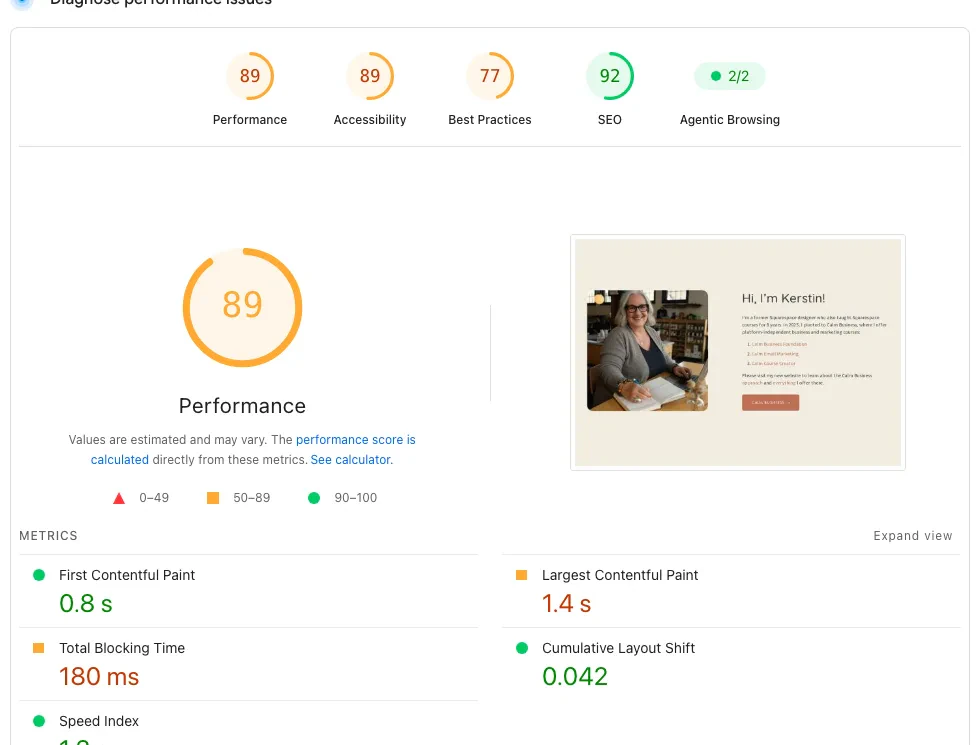
PageSpeed Insights desktop lab results for a professionally built Squarespace site: 89 performance, 0.8 second first contentful paint, 1.4 second largest contentful paint
On desktop, Squarespace's 89 clearly beats this Shopify store's 62. Now mobile, the test that matters more since most shoppers are on a phone.
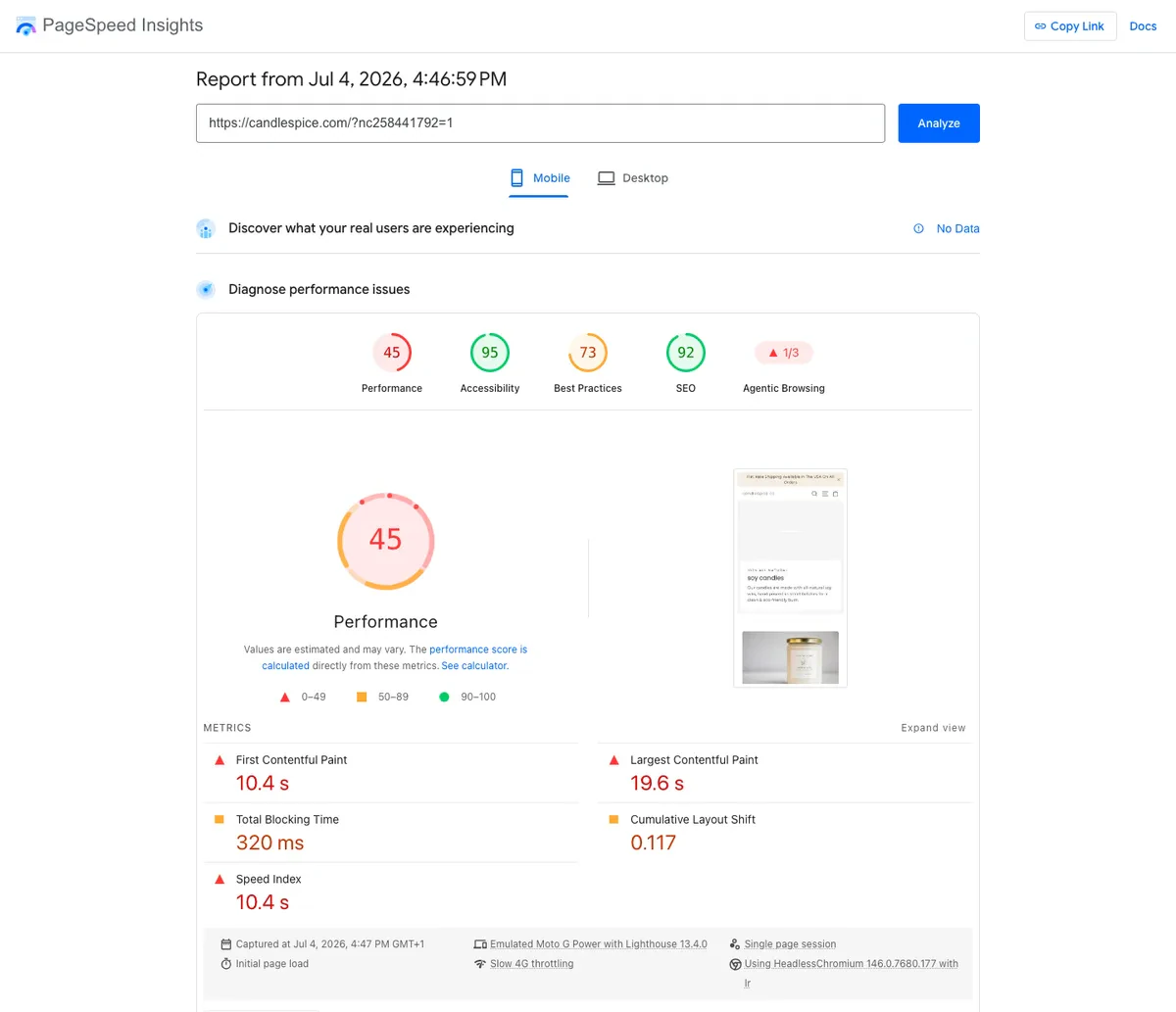
PageSpeed Insights mobile lab results for a typical Shopify store: 45 performance, 10.4 second first contentful paint, 19.6 second largest contentful paint
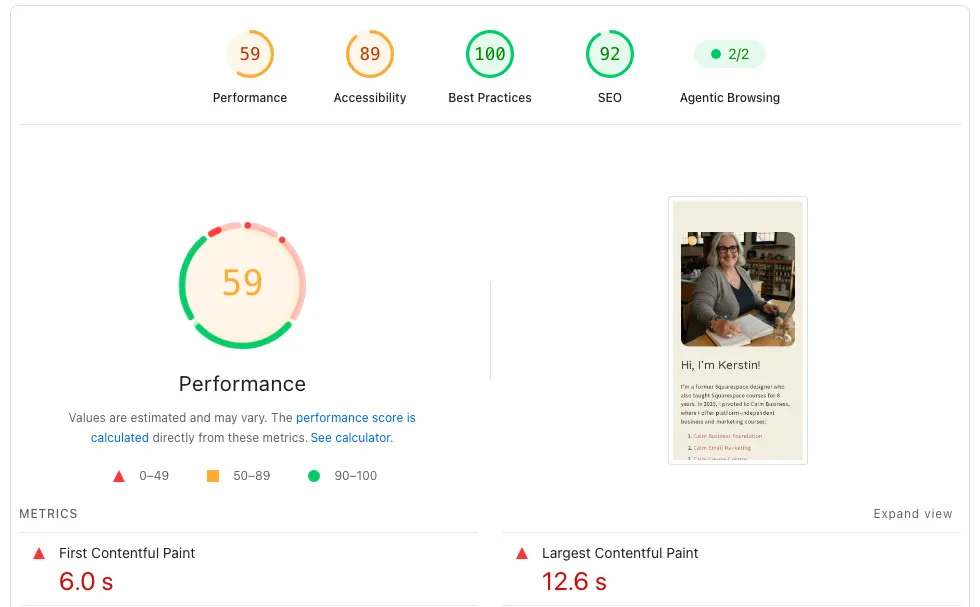
PageSpeed Insights mobile lab results for a professionally built Squarespace site: 59 performance, 6.0 second first contentful paint, 12.6 second largest contentful paint
On mobile Squarespace still comes out ahead, 59 against this Shopify store's 45, though both drop hard under mobile throttling. Here is the honest caveat: Shopify speed is not one number. I have run this test across several real Shopify stores and seen results as far apart as 62 and 45 on one end and 92 and 81 on the other, almost entirely driven by theme choice, how many apps are installed, and how heavy the product photography is. A store running a lean theme with compressed images can post numbers that beat this Squarespace example outright. A store like the one above, stacked with high-resolution product shots and a few too many apps, is what drags the average down, and it is a genuinely common setup, not a worst case I went looking for. Don't take one Shopify screenshot, mine included, as "Shopify's speed." Treat it as a range that depends heavily on how the store owner builds.
| Cold PageSpeed (lab) | Desktop | Mobile | Desktop-to-mobile drop |
|---|---|---|---|
| Typical Shopify store | 62 | 45 | 17 points |
| Professional Squarespace site | 89 | 59 | 30 points |
| Devani (devani.io) | 100 | 92 | 8 points |
Since this is the Devani blog, one more data point, then back to the two platforms you came here to compare. Devani, the separate CMS this site runs on, sits above both.
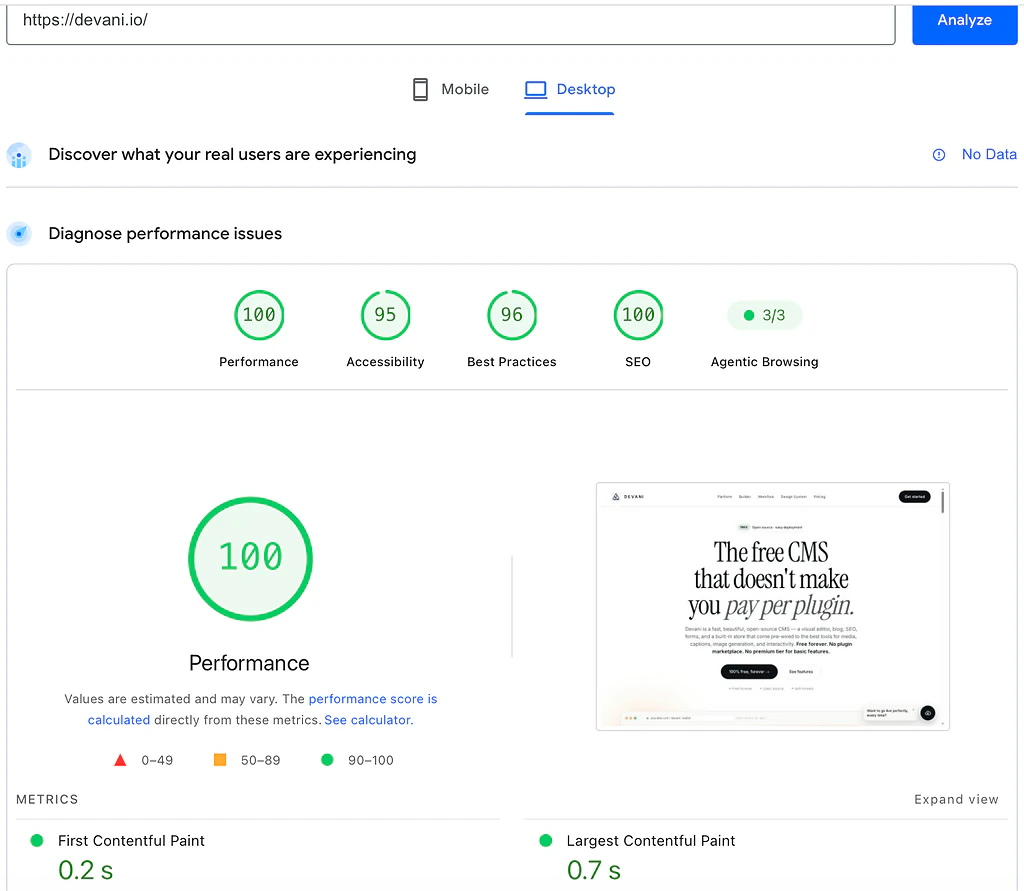
PageSpeed Insights desktop lab results for devani.io: 100 performance, 0.2 second first contentful paint, 0.7 second largest contentful paint
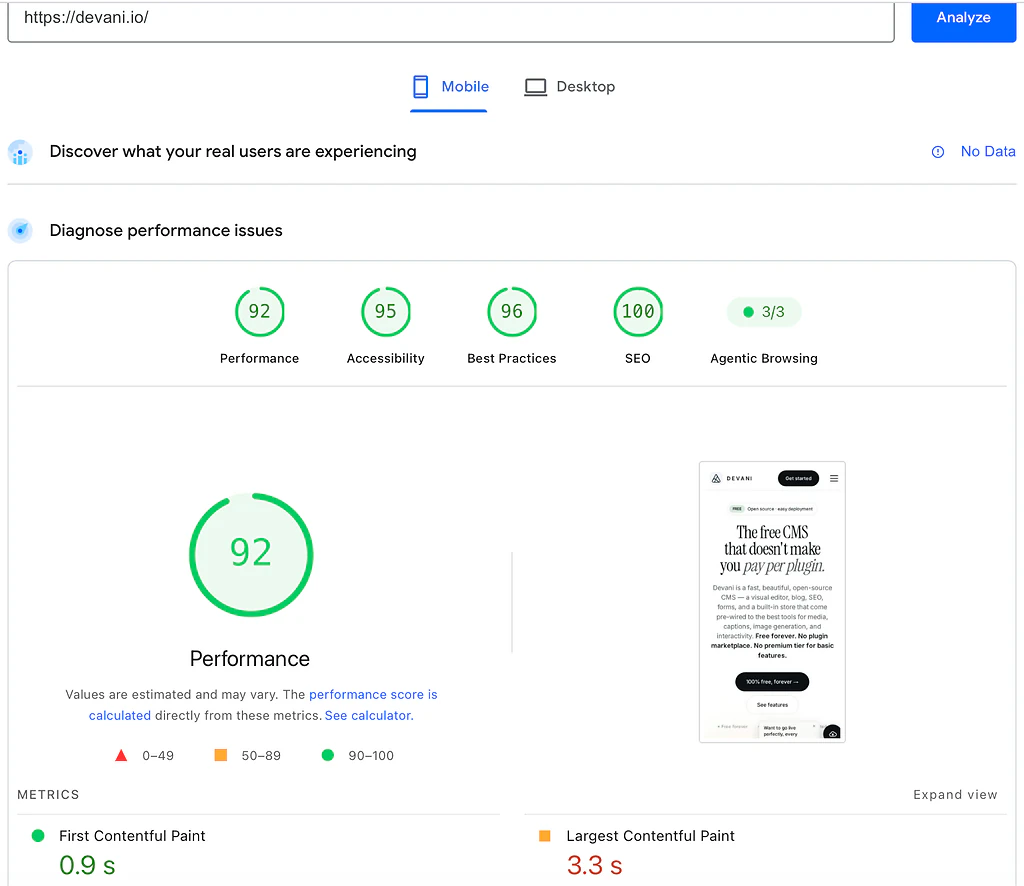
PageSpeed Insights mobile lab results for devani.io: 92 performance, 0.9 second first contentful paint, 3.3 second largest contentful paint
Devani scores 100 on desktop and 92 on mobile, ahead of both, and it drops only 8 points from desktop to mobile against Squarespace's 30-point drop and this Shopify store's steeper one. A lot of that comes down to being database-free: the whole site is stored as plain files with nothing to query, rather than assembled from a database or rendered through a theme's app stack on every request. Neither Shopify nor Squarespace asks a store owner to treat page speed as a design decision, but a heavy Shopify build can lose more than half its mobile score to product photography and installed apps, and even Squarespace's polished desktop number gives up 30 points once mobile throttling kicks in. Devani starts from a different place structurally rather than through tuning, which is why it held that 8-point gap. I build Devani, so weigh that, but the mechanism holds regardless of who is saying it.
Where Devani actually competes is closer to Squarespace's slot than Shopify's: a business that wants a genuinely good, fast website with a light store attached, not a heavy standalone storefront as the whole business. It is free and open source, no monthly software fee, no plugin marketplace to shop in because there is no plugin stack to patch in the first place, and no platform transaction fee the way Shopify's non-Payments surcharge or Squarespace's Basic-tier cut work. Run it on your own hosting, about $5 a month through a one-command installer, or hand it to Devani's own managed hosting, free tier included, if running a server is not something you want to do. The one honest limit: Devani's store is light, with Stripe checkout, not a dedicated ecommerce engine. If your business genuinely is the store, high volume, complex fulfillment, multi-currency selling at scale, Shopify is the honest answer and Devani is not there to replace it. If Devani is on your shortlist too, Devani vs Squarespace lays out that comparison directly.
SEO and moving between the two.
Is Shopify or Squarespace better for SEO?
Closer than you would guess given how different the two platforms are underneath. Both scored 92 on PageSpeed's SEO audit in the tests above, not a perfect 100 for either one, and both ship the basics on every plan without a plugin: crawlable markup, mobile-friendly tags, an automatic sitemap, editable meta titles and descriptions. Shopify's SEO tooling leans toward the store side, structured data for products so search results can show price and availability directly. Squarespace's leans toward content, cleaner control over blog post metadata and category structure. Neither one is going to lose you rankings on technical grounds; the difference shows up in how much of the setup work is done for you versus left to a plugin or app, and on both platforms it is mostly done for you.
Can you move a site from Squarespace to Shopify, or the other way?
In pieces, not wholesale, and it is worth knowing that before you commit to either one. Shopify has real import tools for product catalogs, CSV imports that bring over titles, prices, images, and inventory reasonably cleanly from Squarespace or most other platforms. What does not come over is the site itself: page layouts, blog content formatting, and anything built with Squarespace's design tools has to be rebuilt by hand in Shopify's theme editor. Going the other direction, Shopify to Squarespace, is roughly the same story in reverse: product data imports reasonably well, but Shopify's Liquid-based theme customizations and app-dependent store logic do not translate, so the storefront gets rebuilt from scratch either way. I have run migrations in both directions for clients and budgeted real days for it every time, more on a bigger catalog, and preserving URLs carefully matters as much as the product data does, or years of search ranking go with the old site.
Pick the platform that matches where the weight sits.
Shopify if the store is the business and needs to scale. Squarespace if the site and its design carry more of the weight and the store stays modest. If what you actually need is that second case, a well-designed site that also loads fast with no tuning required, Devani is worth a look. Watch it make an actual edit on a real site before you take my word for any of it.