
Own the store, or rent a fully staffed one.
Plain WordPress does not sell anything, so this comparison is really WooCommerce, the free plugin that turns WordPress into a store, against Shopify, a platform built for selling from day one. WooCommerce means you own the building: software, database, hosting account, every setting. Shopify means you rent a storefront and pay rent plus a small cut of each sale. A properly built WooCommerce store usually lands between $100 and $150 a month once hosting, extensions, and a gateway are counted, close to Shopify's equivalent tier, so this rarely turns on price. It turns on how much control you want against how much work you will own. There is also a third shape worth naming up front: Devani, the free open-source CMS this site runs on, which ships a light store without either platform's upkeep.
A catalog, cart, and checkout
Core WordPress has none of these. WooCommerce adds products, a cart, and order management on top of whatever site you already have. Shopify ships all of it the moment you sign up. This one requirement is why "WordPress ecommerce" almost always means WordPress plus WooCommerce.
A way to take payment
Someone has to handle card processing, PCI compliance, and a gateway. Shopify Payments is built in and on by default, so a new owner never researches gateways to start. WooCommerce lets you wire up any processor you want, and never takes a cut of a sale itself.
Hosting that survives a spike
A store needs SSL and servers that hold up when a promotion lands 5,000 people on the site at once. On Shopify that is Shopify's problem whether you sell ten units a month or ten thousand. On WooCommerce it is your hosting account, your tuning, and your bill.
Inventory across channels
If you sell in a shop and online, one stock count has to serve both. Shopify POS unifies register and website off one shared inventory, as a real feature rather than a bolt-on. WooCommerce reaches the same place through third-party plugins, with more moving pieces to keep synced.
Shipping and tax rules
Real stores need rate tables, zones, and tax that is calculated correctly for where the buyer sits. Shopify handles the common cases on every plan. WooCommerce covers them too, but usually through a handful of paid extensions you select, configure, and keep updated.
The website around the store
Most stores also need an about page, a blog, and landing pages for promotions. WooCommerce sits inside full WordPress, so the content lives beside the products. Shopify is a store first, with content tools that feel added on. It is a real difference once your marketing leans on writing.
Why this really means WooCommerce vs Shopify.
WordPress by itself is a content management system: pages, posts, a media library, a comment section. There is no cart, no checkout, no product catalog anywhere in core WordPress. To sell, you install WooCommerce, a free plugin from Automattic (the company behind WordPress.com), and it adds products, a cart, checkout, and order management on top of whatever site you have. That combination, WordPress plus WooCommerce, is what almost every "WordPress ecommerce" site is running, so this article compares it against Shopify as it actually ships. Worth saying plainly: if you do not need to sell anything and just want a website, this comparison does not apply to you, and the answer looks completely different.
WordPress + WooCommerce
You own the whole building.
- ✓ The entire WordPress plugin library alongside your commerce extensions
- ✓ Full portability: your files and database, move it or self-host it anywhere
- ✓ No platform cut on a single sale, any gateway you like
- × Six to ten pieces of software to keep patched, plus your own hosting
- × POS, dropshipping, and large catalogs are each a separate plugin to manage
Shopify
A rented storefront, staff included.
- ✓ Selling within an afternoon, payments and PCI handled for you
- ✓ POS, dropshipping, and Plus for genuine high-volume commerce
- ✓ Live 24/7 support and one shared inventory across channels
- × A transaction fee if you do not use Shopify Payments
- × No full export: leaving means rebuilding the storefront, not migrating it
Devani
A fast site with a light store attached.
- ✓ Free and open-source, no plugin stack to patch, no per-transaction fee
- ✓ Database-free static pages, near 100/100 Lighthouse by default
- ✓ Content and products in one place, self-hosted from about $5/month
- × A light store, not deep commerce: no POS hardware, no large-catalog tooling
Shopify's pitch is real, not marketing spin.
Give Shopify its due, because it earns most of what it claims. A non-technical owner can create an account this afternoon, pick a theme, add a handful of products, and be taking real payments before dinner. Hosting, SSL, PCI compliance, and the servers under a traffic spike are Shopify's problem, not yours, and that holds whether you sell ten units a month or ten thousand. Shopify Payments is built in and on by default, so a brand-new owner never has to research gateways to start selling. Shopify POS runs a physical register and a website off one shared inventory count, a real working feature rather than an afterthought. Support is a live 24/7 operation. And if dropshipping is the model, Shopify's supplier-integration app ecosystem is mature and well-trodden, the default most dropshippers land on for a reason. Our full Shopify review covers the rest of the platform in more depth.
What owning the whole install still buys you.
WooCommerce's advantages are just as real, and they do not shrink the longer you look. It is a plugin on top of full WordPress, so you get the entire WordPress plugin library, tens of thousands of tools, alongside whatever WooCommerce-specific extensions you need. A course platform bolted onto your store, a membership tier, a directory of local dealers, a blog with a real editorial workflow next to your product pages: all of that is a WordPress plugin away, running in the same install rather than as a separate app. Shopify's own app store is large, somewhere around 8,000 listings, but it is a narrower, commerce-specific ecosystem, and once you are past the common cases (reviews, upsells, email capture) it thins out fast. We cover WordPress's broader strengths and limits in our full WordPress review.
Ownership is the other piece people underrate until the day they need it. A self-hosted WordPress and WooCommerce site is your files and your database, in full. You can move it to a different host, hand it to a different developer, or run it yourself indefinitely, and nobody's permission is required at any step. A Shopify store lives entirely inside Shopify's system. There is no server that is yours to point elsewhere. That is a fine trade for as long as you are happy there, and the whole trade the day you are not.
Is WooCommerce actually free? What a real store costs.
The plugin itself, yes, genuinely free, no catch. But "WooCommerce is free" is the same marketing half-truth as "WordPress is free," and it is worth untangling before you budget around it. The WordPress.org software is free to download. It still needs paid hosting and a domain, and a serious store adds a handful of paid extensions (better shipping rules, tax calculation, a decent theme) plus a payment gateway on top. Add it up and a properly built WooCommerce store, not a bare-bones one, tends to land between $100 and $150 a month once hosting, extensions, and a gateway are counted, before anyone's time is priced in. It is rarely the dramatically cheaper option people expect walking in; it is just billed in more separate pieces, from more separate vendors, which makes the total easy to lose track of.
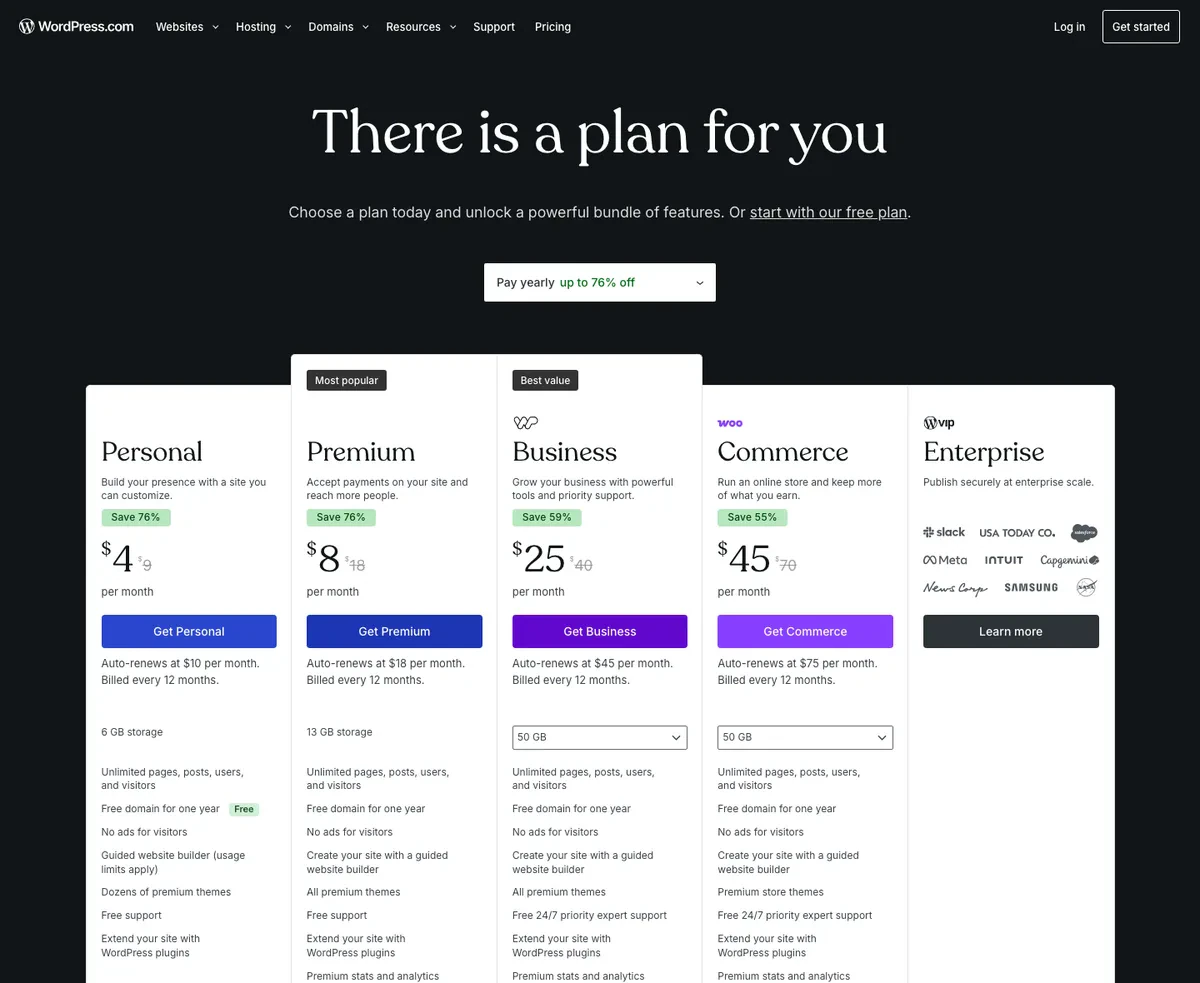
WordPress.com's pricing page in USD, showing the promotional annual rate next to the auto-renewal rate for each plan
If you would rather skip assembling your own hosting stack, WordPress.com offers managed plans: Personal at $4/month billed annually (renewing at $10), Premium at $8 (renewing at $18), Business at $25 (renewing at $45), and Commerce at $45 (renewing at $75), which is the tier that actually includes WooCommerce support. That renewal jump between the promo rate and what you pay a year later is the number people budget around and then get surprised by. Either path, managed or fully self-hosted, the honest total for a real WooCommerce store lands near, and sometimes above, what Shopify charges for the equivalent tier once everything is totaled. The free plugin was never the whole bill.
The free plugin was never the whole bill; it is just billed in more separate pieces, from more separate vendors.
Does Shopify charge a transaction fee?
This trips people up more than any sticker price does. Shopify's plans run Starter at $5/month (a checkout link and social selling, no full site), Basic at $29 billed annually or $39 month to month, Grow at $79 (or $105 monthly), Advanced at $299 (or $399 monthly), and Plus from around $2,300/month for large-volume merchants. Annual billing runs roughly 25 percent cheaper on every tier. What the sticker does not show is what happens if you do not use Shopify Payments.
Every Shopify plan lets you connect a different gateway, but doing that adds a transaction fee on top of your normal card-processing rate. Use Shopify Payments and that extra percentage disappears; you only pay standard card rates. For most merchants that makes Shopify Payments the obvious default, but if you already have a processor you are contractually tied to, or a model Shopify Payments does not support well, the added percentage is a real, recurring cost that never shows on the plan comparison chart.
| Plan | Base card rate (online) | Extra fee for a third-party gateway |
|---|---|---|
| Basic ($29/mo) | 2.9% + $0.30 | + 2.0% |
| Grow ($79/mo) | 2.7% + $0.30 | + 1.0% |
| Advanced ($299/mo) | 2.5% + $0.30 | + 0.6% |
| WooCommerce | Your chosen gateway's rate | None, ever |
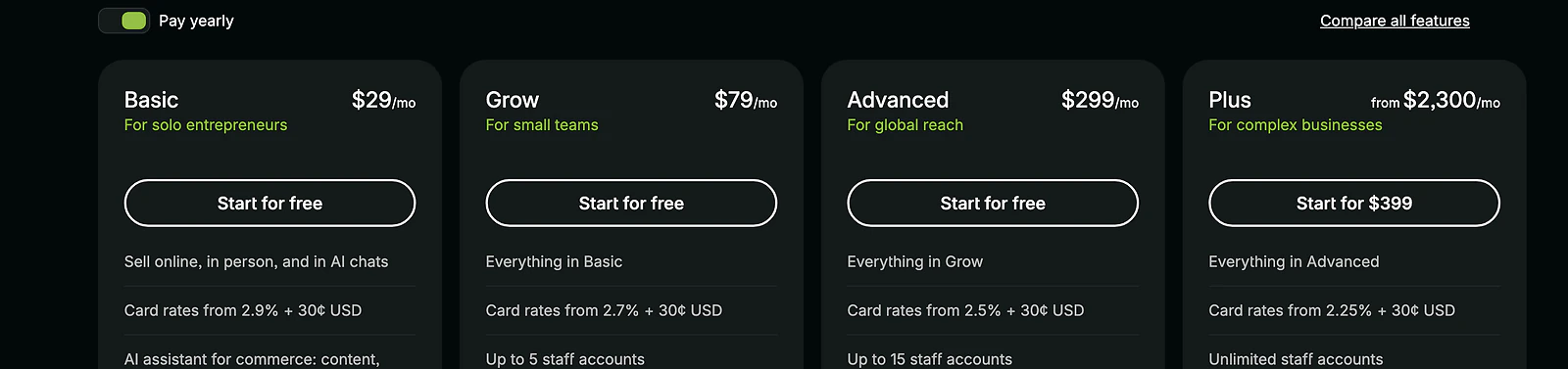
Shopify's pricing page in USD, showing Basic at 29 dollars, Grow at 79, Advanced at 299, and Plus from 2,300 per month billed yearly
WooCommerce has no equivalent of this at all: you pick any gateway you want and WooCommerce itself never takes a cut of a single sale. That is the honest cost asymmetry between the two, and it only widens as sales volume grows.
Which is faster, WordPress or Shopify?
Everyone quotes plugin counts and theme numbers in these comparisons. Fewer people show a real PageSpeed run, so I tested both, cold, on desktop and mobile. These are cold first-load runs, the hit a real first-time visitor gets, not a warm repeat.
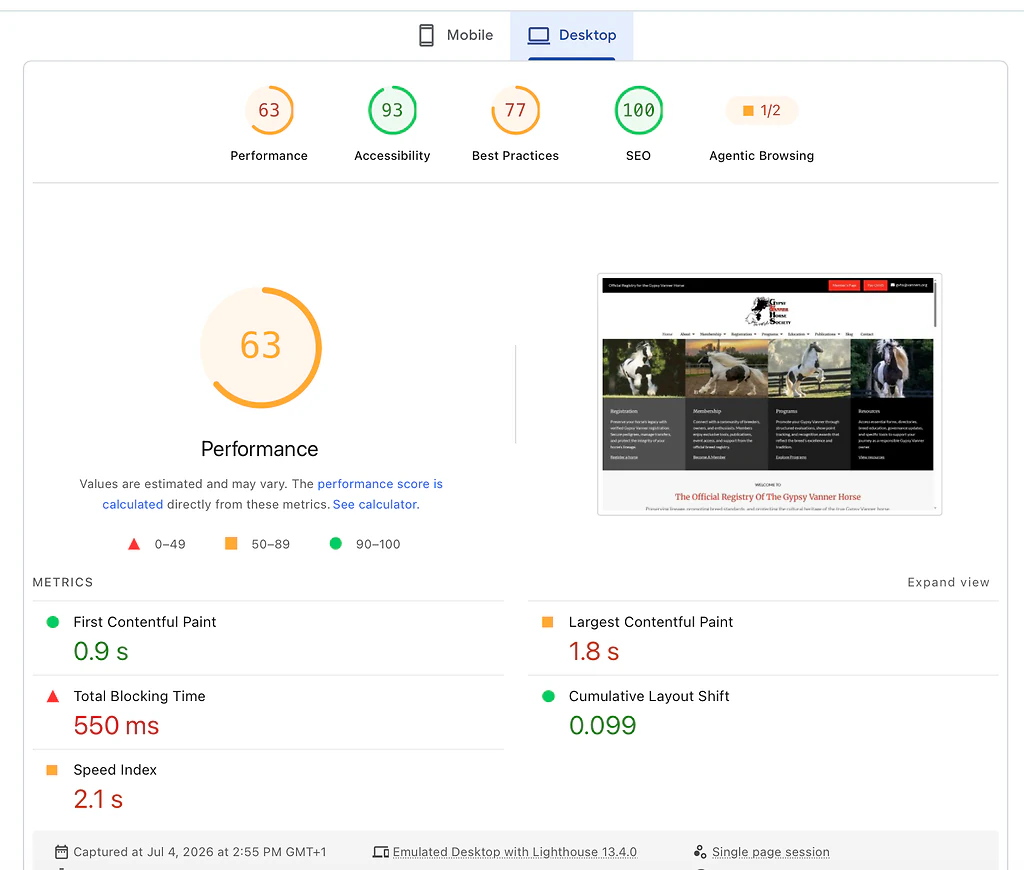
PageSpeed Insights desktop lab results for a typical WordPress site: 63 performance, 0.9s first contentful paint, 1.8s largest contentful paint
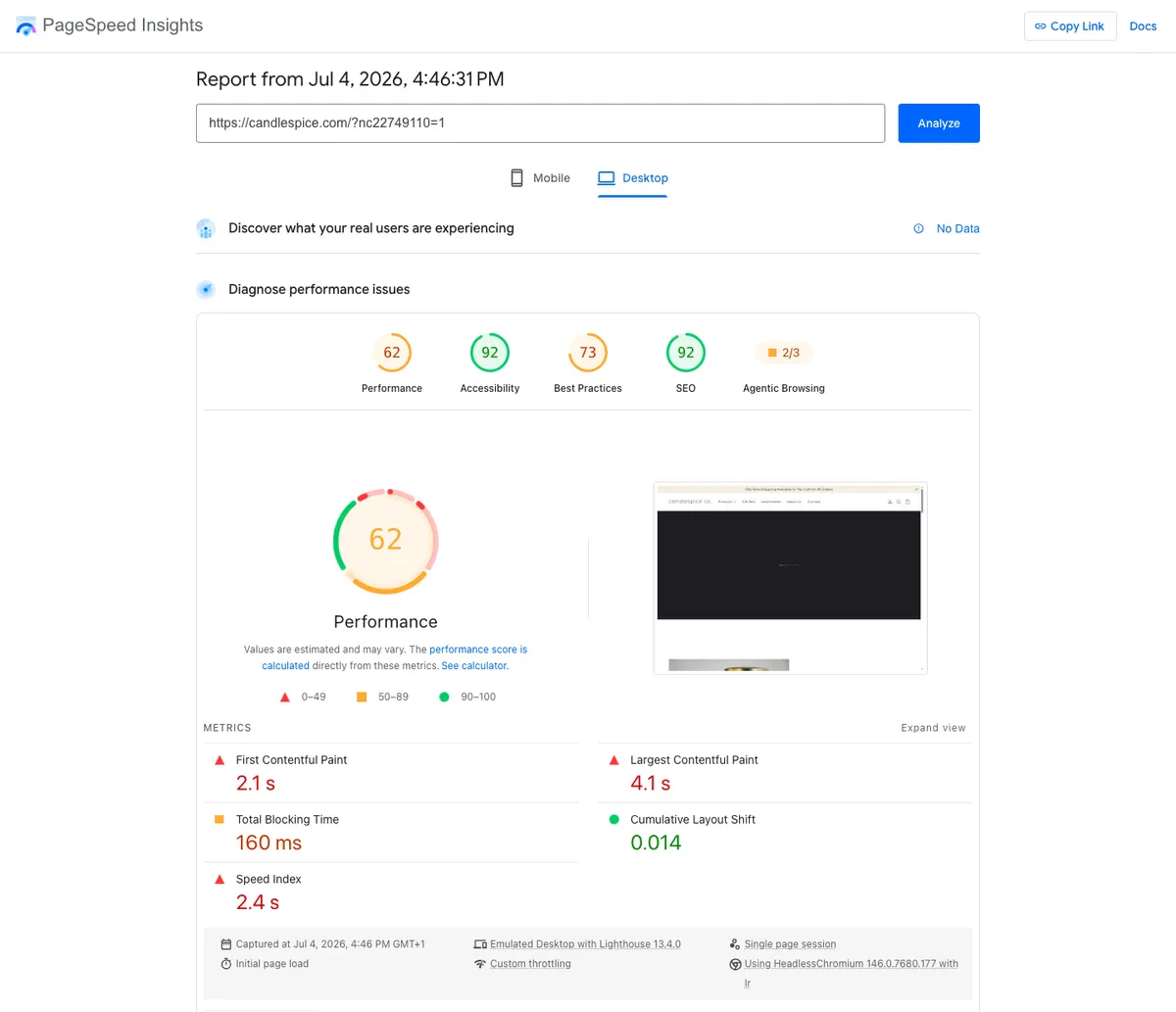
PageSpeed Insights desktop lab results for a real small Shopify store: 62 performance, 2.1s first contentful paint, 4.1s largest contentful paint
On desktop, a typical WordPress site running its usual theme-and-plugins stack scored 63. A real, ordinary small Shopify candle shop, not a showcase example, scored 62 on the same cold test. Essentially tied, and neither one is fast.
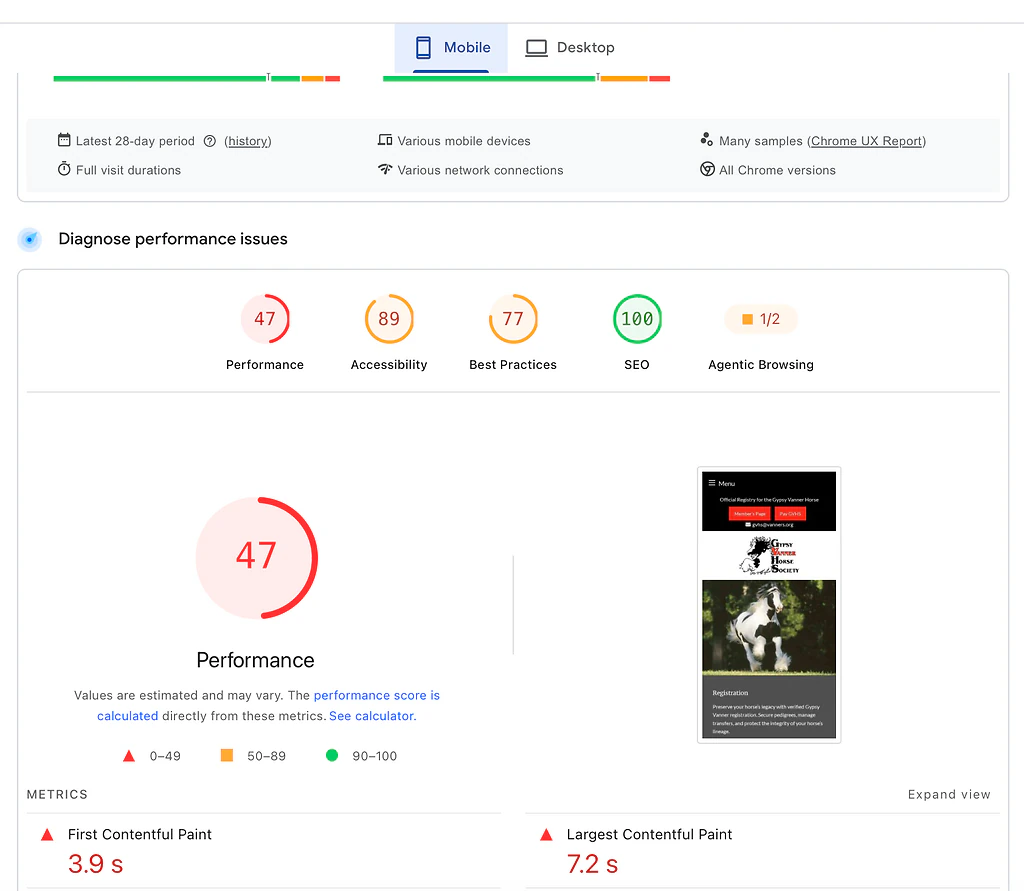
PageSpeed Insights mobile lab results for a typical WordPress site: 47 performance, 3.9s first contentful paint, 7.2s largest contentful paint
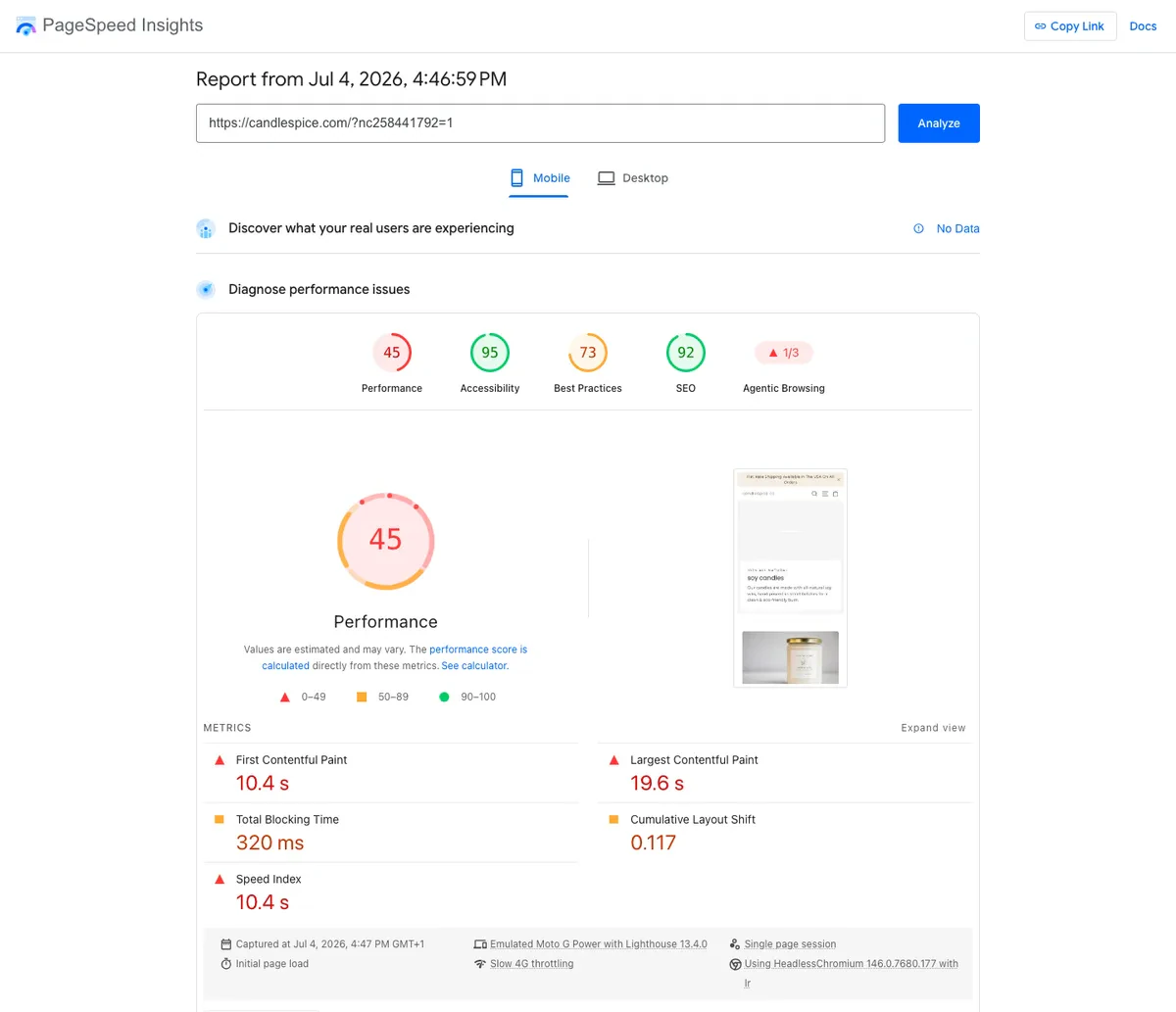
PageSpeed Insights mobile lab results for a real small Shopify store: 45 performance, 10.4s first contentful paint, 19.6s largest contentful paint
On mobile, the test that matters more since most shoppers are on a phone, WordPress dropped to 47 and Shopify to 45, both about 16 to 17 points below their desktop scores. Neither platform hands you speed by default. WordPress's number is a function of the theme, plugin load, and hosting tier underneath it, which varies wildly store to store. Shopify's is a function of the theme and, especially, how many apps and product images load onto the page: I tested three real Shopify stores for this piece and got desktop scores of 62, 92, and 71, with mobile ranging from 45 up to 81. An image-heavy store like the candle shop above sits on the slower end; a leaner one built with fewer apps can score a lot better. Both platforms depend entirely on how the specific store was built. WordPress speed is a range, not a single number.
Since this is the Devani blog, one more data point, then back to the two platforms you came to compare. Devani, the separate CMS this site runs on, sits above both, and the reason is structural.
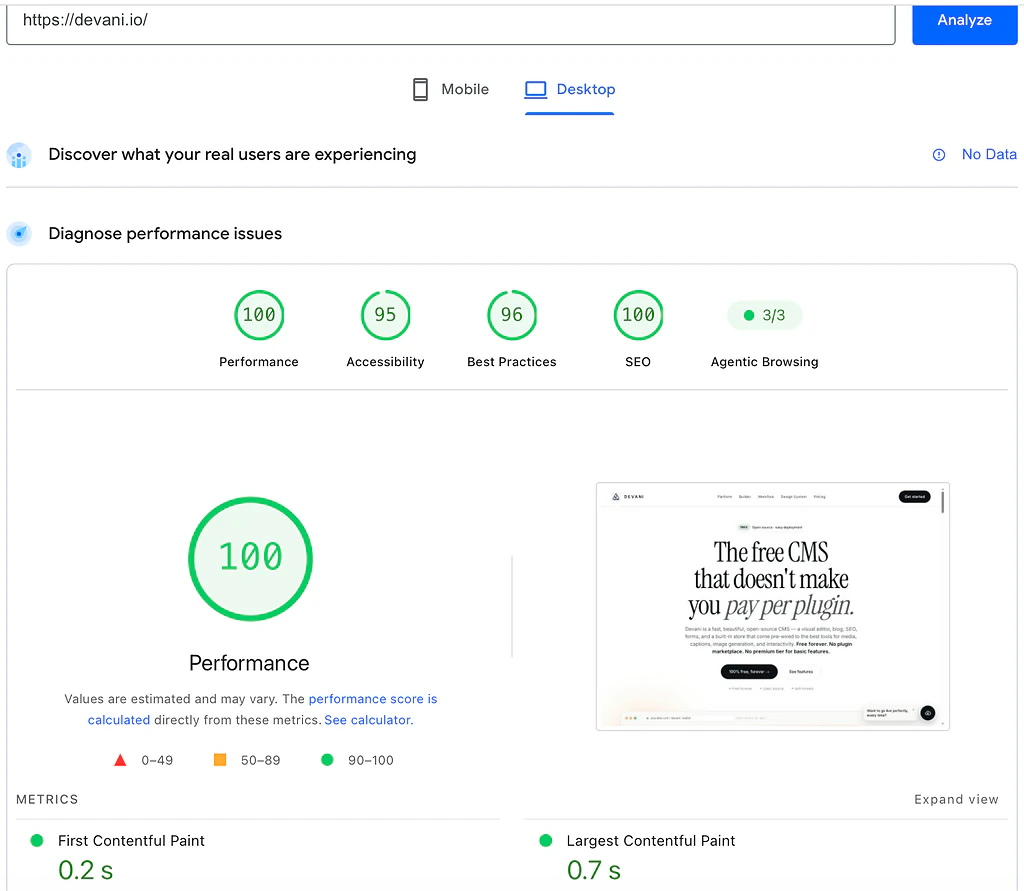
PageSpeed Insights desktop lab results for devani.io: 100 performance, 0.2s first contentful paint, 0.7s largest contentful paint
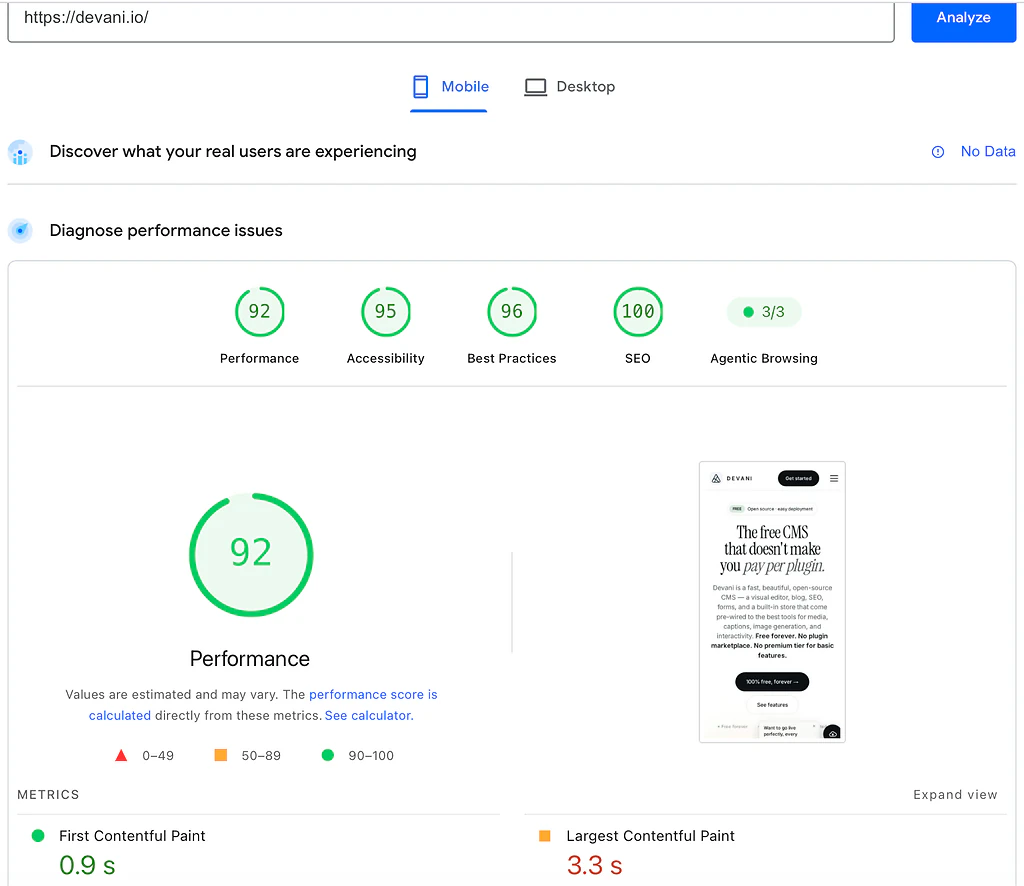
PageSpeed Insights mobile lab results for devani.io: 92 performance, 0.9s first contentful paint, 3.3s largest contentful paint
| Platform | Desktop | Mobile | Desktop to mobile drop |
|---|---|---|---|
| WordPress (typical build) | 63 | 47 | 16 points |
| Shopify (small store) | 62 | 45 | 17 points |
| Devani | 100 | 92 | 8 points |
The telling column is not the top score, it is how little each platform loses moving from desktop to mobile, where a throttled phone is the harder test. Devani's database-free setup is a lot of why it barely moves: the whole site is stored as plain files, nothing to query, rather than assembled from a database on every request. Worth repeating, since it matters more in an ecommerce comparison than it did in past ones: Devani is not a dedicated store platform the way Shopify is. This is a speed number, not a claim that it competes with Shopify on commerce features. If Devani is on your shortlist too, Devani vs Shopify lays out that comparison directly.
POS, dropshipping, and scaling to a real catalog.
This is where Shopify's advantages stop being about convenience and start being about actual capability. Shopify POS genuinely unifies in-person and online inventory in a way WooCommerce only approaches through third-party plugins layered on top, with more moving pieces to keep synced. Dropshipping specifically has a mature, well-tested Shopify app ecosystem behind it; it is the default platform most dropshippers reach for, and for good reason. At serious scale, a catalog of tens of thousands of SKUs with complex variants, Shopify Plus exists specifically to handle that volume as a plan upgrade rather than a re-platform. WooCommerce can technically do all of this, POS integrations, dropshipping plugins, large catalogs, but each piece is a separate plugin or service you select, configure, and keep updated, and at real volume that becomes a genuine technical operation rather than a settings page. If your business is fundamentally a high-volume, multi-channel commerce operation, that is the honest case for Shopify, full stop. If it is not, our Shopify alternatives roundup covers what else is worth weighing.
A CSV of products and orders is your data. Your theme, your app wiring, and your checkout customizations do not come with it.
Straight answers to the ones people ask next.
Is Shopify or WordPress better for SEO?
Closer than either side's fans usually claim. The typical WordPress site above scored 100 on PageSpeed's SEO audit, so a plugin-and-theme WordPress build is not automatically invisible to Google, contrary to some Shopify sales copy. The Shopify store scored 92 on the same audit, a genuinely good number, just not a perfect one, and worth reporting honestly rather than rounding up. WooCommerce needs an SEO plugin (Yoast and RankMath are the common picks) to manage titles, meta descriptions, and schema, and someone has to configure it, a step a lot of small stores half-finish. Shopify handles the basics on every plan without installing anything, but it also imposes some structural limits, like URL patterns you cannot fully customize on certain page types, that a self-hosted WooCommerce site does not have. Content-heavy stores that blog regularly tend to do better long-term on WordPress because its content tools are deeper. Product-heavy stores with a thin content strategy do not lose much either way.
How hard is it to move a store off Shopify or off WooCommerce?
Harder than either platform's marketing suggests, and the direction matters. A self-hosted WooCommerce store is a WordPress database and a set of files; it exports in a genuinely portable way, and you can migrate it to a different host, or even a different ecommerce plugin, without starting from zero. Shopify offers no equivalent full export. You can pull products, customers, and orders out as CSV, which covers the raw data, but your theme, app configurations, and checkout customizations do not come with it. Leaving Shopify means rebuilding the storefront by hand, not migrating it. I ran that migration for a client who expected a data export and a weekend; it turned into three weeks of rebuilding product pages and figuring out which apps had been holding a checkout customization together the whole time. Moving the other direction, from WooCommerce into Shopify, is more mechanical: Shopify's own import tools handle products and customers reasonably well, though a heavily customized checkout or a plugin-dependent feature still needs rebuilding in Shopify's own system.
So is WooCommerce genuinely free, or not?
The plugin is genuinely free, and unlike Shopify it never takes a percentage of a sale. But a real store is not just the plugin. Count paid hosting, a domain, a decent theme, shipping and tax extensions, and your gateway's processing rate, and a properly built WooCommerce store lands between $100 and $150 a month, near Shopify's equivalent tier. The savings show up in the fee structure, no platform cut on transactions, not in a dramatically lower monthly number. Budget for the whole stack, not the download.
Where Devani fits, and where it does not.
I work on Devani, so weigh this accordingly, and it is not trying to be Shopify. Devani is a free, open-source website CMS with a built-in store, not a dedicated ecommerce platform, and for serious selling, a large catalog, a physical register, multichannel, deep app needs, Shopify is genuinely deeper and I would say so to your face. If that is your business, the Shopify section above is the more useful read than anything here.
Where Devani fits is the business that wants a fast, easily editable website with a light store attached, not a heavy standalone storefront bolted onto everything else. The maintenance question this comparison keeps circling, WooCommerce's plugin stack on one side, Shopify's app and transaction-fee math on the other, is exactly where Devani differs from both. There is no plugin stack to keep patched, because there is no marketplace to shop in: Devani is free and open-source, self-hosted the same way WordPress is, so your files and data stay yours, but updates are opt-in on your own schedule rather than a treadmill, and backups run automatically with one-click rollback. A cheap VPS with a one-command installer runs about $5 a month, or the optional managed hosting, free tier included, if you would rather not touch a server. On Shopify's side of the ledger, there is no per-transaction fee on any plan and no app subscriptions stacking up. And because it is a full website rather than a store-first system, the about page, the blog, the promotion landing page live in the same place as the product pages.
On the AI part, since WordPress is in the frame: you connect your own ChatGPT or Claude account through MCP, using an existing subscription with no API keys, and ask it to change the site's content and layout, with every change snapshotted and one click from rollback. WordPress has bolt-on options now too, WordPress.com's MCP integration and the Vibe AI plugin among them, but those work inside the block editor rather than across a whole builder. Devani's assistant is native, working inside the builder itself. That is the honest distinction, native versus alongside, not "the only platform with AI."
What Devani does not have is either competitor's ecosystem: no plugin marketplace anywhere near WordPress's size, no app store anywhere near Shopify's for commerce-specific features, and a newer platform without a decade of freelancer familiarity behind it. If your business genuinely needs Shopify's POS hardware, its dropshipping app ecosystem, or a catalog measured in tens of thousands of SKUs, that need is real and Devani is not the right tool for it yet.
A store with a website, or a website with a store?
If you need deep commerce at volume, this comparison already points you at Shopify. If what you actually want is a fast, honest website with a light store attached rather than a storefront bolted onto everything else, that is a different question, and it is free to test.