

Three real answers, and which one you regret least.
WordPress is for the owner who wants to own the building and act as its contractor indefinitely. Wix is for the owner who wants a rented space live today, with freedom to put the furniture anywhere. Squarespace is for the owner who wants a rented space a professional already staged, beautiful from day one, with the walls fixed where they are. All three open a real business to real customers, so the question is which trade you are actually willing to make. There is a fourth shape in the frame now too: Devani, the free open-source CMS this site runs on, built to close the tradeoff the other three force you into.
WordPress
No ceiling, and a permanent upkeep bill.
- ✓ Over 60,000 free plugins for niche needs nothing else touches
- ✓ Your files and database, movable anywhere without permission
- ✓ Deepest blog and, via WooCommerce, deepest store at real scale
- × Six to eight pieces of third-party software to keep patched
- × Speed depends entirely on theme, host, and plugin load
Wix
Live today, and you can put anything anywhere.
- ✓ Largest template library here, close to a thousand free designs
- ✓ Freeform editor: drag any element anywhere on the page
- ✓ Wix Bookings: native scheduling, staff calendars, deposits, reminders
- × Thinnest blog of the three against a real editorial schedule
- × No file export, so leaving means rebuilding by hand
Squarespace
The best-looking default, with the walls fixed.
- ✓ Best templates of the three by a wide margin
- ✓ Hosting, SSL, backups, and patching are their problem
- ✓ Blogging close to WordPress depth, well ahead of Wix
- × Roughly 40 extensions, so past the built-ins you are stuck
- × The Basic plan skims a percentage off every sale
Devani
Hands-off like the builders, open like WordPress.
- ✓ Free and open-source, no plugin stack to patch, no per-plugin fees
- ✓ Database-free static pages on a CDN, near 100/100 Lighthouse by default
- ✓ Built with AI in 10 to 15 minutes, live in under a minute on the managed free tier
- × Younger, smaller ecosystem: no 60,000-plugin marketplace, fewer templates than Wix or Squarespace
WordPress has no ceiling, and that is the whole pitch.
Give WordPress its due first, because comparisons that rank it last on ease of use tend to bury this. WordPress.org's plugin directory holds over 60,000 free plugins, before you count premium ones, and it covers functionality nothing else on this list touches: tiered membership gating, multi-location store locators, drip-fed course platforms, booking logic specific enough to one industry that a generalist tool would never build it. When a client needs something unusual, there is already a plugin for it, usually three competing ones. And the site is genuinely yours. Your files and your database can move to different hosting, get handed to a different developer, or run indefinitely without asking anyone's permission, because there is no company standing between you and the server.
The cost of that ceiling is upkeep, and it is a real, ongoing job, not a one-time setup fee. A typical small-business WordPress build runs a theme, a page builder like Elementor, an SEO plugin, a caching plugin, a security plugin, a form plugin, and a backup plugin: six to eight pieces of third-party software, each shipping its own updates on its own schedule, each capable of breaking something else when it updates. On one restaurant site, a caching plugin update stopped invalidating pages, with no error and no warning anywhere in the dashboard. A menu price that had changed three weeks earlier was still what visitors saw, right up until someone called in annoyed that the fish special cost twelve dollars more than the website claimed. Nobody had touched the caching settings; the update had changed the default on its own. Our full WordPress review covers the rest of the platform in more depth.
Running WordPress well is a part-time job layered on top of whatever the business actually does.
What Wix and Squarespace each genuinely get right.
Wix earns its side of this comparison. The AI-assisted builder asks a handful of questions about your business and hands you a working draft in a few minutes, already carrying your business name, a plausible layout, and stock photography you can swap out. From there the regular Wix Editor lets you drag a section anywhere on the page, not just into a preset zone, so if you want a photo tucked slightly off-center next to a headline that runs at an angle, you can just do that. The template library behind all of this is close to a thousand free designs across every business category, the largest of the three builders here by a wide margin. Hosting, SSL, backups, and security patching are Wix's job permanently. Wix Bookings is a genuinely native scheduling system: services, staff calendars, deposits, automated reminders, built into the same platform as everything else, with nothing on the Squarespace or WordPress side that matches it out of the box. And Wix has no platform transaction fee on any plan, which matters the moment you start selling. Our full Wix review covers the rest of the platform in more depth.
Squarespace's pitch is just as real. The templates are the best-looking of the three by a wide margin: considered typography, generous whitespace, photography-forward layouts that make an ordinary product photo look like it belongs in a magazine. You pick one, drop in your own content, and the result looks like it cost more than it did, without you touching a font pairing or a grid gap yourself. Squarespace's blogging tools are also a real step ahead of Wix's, closer to WordPress in depth: better post scheduling, cleaner tag and category handling, and templates that treat a long-form post as the main event rather than an afterthought bolted onto a business site. If your business lives or dies on how the site looks, a photographer, a designer, a boutique, a restaurant with a photogenic menu, Squarespace gets you there with fewer decisions and a better default result than either of the other two. Our full Squarespace review covers the rest of what it does well.
Straight answers to the ones people ask next.
Is Wix or Squarespace easier to use?
Both are easy, but in different ways, and which one feels easier says more about your own habits than about either platform. Wix is freeform: drag anything anywhere, resize it, restack it, and nothing stops you from putting a headline three pixels off from where your eye wants it, because there is no grid enforcing alignment. That freedom is exactly what some people want and exactly what turns other people's sites into a visible mess, an inch here, a misaligned button there. Squarespace works the opposite way: you edit within defined sections and a real underlying grid, so you genuinely cannot get the spacing wrong the way you can on Wix, but you also cannot nudge something four pixels left just because you want to. WordPress sits apart from both. The block editor itself is reasonably approachable now, but you are still choosing a theme, likely a page builder plugin, and configuring settings the other two never ask about. Of the three, WordPress has the longest real learning curve, and I would not sugarcoat that to a client who told me they wanted to be live this week.
Which is best for selling something online?
WooCommerce, the plugin that turns WordPress into a store, is the deepest of the three at real scale: complex tax rules, wholesale pricing tiers, inventory across warehouses, all achievable, all requiring real setup and ongoing patching to run safely. Wix Stores covers what a shop with a few dozen to a few hundred products actually needs, a real catalog, coupon codes, abandoned cart recovery, available from the $29 Core plan with no extra transaction fee layered on your processor's rate. Squarespace Commerce is comparable in scope, genuinely well designed for a photography-heavy shop, but Basic still skims a percentage off every sale until you move up to Core. For a modest shop, either builder does the job without the WordPress maintenance tax. For a store planning real scale, WooCommerce is doing a job the other two were not built to do, and I would not talk a client out of that if the volume is genuinely there.
Which is best for SEO?
Closer than the reputations suggest. On our own PageSpeed audit, WordPress and Wix both scored 100 on the SEO check, and Squarespace scored 92, still a strong result, not a weak one. All three produce crawlable, indexable markup and support custom titles, descriptions, and sitemaps. The real difference is how much of that comes standard. Wix and Squarespace ship SEO basics to every paid plan without installing anything. WordPress can reach the same place, but it usually takes a plugin, Yoast and RankMath being the common picks, and someone has to actually configure it, a step a lot of small-business builds skip or half-finish. Nobody here is invisible to Google on the technical basics; the gap is setup effort, not capability.
Which is best for a blog?
WordPress still has the deepest toolset for anyone publishing seriously: categories, tags, revision history, scheduled posts, and a huge ecosystem of blogging-specific plugins for related posts, reading time, and newsletter integration. Squarespace comes in a close second, genuinely capable for a business posting weekly, with templates that treat long-form writing as the main event. Wix is the thinnest of the three here; its blog tool covers an owner posting once or twice a month fine, but it starts to feel noticeably behind the other two against a real editorial schedule with several posts a week.
What each one actually costs, past the sticker.
Sticker prices are a little misleading on all three, and the fine print tells a more useful story than the big number at the top of each pricing page. WordPress.org's software is free to download, full stop, but that number is close to meaningless on its own. A real site needs hosting, which runs from around $4 to $10 a month on budget shared plans and climbs from there for anything faster or more managed, plus a domain, plus usually a theme and a handful of plugins that add up over a year. If you would rather have Automattic manage the hosting the way Wix and Squarespace manage theirs, WordPress.com's own tiers run, billed annually: Personal at $4/month, renewing at $10 after the first term; Premium at $8/month, renewing at $18; Business at $25/month, renewing at $45; and Commerce at $45/month, renewing at $75. That promo-to-renewal jump is the number people budget around and then get surprised by a year later.
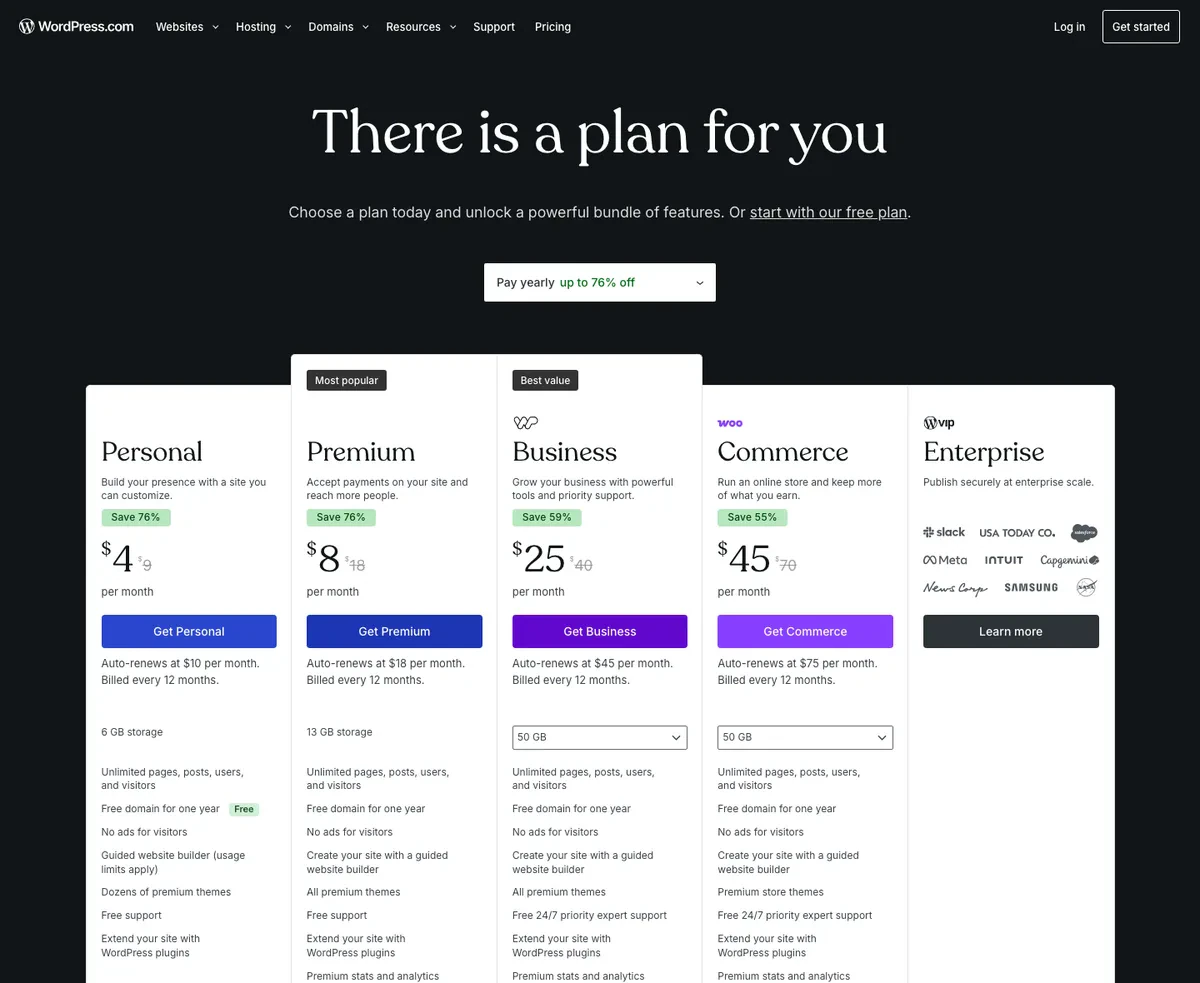
WordPress.com's pricing page in USD, showing the promotional annual rate next to the auto-renewal rate for each plan
Wix runs four paid tiers, billed annually: Light at $17/month with no ecommerce at all, Core at $29/month where ecommerce actually turns on, Business at $39/month adding automated tax handling and more advanced shipping, and Business Elite at $159/month with unlimited storage and priority support. There is also a genuinely free plan, but it carries Wix's own ads, sits on a wixsite.com subdomain, and cannot process a sale of any kind, so it is a test drive rather than a launch option.
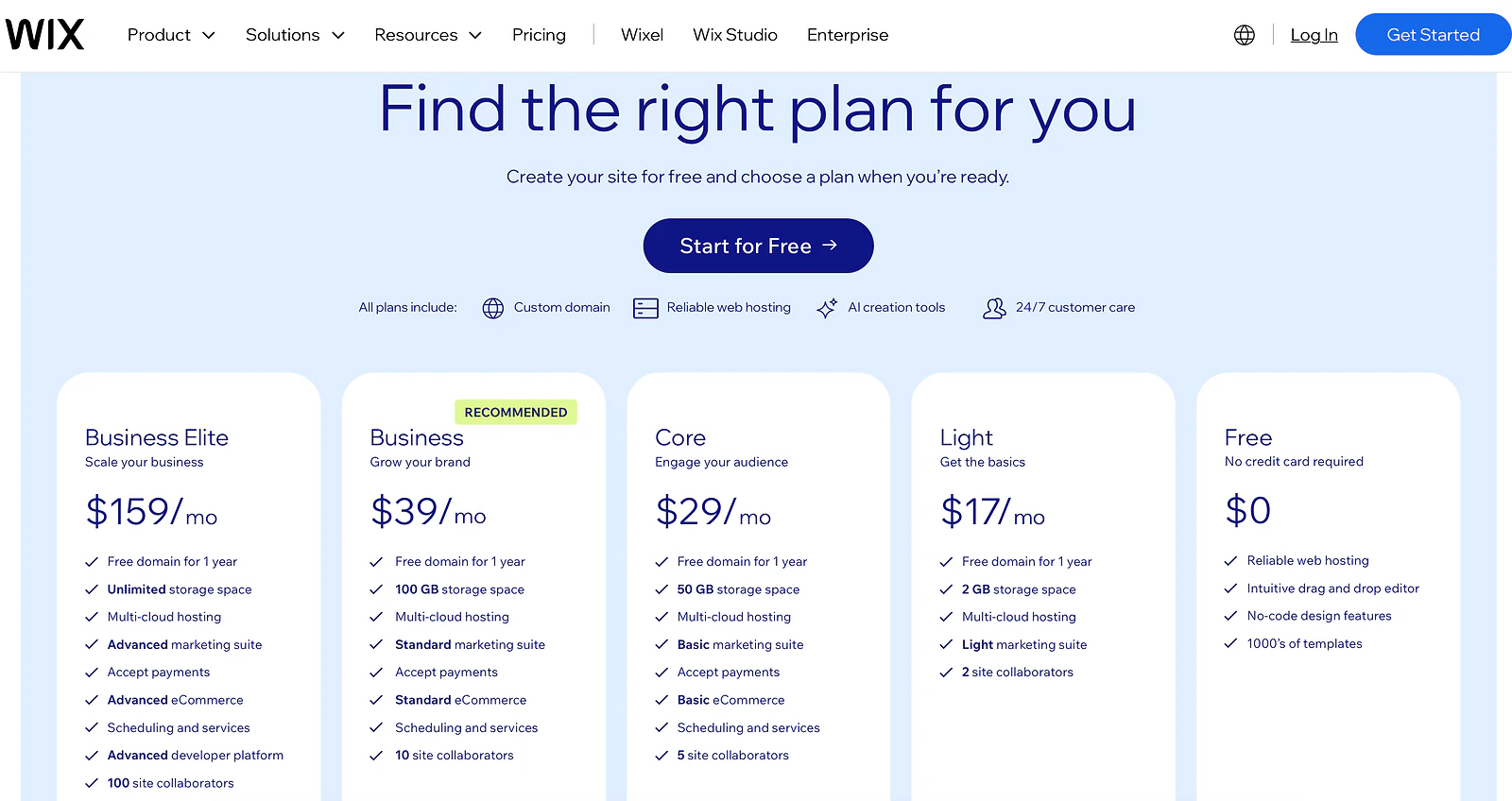
Wix's pricing page in USD, showing Free, Light at 17 dollars, Core at 29, Business at 39, and Business Elite at 159 per month billed annually
Squarespace runs Basic at $16/month, Core at $23/month, Plus at $39/month, and Advanced at $99/month, all billed annually, with a 14-day free trial to test the editor before committing. Basic still takes a cut of your transactions, which does not show up anywhere near the sticker price; that cut disappears once you are on Core or above, worth knowing before you assume the cheapest plan is actually the cheapest one for a store.
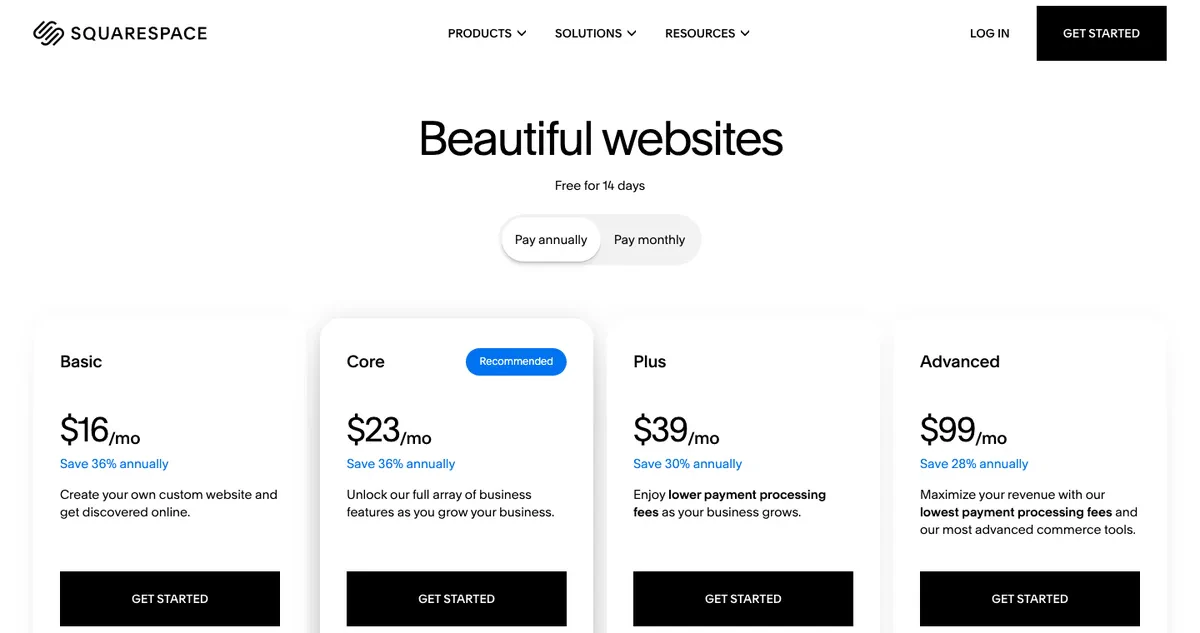
Squarespace's pricing page in USD, showing four plan tiers billed annually
Line them up and a properly built self-hosted WordPress site, once you total hosting, theme, and plugins, tends to land near the builders' middle tiers rather than dramatically cheaper. WordPress just bills you in scattered pieces instead of one line. Devani sits outside this table entirely: the CMS is free and open-source, and a cheap VPS at about $5/month, or the managed free tier, is the whole hosting bill.
Which one is fastest, on a real cold load.
Most comparisons quote template counts and move on. I ran a real PageSpeed Insights test instead, on real sites, cold, on both desktop and mobile, because that is the number that actually predicts whether a visitor waits around.
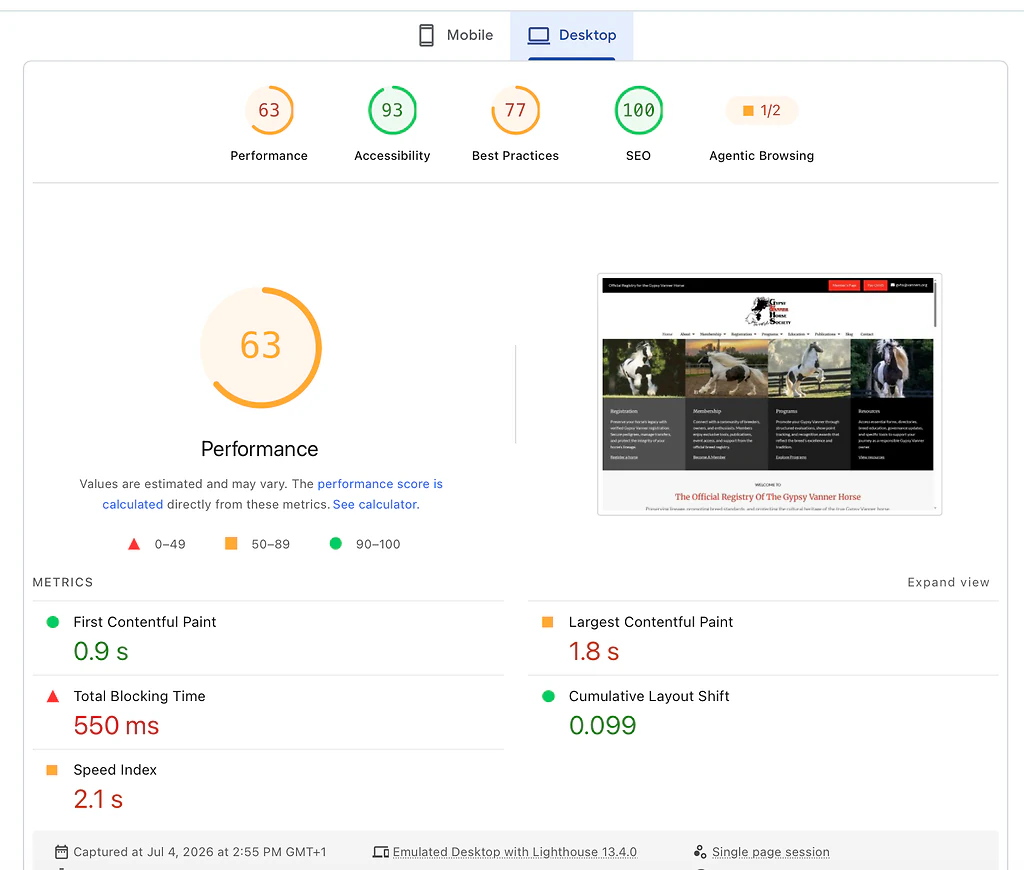
PageSpeed Insights desktop lab results for a typical WordPress site: 63 performance, 0.9 second first contentful paint, 1.8 second largest contentful paint
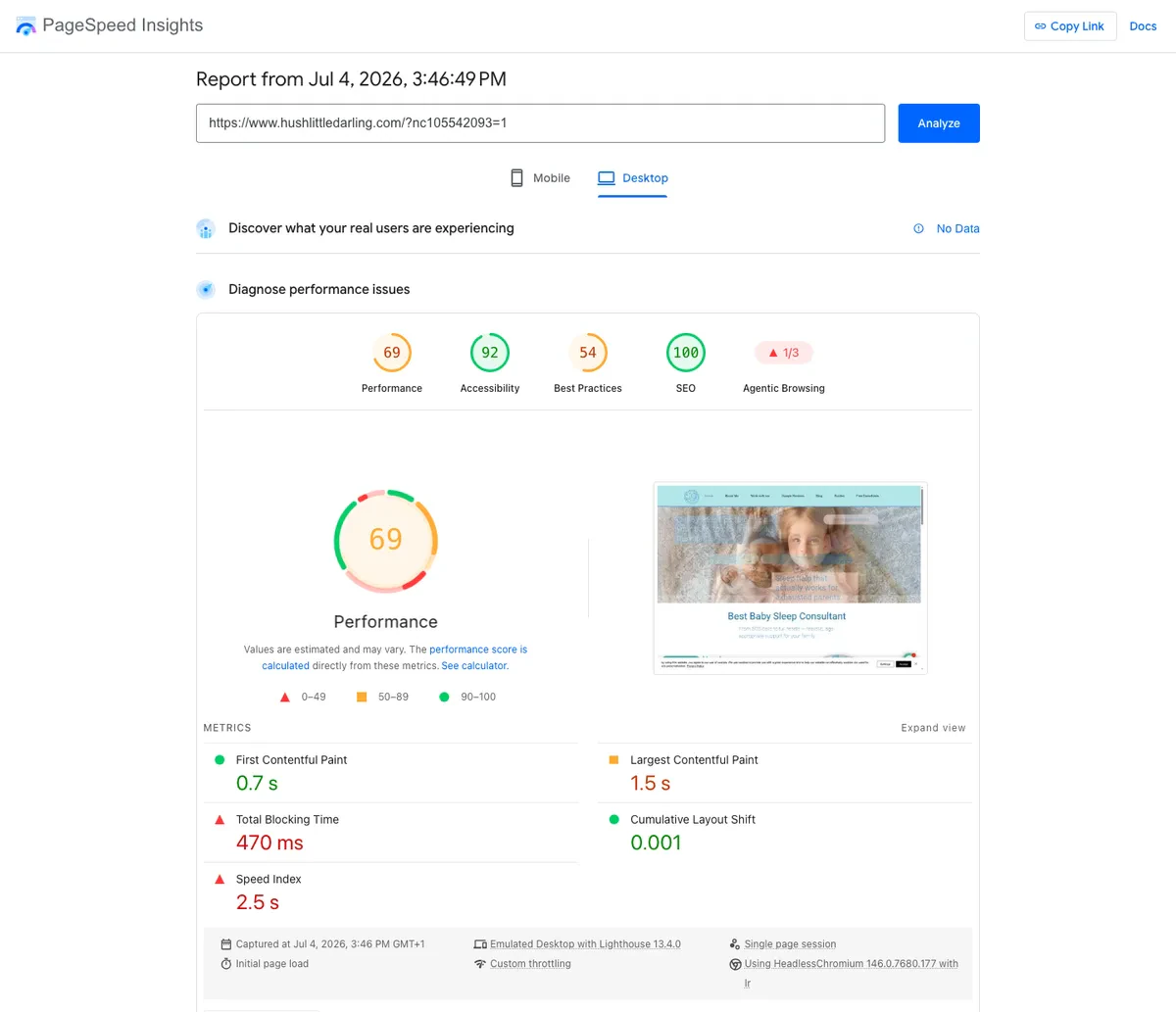
PageSpeed Insights desktop lab results for a typical Wix small business site: 69 performance, 0.7 second first contentful paint, 1.5 second largest contentful paint
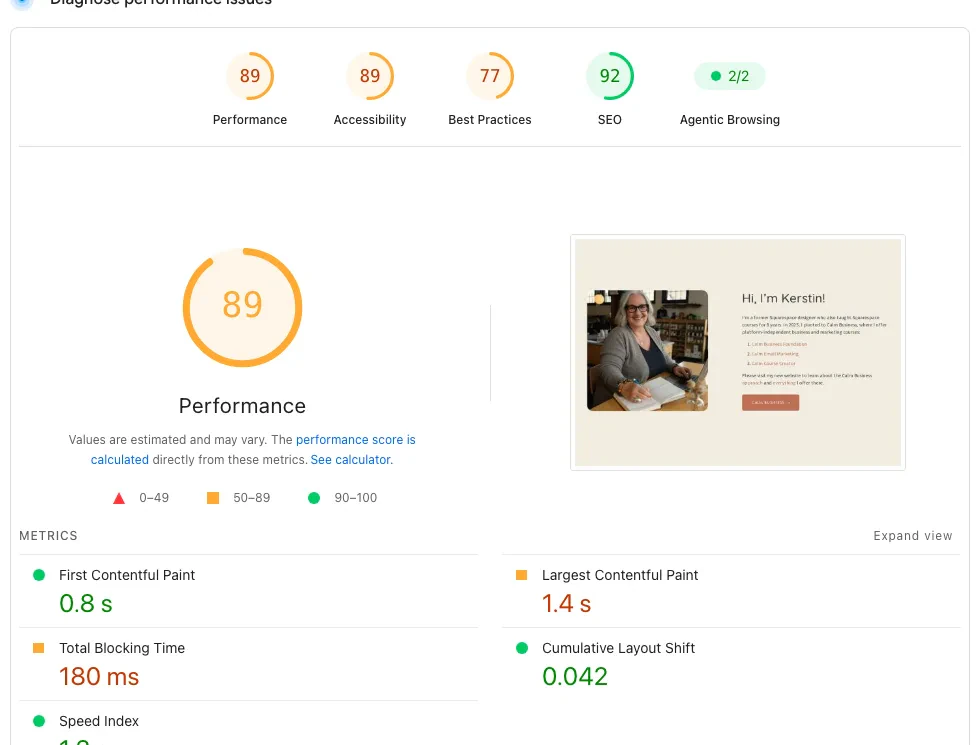
PageSpeed Insights desktop lab results for a real Squarespace-built site: 89 performance, 0.8 second first contentful paint, 1.4 second largest contentful paint
On desktop, a typical WordPress site scored 63, a typical Wix site scored 69, and a real Squarespace site scored 89, comfortably ahead of both. Now mobile, the test that matters more, since most small-business traffic is a phone in someone's hand.
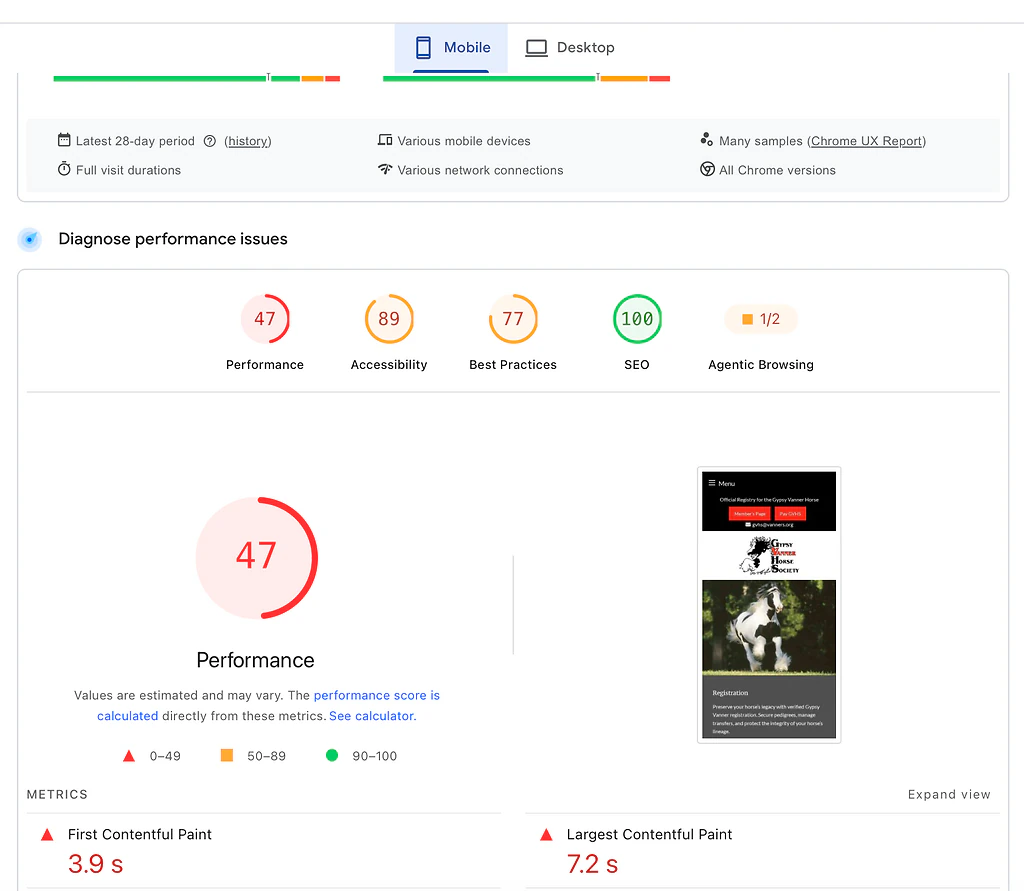
PageSpeed Insights mobile lab results for a typical WordPress site: 47 performance, 3.9 second first contentful paint, 7.2 second largest contentful paint
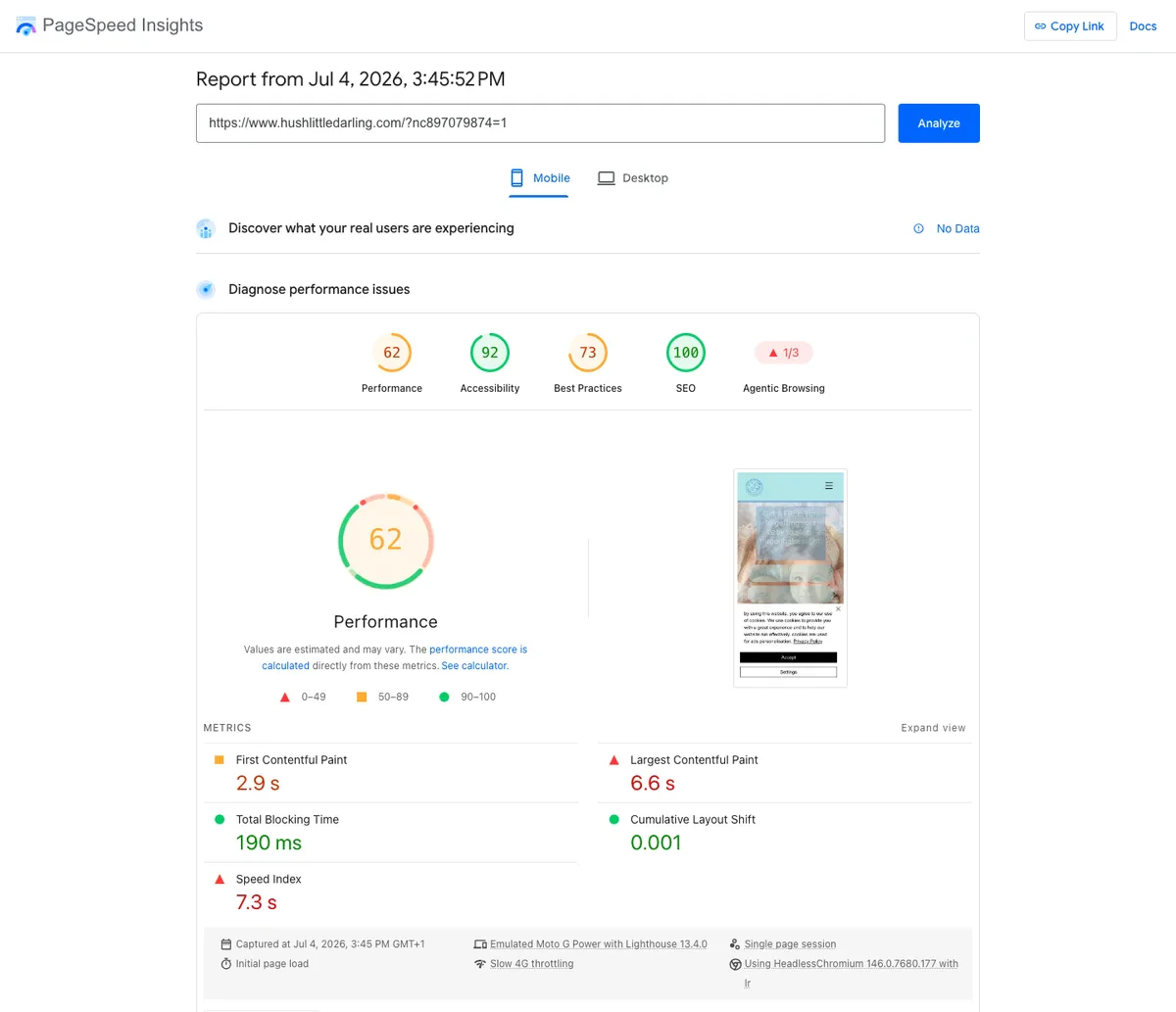
PageSpeed Insights mobile lab results for a typical Wix small business site: 62 performance, 2.9 second first contentful paint, 6.6 second largest contentful paint
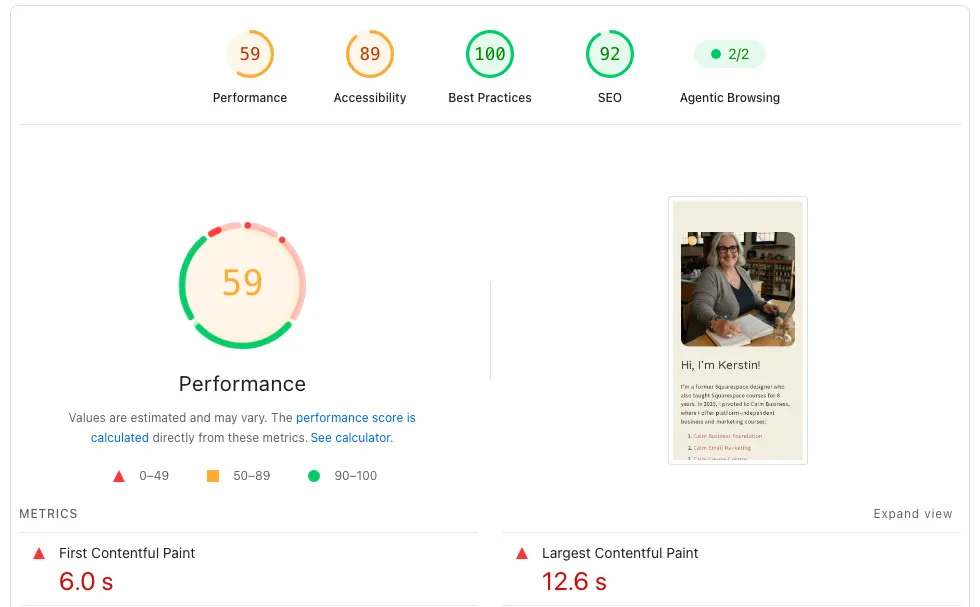
PageSpeed Insights mobile lab results for a real Squarespace-built site: 59 performance, 6.0 second first contentful paint, 12.6 second largest contentful paint
Mobile flips the story. WordPress drops to 47, the lowest of the three, with a 7.2 second largest contentful paint. Squarespace, the desktop winner, drops the hardest of anyone here, down to 59, with a largest contentful paint past 12 seconds under mobile throttling. Wix holds up best of the three builders, at 62, the smallest desktop-to-mobile drop of the group. None of this makes Squarespace slow in any real sense; its actual users are not sitting through a 12 second load on a real connection, and it is still beating typical WordPress on both counts. It does mean that if mobile performance under a genuinely bad connection is your priority, Wix's consistency is worth knowing, and WordPress's number is entirely a function of the theme, the plugins, and the hosting tier underneath it, which is the honest range for that platform rather than a fixed score.
Since this is the Devani blog, one more row, and then back to the three you came here to compare. Devani, the separate CMS this site runs on, sits above all three, and the reason is structural: its pages are plain static files served from a CDN with nothing to query, so there is no theme or plugin load to tune in the first place.
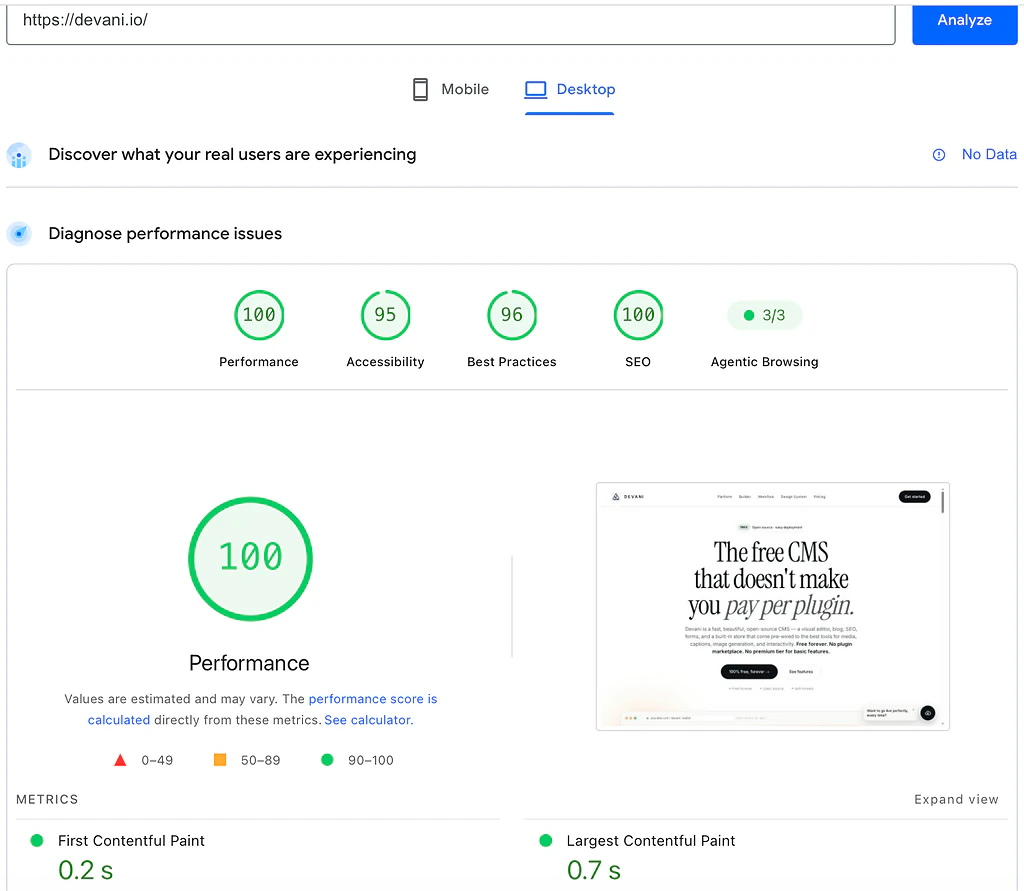
PageSpeed Insights desktop lab results for devani.io: 100 performance, 0.2 second first contentful paint, 0.7 second largest contentful paint
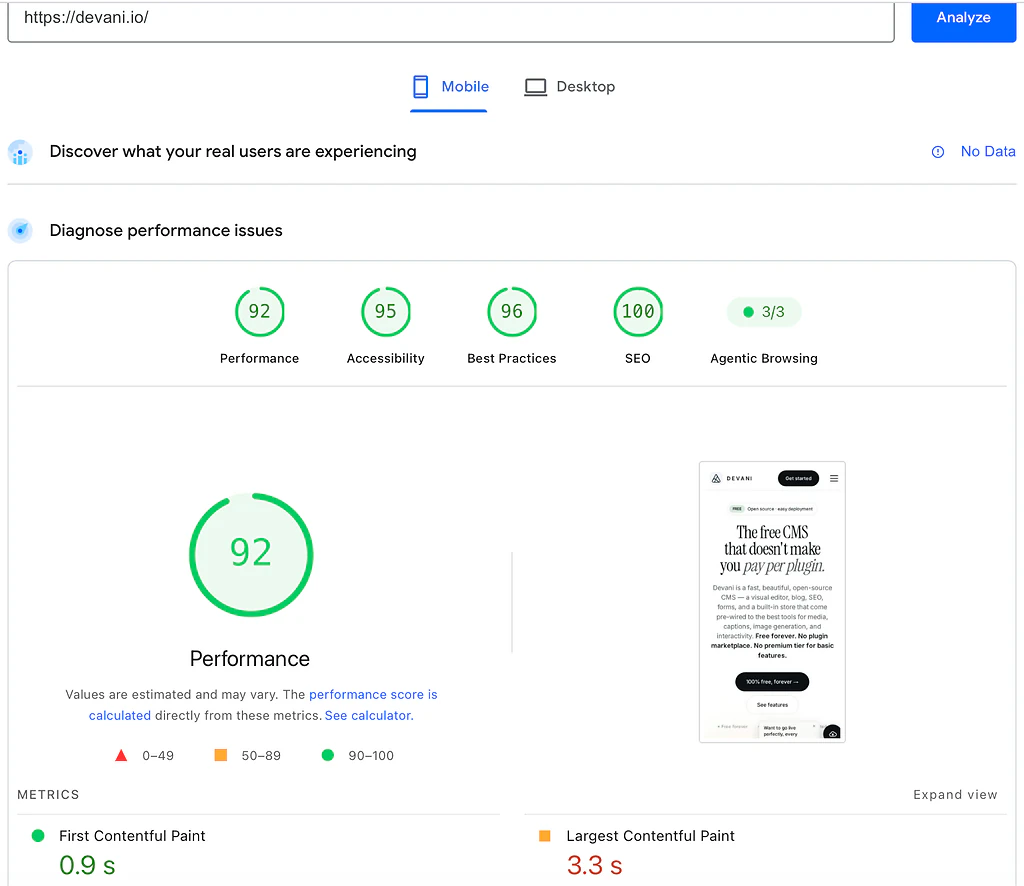
PageSpeed Insights mobile lab results for devani.io: 92 performance, 0.9 second first contentful paint, 3.3 second largest contentful paint
The telling column is not the top score, it is how little each platform loses moving from desktop to mobile, where a throttled phone is the harder test.
| Platform | Desktop | Mobile | Desktop to mobile drop |
|---|---|---|---|
| WordPress (typical build) | 63 | 47 | 16 points |
| Wix (typical build) | 69 | 62 | 7 points |
| Squarespace | 89 | 59 | 30 points |
| Devani | 100 | 92 | 8 points |
The WordPress vs Wix vs Squarespace question stands on its own regardless of where Devani lands: among these three, Squarespace wins desktop clearly, Wix holds mobile best, and typical WordPress trails on both, with the honest caveat that a lean, well-hosted WordPress build can do better than this and most real small-business builds never get there. Treat the Devani row as a footnote if you like.
Twelve seconds is a long time to watch a mostly blank screen on a phone, and it is exactly the wait that sends someone back to the search results.
Marketplaces and the exit, the two things that bite last.
Ecosystem size is the number that decides what happens the day your business needs something none of these three built in. WordPress's plugin directory runs past 60,000 free options, before premium ones, covering nearly anything you can name. Wix's App Market runs in the low hundreds up toward roughly 800 depending on how you count, a real but noticeably smaller catalog, covering the common cases well and thinning out fast past that. Squarespace's extension library is the smallest of the three, roughly 40 native extensions, because its whole model leans on built-in tools doing more of the work rather than a marketplace filling gaps. If your business needs a specific, unusual feature, WordPress almost certainly has an answer somewhere in that 60,000; if it does not, on either builder, you are stuck with whatever the platform ships. If that ceiling is the deciding factor, our WordPress alternatives roundup covers what else is worth weighing.
The exit is the other thing that bites late. A self-hosted WordPress site is your files and your database, movable to different hosting or a different developer whenever you want, without anyone's permission. A Wix or Squarespace site lives entirely inside that company's system: no server to point elsewhere, no file export that reconstructs the working site, because there is not a server that is yours to begin with. Moving off either builder later means largely rebuilding by hand, page by page, and preserving your URLs carefully so years of search rankings do not die with the old platform. I have run these migrations in both directions for clients more than once, and it is never the weekend project people expect going in; budget real days for it, particularly if a booking system or custom store logic needs rebuilding from scratch.
So which is it, for the business you actually have?
- Pick WordPress if your business needs something specific and unusual, membership tiers, a course platform, a multi-location directory, and you are willing to own the upkeep or pay someone to. It is the honest answer there.
- Pick Wix if you want the deepest template library here, a truly freeform editor, and scheduling that runs to staff calendars and deposits. That is a better fit, not a consolation prize.
- Pick Squarespace if your business is genuinely about how it looks, a photographer, a designer, a boutique, a restaurant with a menu worth photographing. It gets you there with the least effort and the best default result.
A single verdict does not serve any of these three well, and that is the actual shape of the decision.
The one built to close the tradeoff.
All three platforms above lock you into something once you have built it, just in different shapes. WordPress locks you into whoever wrote your theme's code and whatever plugin stack you have accumulated: changing either later is a real project, not a setting. Wix and Squarespace lock you into their own block editors, fast and maintenance-free, but the day your business outgrows the fixed set of sections either one ships, you are rebuilding rather than extending. I build Devani, so weigh this next part with that in mind, but the pattern holds regardless of who is naming it. Devani is free and open-source, so there is no plan to buy into, and because there is no plugin stack in the first place there is nothing to keep patched, updates are opt-in on your own schedule, and automatic snapshots with one-click rollback cover backups. It runs on your own hosting, about $5 a month through a one-command installer, or on Devani's own managed hosting, free tier included, if running a server is not something you want to take on. Worth being plain about what that covers: the managed tier has a site live in under a minute, there is nothing to maintain afterward, and simple appointment bookings are built in, so none of those three needs sends you to a builder by default. What Wix Bookings still wins is depth, staff calendars, deposits, and packages, if your scheduling genuinely needs all of that.
What answers all three locks at once is the same mechanism: you connect your own ChatGPT or Claude account through MCP, using an existing subscription with no API keys, and it makes real changes to your site's actual content and layout on request, an assistant that does the editing rather than a chatbot answering questions about your business. To be precise about the AI part, since WordPress is in the frame: WordPress has bolt-on options now too, WordPress.com's MCP integration and the Vibe AI plugin among them, but they work inside the block editor rather than across a Divi or Elementor build. Devani's assistant is native, working inside the builder itself, and because its pages are plain HTML the edits land in the visual editor with every change snapshotted. That is the honest distinction, native versus alongside, not "the only platform with AI." It resolves WordPress's plugin-hunt and the builders' fixed-block ceiling the same way, by replacing the rebuild with a request.
What Devani does not have is any of these three's years of runway. No marketplace anywhere close to WordPress's 60,000 plugins, a smaller template library than either builder's, and a newer platform without a decade of freelancer familiarity and Stack Overflow answers behind it. If your project needs a specific, obscure WordPress plugin with no equivalent anywhere else, Devani is not the right fit yet, and I would tell you that directly if you asked.
Still torn between owning the workshop and renting a space?
If the whole decision has felt like choosing between owning the building and renting one you cannot fully make your own, that is the exact tradeoff Devani is built to close. It is free, so there is nothing to commit to.